|
May 2005 News Archive
Return to Macs Only!'s Current News Page.
Copyright 2005 by Bill Fox All rights reserved.
Last Updated: May 31, 2005

Note: Use "Find" under your browser's "Edit" or "Search" Menu to search each month's archive.
Older Archives: April | March | February | January | December | November |
[5/31] Hands-On Review--DOOM 3, the Latest First Person Shooter 3D Mac Game: A couple of weeks ago we picked up a copy of DOOM 3, the latest 3D first person shooter game for the Mac. DOOM 3 is published for the Mac by Aspyr Media. We bought our copy at an Apple Retail Store for $49.95 but you can get it from the online Mac Game Store for $47.95 or Amazon.com for $44.99.
The story takes place in an earth colony on Mars where, after a number of strange events, demonic forces from the underworld begin taking over just as you arrive to investigate the events. There are some pretty wild creatures along with zombified scientists, workers, marines and commandos among the attackers. Curiously, none seem smart enough to have planned the attack in the first place--what do they do when they are not attacking and eating earthling invaders?
In the single-player version of the game, your job is to fight your way back to the entrance, shooting the creatures and zombies along the way. The zombified marines and commandos shoot back and some creatures throw fireballs or shoot at you with plasma guns or rockets but otherwise they strike, claw or chew on you. Mars City is a pretty dingy place before the attack but it gets darker as the lights malfunction or are turned off by the creatures--this just makes your job harder, of course. You get the picture.... In the multiplayer online game, you just run around Mars City and shoot the other players without interference from creatures or zombies.
System Needs
The minimum system requirements for DOOM 3 are pretty high. They include a PowerPC G4 at 1.5 GHz or faster and an ATI Radeon 8500 or Nvidia GeForce 3 or better graphics card with 64 MB VRAM. We normally use a dual 2.5 GHz Power Mac G5 with an NVidia GeForce 6800 Ultra DDL graphics card that has 256MB of VRAM for testing 3D games. It easily meets the minimum requirements. But we also tried DOOM 3 on our 1.67GHz 17" PowerBook G4 with ATI Radeon 9700 graphics that has 128MB of VRAM, just a cut above the minimum requirements.
Settings
Out of the box with DOOM 3's default settings for our PowerBook G4, the latest and most powerful that Apple makes, was unable to run DOOM 3 at an acceptable frame rate when confronted with a zombie or creature. Here are the settings:
- Video Quality: Medium Quality
- Screen size: 640x480
- Fullscreen: Yes
- High Quality Special Effects: Yes
- Enable Shadows: Yes
- Enable Specular: Yes
- Enable Bump Map: Yes
- Vertical Sync: No
- Antialiasing: No
Using the built-in demo (see our SpeedFAQ for how), our 1.67GHz PowerBook G4 managed an average of 19.6 fps. Disabling shadows moved it up to a respectable 27.5. Disabling specular yielded 28.1, disabling Bump Map also gave 28.1 and disabling high quality special effects provided 29.0 fps. The latter steps also obviously degraded the visual quality for just 1.5 fps. It seems the best combination of performance and visual effects is with just disabling shadows. Playing at an 27-28 fps is generally okay until you meet up with two or more creatures. Then the frame rate drops significantly to yield lags and choppy action. Most gamers will not like this so we'd say that the minimum requirements are probably set too low.
The default settings for our Power Mac G5 are:
- Video Quality: High Quality
- Screen size: 800x600
- Fullscreen: Yes
- High Quality Special Effects: Yes
- Enable Shadows: Yes
- Enable Specular: Yes
- Enable Bump Map: Yes
- Vertical Sync: No
- Antialiasing: No
The default settings averaged 52.1 fps. However, we like to play at a resolution of 1024x768 which reduced the fps slightly to 51.8. Turning shadows off increased the speed to 60.6 fps and provides very smooth play, even with many attackers present.
Play Experience Tips
Here are some tips we learned while playing. Skip this section if you would like to discover things by yourself.
Use your flashlight to search the corners of every room for ammo. It's there after every skirmish and virtually impossible to see without the flashlight. If you see ammo or armor or a med kit too high to reach, look for a container that you can move by "kicking" to jump up on. Don't forget to search under stairs.
If you are a serious gamer, you have a multi-button mouse. Map the flashlight to the second mouse button rather than the "F" key so it is easy to flip between the flashlight and a weapon. There is a mod that tapes the flashlight to the weapon if you are into hacks. We don't use it because we think it significantly detracts from a unique skill requirement for the game.
Conserve your ammo, especially the shotgun shells, because it is easy to run out and the shotgun is your best friend. The creature who throws fireballs is difficult to stop from a distance with either a pistol, shotgun or machine gun. You will waste a lot of ammo stopping them because they show up frequently once you find the shotgun. The best way to dispatch them is to move to the right, wait until they throw their fireball, dodge it easily by moving back to the left and then charge up and shoot them point blank in the upper torso--one shot instead of 3-6. Always just use your pistol on the scientist or worker zombies with a shot to the head at close range to conserve shotgun shells. The creature the climbs walls and looks like a lean gorilla can be stopped with one shotgun blast to the head at close range. The two-headed creatures can be dispatched easily with one shotgun blast to either head at mid range. Save the grenades and machine gun ammo for the marine zombies who hide behind containers and the myriads of spider-like creatures who seem to pour out of nowhere, almost endlessly at times. The toughest creature is the largest one--it resembles a grizzly bear in form and first attacks in the very close quarters of a small room. Dispatching it takes nearly a full submachine gun clip or 4 shotgun shells at very close range--we've found no way to not lose a lot of health to this creature per encounter. There are also skeletons with plasma guns and creatures with chainsaws and rockets that will need grenades and the longer range weaons like the BFG to stop.
Make sure that you do not miss collecting any PDAs along the way. They have essential information, like codes to get into supply and ammo lockers. Write down the codes and the locker that they work on. They also permit access to the various compartments you will need to pass though. You will have to knock off a couple of scientists for their PDAs--remember, DOOM 3 is only a game and you have to survive to win, right?
Save often--press the F5 key. When you find a health station, do a save so its easy to come back to if you get stuck further along in the game. Do this for every health station that you find, especially if you are at near full health when you find it.
If you seem to be stuck in an area with no way out look around for a vent or an area under the floor. Keep walking around the broader area of several compartments because passages will be revealed by creatures breaking through walls or from under stairs or through formerly malfunctioning doors to attack you.
Finally, look at every computer screen you encounter. Some will be a "touchscreen" and allow you to mouse-click to turn on lights, open secure areas, etc.
If you really want some help, there are many walkthrough files to help you get oriented, like the donationware DOOM 3 Guide v1.19 from Grawl for example. Just use Google to find others.
In Summary
We are still enjoying DOOM 3 and are about 80% of the way through it at medium difficulty. It's a very challenging game. We find it hard to believe that anyone is good enough to make it through at the highest difficulty level (Nightmare) but some are--amazing. We find DOOM 3 to be difficult, not so much because of the attackers but because it takes place indoors and the companion ways and compartments all look so much alike, especially with the lights dimming or going out all the time. It's very disorienting and easy to lose direction, inadvertantly backtracking.
The best thing about DOOM 3 is its fabulous graphics. They are truly outstanding as every reviewer has claimed. Of course, this is the reason for the high hardware requirements. Nevertheless, we are very impressed. In our view, DOOM 3's graphics edge out Halo's as the best.
DOOM 3 is not particularly scary to us as some reviews have claimed. Many of the creatures/zombies (except for the "grizzly bear," zombie marines/commandos and creatures that shoot rockets and plasmas) are fairly easy to dispatch at medium difficulty after encountering them a few times. Maybe we are just jaded from playing way too many first-person-shooter games. Alien vs Predator (or Marathon for that matter) is very similar in being dark, inside a space "city" and having ugly creatures suddenly appear and try to rip you apart before you can dispatch them.
Most of the weapons (fists through BFG) are taken right out of the stock of previous games so they hold no real surprises, good or bad, for the initiated. The Soul Cube is different so I won't spoil it for you.
We don't find the multiplayer online maps to be particularly interesting. They are all inside, or at least the ones we found were, and there are darn few servers at the moment. Like other 3D games of this genre, the players simply run around the confines of Mars City with rather small compartments trying to frag one another. We prefer bigger maps like the original Unreal Tournament and outside areas like Quake III Arena. DOOM 3 is too much like Unreal Tournament 2003 for us, even if it is better. So we prefer the single player version, a first for us.
Hopefully, Aspyr Media can keep DOOM 3 up to date for Mac users. It has been out on the PC since last summer and the PC version has recently received a patch to v1.3, which may be the reason why we could find only a handful of servers. According to IGM (scroll down), they are working on a similar patch for the Mac version and it should be out soon. When that happens, we'll retry the multiplayer online version and provide an update if it is warranted. [Bill Fox]
[5/31]Apple Posts Cool Freeware Automator Actions/Workflows: Automator is one of the new technologies in Tiger. It's basically a simple AppleScript maker that allows scripts (Actions) to be combined easily into a series of actions called Workflows. Apple has devoted a special web page to Automator Actions and Workflows created by third parties. There are 45 available as of publication time. Many are freeware but there are also demos and shareware actions available. Here are examples of some of the cool freeware Actions/Workflows:
Maintenance 2.0 -- This Automator application allows one to easily run the basic maintenance scripts in Mac OS X on demand. It throws up a set of Terminal windows that only requires one to type in their login password and hit return in each window.
Set Location Automator Action 1.0 -- Adds an Automator Action to System that automatically sets the user’s Network Location to a specified location when run.
Folder 2 Widget -- An Automator Workflow and application that automates making a Dashboard Widget from a folder and tests it in the Dashboard environment.
Resize Screenshot -- An Action that resizes a selected image/screen shot to a good size for web placement and saves it in the jpg format for higher compatibility.
[Bill Fox]
[5/28] Get inside Tiger--Implementing Core Data in Mac OS X 10.4 Tiger: The upcoming Worldwide Developers Conference 2005, June 6-10, will focus on the latest edition of Mac OS X, i.e. "Tiger" or 10.4. Backups enable administrators to ensure business continuance. In this hands-on session, Apple's engineers will expand on the basics of Core Data by walking you through a series of examples to demonstrate how you can use Core Data to manage data effectively in your application. From data models to Interface Builder bindings to managed object context initialization, you'll discover practical techniques for using this compelling new Tiger technology in your application. Check out the details on what will be covered at WWDC 2005 on this Apple Web page. [Bill Fox]
[5/28] Brief Hands-On Report--Halo 1.5.2 Update Brings PC Compatibility and Security: According to MacSoft the 1.5.2 update will bring the Mac version into sync with the current PC version and contains a networking security fix. This application will update all previous versions of Mac Halo to version 1.5.2. The Halo 1.5.2 Updater is for the U.S. (ie, English) retail version of Halo only.
We downloaded the installer and had difficulty decoding it with StuffIt Expander 9.0.2. So we downloaded it on another Mac and it decoded fine with StuffIt Expander 7.0.3. The installer worked fine and we ran our benchmark to determine 1.5.2's speed relative to 1.5.1. Here is the table of 3 runs each:
Speed (frames/sec) of Halo 1.5.1 vs 1.5.2
| Run # |
v1.5.1
|
v1.5.2
|
| 1 |
66.78
|
65.99
|
| 2 |
66.82
|
65.77
|
| 3 |
66.96
|
65.98
|
| Average |
66.85
|
65.91
|
Unfortunately, 1.5.2 is just a bit slower than 1.5.1 at the settings that we use to play Halo. One frame per second, though, is not much to worry about. We played for a couple of hours and found no problems. However, we hate the fact that playing Halo rearranges our desktop. [Bill Fox]
[5/28] Apple Revised the Offerings from Two Hot Deals Retailers:
ClubMac has great deals on essential Mac products, including Nikon's D70 Digital SLR Camera with AF-S DX 18-70mm Zoom Nikon Lens, Hewlett Packard PhotoSmart 7450 Printer, Sony MVC-CD350 Mavica 3.2MP Digital Camera, Axis 206W Wireless Network Camera, Logitech QuickCam Pro 4000 640x480 Resolution Webcam, Epson Stylus Phohto R800 Inkjet Printer, Epson PictureMate 4"x6" Photo Printer, and much more.
MacConnection has fantastic prices on essential Mac products, including Microsoft's Virtual PC for Mac 7.0 Upgrade Version, Sony DSC-T7 5.1MP CyberShot Digital Camera, Microsoft Office 2004 for Mac Standard Upgrade, Epson PowerLite S3 Project with FREE 83.6" Hanging Pull Down Screen, Monster Cable iCruze CD Changer iPod Interface Module, and much more.
[Bill Fox]
[5/28] Feral Interactive's Weekly Game Report--Colin MacRae 2005: One of the gaming world's landmark racing games is coming to the Mac from Feral Interactive. Colin McRae 2005, the premier Rally racing simulation is currently in Mac development for a release in the Autumn. There's a huge amount to say about this game and a full-on minisite will be launched on Friday, June 3rd. [Bill Fox]
[5/28] Griffin's RocketFM Now Shipping: Griffin Technology Inc., announced that they are shipping the RocketFM, a unique wireless solution for broadcasting Mac audio applications to any FM radio. RocketFM uses any available FM frequency to transmit music or audio through your home or office stereo system. Applications such as iTunes, GarageBand, video soundtracks and even streaming audio can be conveniently broadcast with RocketFM, which runs $39.99. [Bill Fox]
[5/28] IOXperts Wi-Fi "b" Driver Updated for Tiger: IOXperts has released a compatibility update to its 802.11b driver for Mac OS X 10.4 "Tiger". Version 1.0.4 works with MacOS X 10.4 only. Version 1.0.3 remains the current release for MacOS X 10.1 through 10.3. Both have equivalent functionality. The IOXperts driver supports more than 60 different 802.11b wireless networking cards on PowerBooks equipped with PC Card slots as well as PCI-equipped desktop Macs via a dozen "sled-style" PCI adapters. [Bill Fox]
[5/27] Get Inside Tiger--3D Environmental Audio with OpenAL in Mac OS X 10.4 Tiger: The upcoming Worldwide Developers Conference 2005, June 6-10, will focus on the latest edition of Mac OS X, i.e. "Tiger" or 10.4. Looking to create thrilling multi-channel 3D audio experiences in your application? Check out OpenAL, a multi-platform audio API that is perfect for games and advanced media applications. Leveraging the power of Core Audio, Tiger's built-in OpenAL implementation provides high-quality, low-overhead environmental audio that is compatible with a wide-range of audio devices. Learn how easy it is to integrate OpenAL into your application and take your audio to the next dimension. Check out the details on what will be covered at WWDC 2005 on this Apple Web page. [Bill Fox]
[5/27] MacWay's minipartner for Apple's Mac mini Released: MacWay, the French maker of storage solutions, announced the immediate availability of its minipartner™, an external hard disk and port extender with backup button designed to provide Apple's Mac mini with up to 400 GB of extra fast storage, 4 USB 2.0 ports and 3 FireWire ports. The minipartner™ perfectly matches the elegant design of the Mac mini. MacWay's minipartner™ is available from MacWay worldwide with drives that rang in size from 80GB (~$135) to 400GB (~$418). [Bill Fox]
[5/27] From the Dark Side--Intel Shipping Dual-Core Pentium D CPUs: Could this be what Apple is after in its discussions with Intel? Intel plans to ship 100,000 by the end of June and millions by the end of the year. The Pentium D running at 2.8-3.2GHz is destined for consumer PCs but needs software written to take advantage of its dual cores. Dual-core CPUs like dual CPUs are great at running multiple applications at the same time as well. More... [Dana Baggett]
[5/27] Marc Moini Released 3D-Space VFS v1.2.1: 3D-Space VFS combines Launcher, Dock and Finder features with elegant 3D drawers to give you easy point-and-click access to all of your favorite files and applications, without having to dig through folders.
+ Easy visual launcher / dock.
+ Finder like features and navigation.
+ Instant access to hundreds of your favorite items in glorious, spacious 3D drawers!
+ Fast OpenGL graphics for a fluid user experience.
3D-Space VFS lets you navigate from folder to folder, but it is designed to help keep navigation to a minimum. Because each 3D drawer lets you view a whole landscape's worth of items, you'll only need one or a few of these large spaces to keep all of your favorite applications, folders and documents at your fingertips. With fewer places to manage you spend less time digging things out, and everything becomes more accessible. [Bill Fox]
[5/26] Apple's Chief Designer Jonathan Ives Won 2005 Top Design Award: Wednesday night in London, D&AD (Design and Art Direction) presented its top award to Jonathan Ives, Apple's chief designer. The President's Award is given for outstanding contributions to the design and art direction industry. Apple's 4G iPod, 2G iPod mini and 23" Cinema Display won top awards in the product design category.
According to the D&AD web site, "[t]he D&AD Awards Ceremony & Dinner is the highlight of the design and advertising industry calendar. Drawing together over 1,800 creative professionals and the world’s media, the Awards are the only place where you can discover at first hand who’ll be taking home the Black and Yellow Pencils. With Nominations announced over a month before the Ceremony, you can be sure that the atmosphere will be something to remember."
The 2005 Awards Ceremony & Dinner was held at Old Billingsgate in the heart of the City of London. Both Apple CEO Steve Jobs and Ives attended the event. [Dana Baggett]
[5/26] Brief Hands-On Report--Apple Updated iWork, Pages to 1.0.2 and Keynote to 2.0.2: The updates are available for download via the System Preferences Software Update pane if you have Pages and Keynote 2 installed. There were no standalone updaters available at publication time. Pages 1.0.2 addresses issues with page navigation and organization. Keynote 2.0.2 corrects a security issue:
CVE-ID: CAN-2005-1408
Available for: Keynote 2, Keynote 2.0.1
Impact: A maliciously modified Keynote presentation could be constructed to retrieve files from the local system.
Description: With a specially crafted Keynote presentation and the use of the "keynote:" URI handler, it is possible that local files could be read and then sent to an arbitrary network location. This issue has been addressed in two ways: References to external resources have been limited, and the registration of the "keynote:" URI handler has been removed. This issue does not affect Keynote versions prior to Keynote 2. Credit to David Remahl (www.remahl.se/david) for reporting this issue.
We updated our copies of Pages and Keynote 2 with no problems. We weren't having any problems with the previous versions during our use and none have cropped up since updating. [Biill Fox]
[5/26] Registration Opened for O'Reilly Open Source Convention (OSCON)--8/1-5/2005: Registration has just opened for OSCON, the O'Reilly Open Source Convention. It's taking place August 1-5 at the Oregon Convention Center in Portland, Oregon. Exploring what's afoot, what's fun, what's ahead, and the continuing challenges of adopting, integrating, and learning the basics of open source technologies are what OSCON is all about. This year's OSCON focuses on three deep trends affecting open source: the commoditization of software, network-enabled collaboration, and software customizability. [Bill Fox]
[5/26] Tonight on Tech Night Owl LIVE--Apple's Wiley Hodges plus Matt Neuberg and David Biedny: This week co-hosts Gene and Grayson Steinberg will continue talking about Mac OS X 10.4 Tiger with some experts. Apple's Wiley Hodges will be on hand to provide Tiger tips and tricks. You'll also meet Matt Neuburg, author of "Take Control of Customizing Tiger." In addition, author and multimedia wizard David Biedny will be on hand to offer his usual provocative commentary on a variety of hot topics, including the new Star Wars movie and whether Apple should switch to Intel processors. You can tune in the internet radio broadcast tonight from 6:00 to 8:00 PM Pacific (9:00 to 11:00 PM Eastern). [Bill Fox]
[5/26] Apple Revised the Offerings from Four Hot Deals Retailers:
MacZone has fantastic prices on essential Mac products, including Microsoft Office 2004 Pro Upgrade/Adobe Acrobat 7.0 Pro Upgrade Bundle, LaCie 16x FireWire DVD±RW Drive with LightScribe and Toast 6, Symantec Norton SystemWorks 3.0.1 with $50 mail-in rebate, Sonnet PodFreq Premium FM Transmitter for iPod, Griffin RoadTrip FM Transmitter and iPod Charger, and much more.
CompUSA has money saving deals on a bevy of Mac products, including Roxio Toast 6 Titanium with $20 mail-in rebate, Epson Stylus C86 Color Inkjet printer with $20 mail-in rebate, Epson Perfection 2580 Photo Flatbed Scanner with $20 mail-in rebate, Sony HS95P/S 19" LCD Display with $100 mail-in rebate, Intuit QuickBooks Pro 2005 for mac with $100 mail-in rebate, and much more.
CDW|MacWarehouse has great deals on cool Mac products, including Epson PictureMate Deluxe Photo Printer, Macromedia Studio MX 2004, QuarkXPress 6.5, Epson S3 Projector, Adobe Acrobat 7 Pro/EnFocus Pitstop 6.5 Bundle, Canon PowerShot SD400 5MP Digital Camera with FREE Corel Painter Essentials Software, Nikon D70s 6.1MP Digital SLR Camera with FREE 256MB Memory Card, and much more.
Apple's Clearance Section of Hot Deals dedicated entirely to end-of-life and clearance Mac OS X products from all of your favorite retailers, boasts some newly added offers, including Ramjet 128MB SDRAM DIMM for Power Mac G3 Blue and White, Nectron Epson Stylus Color 9000 Ink Cartridges in a wide variety of colors, Microsoft Optical USB Mouse by Starck, M-Audio Oxygen B A-25 Key MIDI Controller, and much more.
[Bill Fox]
[5/26] Spotlight on Innovation--Using WebObjects Tools with Mac OS X 10.4 Tiger: The upcoming Worldwide Developers Conference 2005, June 6-10, will focus on the latest edition of Mac OS X, i.e. "Tiger" or 10.4. WebObjects provides a rich set of tools for developing web-based applications. Bring your laptop to this session and get hands-on experience with Apple's engineers using data modeling, component creation, and rule-based assistants to rapidly build your application. Check out the details on what will be covered at WWDC 2005 on this Apple Web page. [Bill Fox]
[5/25] Friday Night is Game Night at Several Apple Retail Stores: Several Apple stores are hosting a free Game Night every Friday from 7-9 p.m. Experience the latest and greatest games for the Mac. The following list gives contact info for some of the participating stores. If you know of any Mac gaming events going on in your area, please let Aspyr know.
Apple Store Barton Creek:
Every Friday at 7 p.m.
2901 South Capital of Texas Highway
Austin, TX 78746
(512) 347-7888
Featuring Star Wars Battlefront(TM) May 20th
Apple Store The Grove
189 The Grove Drive
Los Angeles, CA 90036
(323) 965-8400
Apple Store Third Street Promenade
1248 Third Street Promenade
Santa Monica, CA 90401
(310) 576-1011
For a nationwide list of Apple stores, visit this Apple Web page. [Bill Fox]
[5/25] Two Great QuickTime 7 H.264 Video Demos from Endorphin: If you want to see two excellent QuickTime 7 videos featuring a 16x9 format and the new H.264 codec, check out this Endorphin.com Web page. You can grab the corner of the QuickTime 7 Player and expand it to virtually full screen and even though it is just standard definition as opposed to HD, the clarity using H.264 and a small file size is remarkable. The two movies, Land & Sea and Powered by Gasoline, look very good even on our 30" Cinema Display at full screen.
"The ability to watch high quality H.264 full screen video on your computer monitor with QuickTime 7," states Endorphin President Bob Franco, "has the potential to start shifting the delivery of some of our entertainment from cable, satellite, and broadcast, to the internet and to elevate the perception of online video." [Bill Fox]
[5/25] Symantec's Norton AntiVirus for Mac 10.0 CD Now Shipping: Dana Baggett received notice that his credit card has been charged and his copy of the NAV 10.0 CD has shipped. NAV 10.0 is compatible with Tiger. [Dana Baggett]
[5/25] FREE Envision Web Show of the Week--Fractals: This week's Envision Web Show of the Week includes hundreds of images based on the mathematical concept of fractals. Fractals are objects with infinite levels of self-similarity. These images are from Sprott's Fractals at the University of Wisconsin. The Envision Web Show of the Week can be downloaded from Open Door Network's Envision Show of the Week Web site. Previous Shows of the Week are available in the Show of the Week archive. [Bill Fox]
[5/25] FREE Passes to MacDesign Expo in Tampa: Peachpit is offering free passes to the upcoming MacDesign Expo in Tampa, FL, June 21-23, 2005. To request a pair of passes (exhibit-only passes good for June 22 only; a $40 value), send an email message to freepasses@peachpit.com with your name and postal address. The passes are available on a first-come, first-serve basis, and Peachpit must receive all requests by June 16, 2005. [Bill Fox]
[5/25] iCal Events Widget Updated: Ben Kazez just released version 2.0 of his iCal Events widget, which now offers:
- Ability to view events from multiple calendars in the same widget
- See up to two weeks of upcoming events
- Dates and times now automatically appear in your language and format
- French localization
Many Tiger users had wanted a similar widget to come with Tiger. Here is the Web site for iCal Events. [Bill Fox]
[5/24] Commentary--The Rumor of Apple Using Intel CPUs: The Wall Street Journal posted an article claiming that Apple may soon switch to using Intel CPUs in the Mac. This is not the first time that this has happened, i.e. a rumor circulating that Apple will switch to Intel CPUs. It has happened several times before. But can it be true this time? After all, the WSJ cited inside scoop from Intel executives.
It seems to us that it is unlikely to be true but we don't really care that much one way or the other. Our feeling that the switch is unlikely is supported by reports on the technical challenges in doing so--it's not impossible, just challenging. The transition hassle factor with regard to application compatibility might be very high. It is also supported by Apple's persistent comments that it likes the IBM road map for development of its PowerPC CPUs. Finally, there's the expected negative reaction of many of the Mac faithful to Apple going partially over to the Dark Side.
On the other hand, the Power Mac G5 has not reached 3GHz, a feat promised to happen last summer. That's nearly a year ago! But to buy this as the reason for a switch is to buy into the GHz Myth all over again. Apple's PowerMac G5 and iMac G5 remain clearly competitive on performance and price with the Wintel crowd's offerings.
The only relevent concerns to us are if the new IBM technology of dual cores is not being quickly adapted for the Mac G5, the game machine CPU technology is also not being adapted for the Mac G5 and the G5 heat issue continues to look like a PowerBook G5 will not be feasible in the forseeable future. If the WSJ rumor is true, Apple executives may be seeing one or all of these happening.
Just remember that the Dark Side is really Windows. Apple's treasure is really innovation, Mac OS X and Apple's hardware design team. Would someone care if Mac OS X ran on an Intel CPU inside a fabulous, innovative, Apple-designed Mac and ran great at a competitive price? Maybe, we wouldn't that much but we'd certainly peel off the "Intel Inside" sticker. [Bill Fox]
[5/24] Spotlight on Innovation--Maximizing OpenGL Performance in Mac OS X 10.4 Tiger: The upcoming Worldwide Developers Conference 2005, June 6-10, will focus on the latest edition of Mac OS X, i.e. "Tiger" or 10.4. In this hands-on session, the Mac OS X OpenGL team will explain the latest techniques to optimize your application's OpenGL usage. All aspects of optimization will be covered including vertex and texture submission, elimination of redundant copies of data, and ideal pixel formats. Threading tips and techniques will also be discussed. Code along with live demonstrations of the OpenGL Profiler and Driver Monitor, and discover how to solve real-world performance problems. You'll learn to maximize your use of the GPU to increase your application's frame rate. Check out the details on what will be covered at WWDC 2005 on this Apple Web page. [Bill Fox]
[5/24] Apple's Latest Tiger Tips of the Week: Every week Apple posts another tip on using special features in Mac OS X 10.4 Tiger. Here are the two latest tips:
System Preferences: Shine a Spotlight. System Preferences now sports its own Spotlight search field. As soon as you start typing a word, a list drops down with any and all related preferences, while a nifty spotlight effect illuminates the corresponding icons.
Desktop Picture: Frame your Mac. Personalize you Mac's desktop background.
[Dana Baggett]
[5/23] Mac OS X 10.4.1--How Fast Is It? On Monday afternoon, May 16, Apple released Mac OS X 10.4.1 Update to Tiger. The Server edition of 10.4.1 Update was released Thursday of last week. As frequent readers know, we have benchmarked virtually every release of Mac OS X from the original 10.0 release through 10.3.9 to keep track of the improvements in its speed, a major complaint initially about Mac OS X. With the evolution of Mac OS X, Apple has made great strides in speeding it up. That, along with the release of Apple's Power Mac G5 and iMac G5, have mostly eliminated any significant OS speed concerns for its desktop computers. Even on the remaining G4s (i.e. PowerBooks, iBooks and Mac mini) and many legacy G4s and G3s, Mac OS X runs very well these days. According to Apple, the improvements in 10.4.1 included core graphics and updated ATI and NVIDIA graphics drivers.
So how fast is it? Did 10.4.1 speed anything up? To determine this we ran our usual suite of speed tests on our two test-bed Macs and one other. The speed tests are composed of a series of "canned" benchmark applications and several so-called "real world" tests that anyone can repeat on their own Mac for comparison by following the steps that we perform.
Our long-term test Mac (since Mac OS X 10.0) has been a mostly-stock, year 2000-vintage 450 MHz Power Mac G4 Cube with 704MB RAM. With Mac OS X 10.3, Apple began including improvements that are aimed mainly at the G5 CPU and graphics cards with 32MB of video RAM or more (the Cube's has only 16MB) so we also began using our dual 2.5GHz Power Mac G5 with 1.5GB RAM and an Nvidia GeForce 6800 Ultra DDL graphics card in the speed tests. For Tiger, we also ran our speed tests on a 20" 1.8GHz iMac G5 so we have also included the results for 10.4.1 below.
The 10.4.1update also did not turn on by default Tiger's new Quartz 2D Extreme technology (not to be confused with Quartz Extreme), just as we found for Tiger. To turn it on, one has to install Apple's Developer Tools and use the Quartz Debug application. Why this new technlogy is not enabled is a mystery to us.
Here are the results for the G4 Cube using Mac OS X 10.4.1 and Mac OS X 10.4 (Tiger) plus the last update of each "cat" version, i.e. 10.3.9 (Panther) and 10.2.8 (Jaguar) and 10.1.5 (Puma). Other versions back to 10.0 can be found in our previous articles:
450MHz G4 Cube Speed Tests (average* scores or secs).
| Test |
Cube 450 MHz |
| Mac OS X Version: |
10.1.5
|
10.2.8
|
10.3.9
|
10.4
|
10.4.1
|
| Benchmarks: |
|
|
|
|
|
| Altivec Fractal (GFLOPS) |
-
|
1.5
|
1.5
|
1.5
|
1.5
|
|
Cinebench 2003 - Rendering
|
-
|
49
|
48
|
48
|
48
|
|
- OpenGL Hardware Lighting
|
-
|
92
|
91
|
90
|
97
|
| Let1kWindowsBloom 1.0 (sec) |
57
|
61
|
53
|
30
|
30
|
| Xbench - CPU |
-
|
52
|
54
|
54
|
53
|
| - Threading |
-
|
34
|
42
|
42
|
42
|
| - Memory |
-
|
64
|
76
|
77
|
77
|
| - Quartz Graphics |
-
|
63
|
74
|
73
|
73
|
| - OpenGL Graphics |
-
|
84
|
80
|
88
|
88
|
| - User Interface Graphics |
-
|
60
|
102
|
150
|
148
|
| - Hard Disk |
-
|
66
|
54
|
56
|
57
|
| "Real World" Tests: |
|
|
|
|
|
| Startup (sec) |
98
|
54
|
52
|
53
|
49
|
| Shutdown (sec) |
5
|
7
|
15
|
16
|
15
|
| Launch Classic Mode (sec) |
43
|
-
|
25
|
36
|
37
|
| Dup. 700 MB Folder 3600 Files (sec) |
-
|
131
|
152
|
128
|
129
|
| Scroll 142p Acrobat Reader File (sec) |
71
|
57
|
55
|
55
|
59
|
| Encode MP3 in iTunes (sec) |
-
|
105
|
105
|
104
|
104
|
| Export QT FQDV Movie in iMovie (sec) |
-
|
32
|
36
|
38
|
38
|
| Quake III Arena 1.32 (frames/sec) |
-
|
22
|
34
|
32
|
32
|
*Average of three runs. Green is much faster. Red is much slower.
There are no significant performance improvements in Mac OS X 10.4.1 for the G4 Cube, the oldest Mac tested. For the most part, the significant speed improvements that arrived in Tiger were maintained in 10.4.1. Startup averaged a few seconds faster but scrolling averaged a few seconds slower. All of the rest are virtually identical.
Here are the Power Mac G5's results, with Quartz 2D Extreme manually turned on using Quartz Debug, comparing 10.4.1 with 10.4 and several previous versions of Mac OS X 10.3.x:
Dual 2.5GHz Power Mac G5 Speed Tests (average* scores or secs).
| Test |
Dual 2.5 GHz Power Mac G5 |
| Mac OS X Version: |
10.3.5
|
10.3.7
|
10.3.9
|
10.4+
|
10.4.1+
|
| Benchmarks: |
|
|
|
|
|
| Altivec Fractal (GFLOPS) |
12.7
|
12.7
|
12.9
|
12.9
|
12.9
|
|
Cinebench 2003 - Rendering
|
647
|
644
|
647
|
649
|
646
|
|
- OpenGL Hardware Lighting
|
1569
|
1579
|
1601
|
1797
|
1801
|
| Let1kWindowsBloom 1.0 (sec) |
11
|
11
|
11
|
6
|
7
|
| Xbench - CPU |
243
|
243
|
241
|
242
|
241
|
| - Threading |
241
|
260
|
262
|
268
|
268
|
| - Memory |
340
|
335
|
333
|
385
|
376
|
| - Quartz Graphics |
300
|
342
|
348
|
525
|
521
|
| - OpenGL Graphics |
209
|
178
|
202
|
233
|
234
|
| - User Interface Graphics |
374
|
410
|
415
|
521
|
517
|
| - Hard Disk |
110
|
108
|
106
|
105
|
107
|
| "Real World" Tests: |
|
|
|
|
|
| Startup (sec) |
45
|
38
|
40
|
35
|
37
|
| Shutdown (sec) |
9
|
9
|
10
|
8
|
11
|
| Launch Classic Mode (sec) |
9
|
9
|
10
|
11
|
10
|
| Dup. 700 MB Folder 3600 Files (sec) |
62
|
56
|
66
|
58
|
62
|
| Scroll 142p Acrobat Reader File (sec) |
13
|
12
|
11
|
12
|
12
|
| Encode MP3 in iTunes (sec) |
54
|
54
|
54
|
52
|
52
|
| Export QT FQDV Movie in iMovie (sec) |
20
|
19
|
20
|
22
|
24
|
| Quake III Arena 1.32 (frames/sec) |
417
|
407
|
411
|
405
|
401
|
|
Halo 1.0.5.3/1.5.1 (frames/sec)
|
57**
|
61***
|
63***
|
67***
|
67***
|
|
Call of Duty 1.4 (frames/sec)
|
n/a
|
84
|
85
|
86
|
86
|
*Average of 3 runs. **Halo 1.0.5.3 with ATI Pixel and Vertex Shaders. ***Halo 1.5.1 with Advanced Shaders. +With Quartz 2D Extreme enabled. Green is much faster. Red is much slower.
For the next-to-latest top Power Mac G5, the performance improvements of 10.4 were retained but there were no further gains. The greatest effect of Quartz 2D Extreme is on the benchmarks Cinebench 2003 (G5)'s OpenGL Hardware Lighting, Xbench Quartz Graphics and Xbench User Interface Graphics. Halo still benefitted from the faster OpenGL graphics but not by much. Perhaps, the updated Nvidia graphics drivers (v1.42) in 10.4.1 still need even more tweaking.
Here is a table comparing Tiger's 10.4.1 vs 10.4 and Panther (10.3.9) using the 20" iMac G5:
iMac G5 Speed Tests (average* scores or secs).
| Test |
20" iMac G5**
|
| Mac OS X Version: |
10.3.9
|
10.4
|
10.4.1
|
| Benchmarks: |
|
|
|
| Altivec Fractal (GFLOPS) |
2.6**
|
2.4**
|
2.3
|
|
Cinebench 2003 - Rendering
|
242
|
246
|
244
|
|
- OpenGL Hardware Lighting
|
680
|
936
|
946
|
| Let1kWindowsBloom 1.0 (sec) |
18
|
12
|
12
|
| Xbench - CPU |
88
|
114
|
128
|
| - Threading |
70
|
97
|
100
|
| - Memory |
154
|
240
|
234
|
| - Quartz Graphics |
171
|
202
|
209
|
| - OpenGL Graphics |
169
|
173
|
178
|
| - User Interface Graphics |
204
|
314
|
312
|
| - Hard Disk |
83
|
85
|
86
|
| "Real World" Tests: |
|
|
|
| Startup (sec) |
49
|
38
|
38
|
| Shutdown (sec) |
9
|
7
|
7
|
| Launch Classic Mode (sec) |
-
|
-
|
-
|
| Dup. Britannica 2004 Folder (sec)** |
84
|
80
|
80
|
| Scroll 57p Acrobat Reader File (sec)** |
99
|
105
|
113
|
*Average of 3 runs. **Run by a different person than the other tests using different but consistent within-iMac test files. -Not available. Green is much faster. Red is much slower.
The results from the iMac G5 are very similar to our usual test-bed computers. Only the Xbench CPU test is a little higher. Quartz 2D Extreme was not enabled.
Apparently, 10.4.1 has only security, compatibility and stability improvements. We found no speed improvements. Unfortunately, Quartz 2D Extreme is still not enabled but, anyway, it seems to affect only some of the canned benchmarks and not any of our "real world" tests. 10.4.1 updated both Mail and Safari but we still have the major issues introduced in those applications by Tiger--the speed of backups due to Mail's new file structure and Java problems in Safari (e.g. see Edmunds.com). [Bill Fox & Dana Baggett]
[5/21] Apple Recalls More LG Batteries for 12" & 15" PowerBook G4s and 12" iBook G4s: According to Apple,
In cooperation with the U.S. Consumer Product Safety Commission (CPSC) and other international safety authorities, Apple is voluntarily recalling certain lithium ion rechargeable batteries that were sold worldwide from October 2004 through May 2005 for use with the following notebook computers: 12-inch iBook G4, 12-inch PowerBook G4 and 15-inch PowerBook G4. These batteries were manufactured by LG Chem, Ltd. of South Korea.
The affected batteries could overheat, posing a fire hazard to consumers. Apple has received six consumer reports of these batteries overheating. If you have a recalled battery, please stop using it and order a replacement battery immediately. Once you have removed the battery, plug in the AC adapter to power the computer. If you must temporarily use your computer with the battery, do not leave it unattended and check for signs of overheating.
Apple has initiated a worldwide exchange program and will provide eligible customers with a new replacement battery, free of charge.
Identifying your battery
The recalled batteries include those with model numbers A1061, A1078, and A1079 and serial numbers that begin with HQ441 through HQ507 and 3X446 through 3X510. To view the model and serial numbers labeled on the bottom of the battery, you must remove the battery from the computer. The battery serial number is printed in black or dark grey lettering beneath a barcode. See photos below. Please use the chart below to identify the battery model and serial numbers that apply to your iBook or PowerBook.
|
Computer model
|
Battery Model
|
Serial No. Range
|
| 12" iBook |
A1061
|
HQ441-HQ507
|
| 12" PowerBook |
A1079
|
3X446-3X510
|
| 15" PowerBook |
A1078
|
3X446-3X509
|
Please check Apple's Web page for more details on how to return the recalled batteries and receive a replacement. [Dana Baggett]More...
[5/21] Apple Revised the Offerings from Two Hot Deals Retailers:
Small Dog Electronics, a brand new retailer we warmly welcome to Hot Deals, has great prices on top quality Mac products, including Adobe's Photoshop CS2 Upgrade Version, LaCie Big Disk Extreme 500GB External Hard Drive with Extensis Portfolio 7, Small Dog Groove Cube Personal Speaker System iPod, Micronet miniMate 160GB FireWire/USB External Hard Drive and Hub with FREE MouseRug, and much more.
Mac Game Store, another new retailer joining the Hot Deals family, has great deals on the hottest games for the Mac, including MacSoft's Tropico 2: Pirate Cove, MacSoft Close Combat: First to Fight, Aspyr True Crime: Streets of LA, Aspyr Doom 3, Aspyr Command & Conquer Generals: Zero Hour, Freeverse Burning Monkey Solitaire 2005, Feral Bionicle: The Game, and much more.
[Bill Fox]
[5/20] Apple LIVE Webcast May 25--Mac OS X v10.4 "Tiger" for Scientific and Technical Computing: You may join Apple at 10-11:15 a.m. on May 25 in this densely-packed webcast for general audiences on how each new feature in Tiger applies to Apple's scientific customers. For more details and to register for this live webcast go to this Apple Web page. [Bill Fox]
[5/20] Details on the Apple Mac OS X 10.4.1 Server Update: Mac OS X 10.4.1 Seerver Update is available for download either from the System Preferences Software Update pane or as a standalone updater from this Apple Web page. According to Apple,
The 10.4.1 Server Update delivers overall improved reliability for Mac OS X Server v10.4 and is recommended for all systems.
It includes improvements for:
-file sharing using AFP and SMB/CIFS network file services
-Software Update Server notifications and synchronization of package downloads
-displaying published Weblog Server content after a reboot
-binding to LDAP and Active Directory during system startup
-remote management using the Server Admin application
-creating and burning disk images using Disk Utility and System Image Utility
-compatibility with third party applications and devices
Here are the details of some of the enhancements and improvements:
Software Update Server
• Addresses an issue where the Software Update Service may not automatically download and host mirrored updates.
Open Directory
• Addresses an issue in which users may not be able to add Password Hints to an Access Control List.
• Addresses an issue in which static LDAP binding entries may be lost when bound to a DNS entry which resolves to many IP addresses.
• Addresses startup issues which may prevent computers from fully starting up when bound via Active Directory and hosting multiple services.
Apple File Server
• Addresses an issue in which the Apple File Server may stop unexpectedly when used simultaneously with SMB and CIFS.
servermgrd
• Addresses an issue that may cause the servermgrd service to stop unexpectedly over time with multiple services running.
Weblogs
• Addresses an issue in which user Weblogs may appear to be unavailable, even though they're really still available.
Mail Services
• Addresses mail migration issues in which the mail databases may be located on a different partition separate from where the 10.4.1 install resides. Additional mail database reconstruct instructions may be found here.
Disk Imaging
• Addresses an issue in which Disk Images may not properly uncompress and mount when stored on an Automounted Home Directory
Here are the security enhancements for both 10.4.1 Client and Server:
Bluetooth
CVE-ID: CAN-2005-1333
Available for: Mac OS X v10.4, Mac OS X Server v10.4
Impact: Directory traversal via Bluetooth file and object exchange
Description: Due to insufficient input checking, the Bluetooth file and object exchange services could be used to access files outside of the default file exchange directory. This update addresses the issue by adding enhanced filtering for path-delimiting characters. Credit to kf_lists[at]digitalmunition[dot]com for reporting this issue.
Dashboard
CVE-ID: CAN-2005-1474
Available for: Mac OS X v10.4, Mac OS X Server v10.4
Impact: Malicious websites can download and install widgets via Safari without the Safe Download Validation warning
Description: This update blocks the automatic installation of Dashboard widgets. Mac OS X's Safe Download Validation warning is enabled, requiring user approval before a Dashboard widget is installed by Safari. This issue does not affect Mac OS X versions prior to 10.4. Further information on removing Dashboard widgets that you have installed is available from this article.
Kernel
CVE-ID: CAN-2005-1472
Available for: Mac OS X v10.4, Mac OS X Server v10.4
Impact: Users can discover the names of files placed in normally unsearchable places
Description: Two system calls designed to allow efficient searching of filesystem objects incorrectly checked the permissions on enclosing directories and would reveal the names of files. The incorrect checking only occurred for directories without the POSIX read, but with the POSIX execute bits set for group and other. In practice this issue only affects files stored in users ~/Public/Drop Box. This update addresses the issue by correctly honoring the POSIX permission bits on directories. Credit to John M. Glenn of San Francisco for reporting this issue.
CVE ID: CAN-2005-0974 CERT: VU#713614
Available for: Mac OS X v10.4, Mac OS X Server v10.4
Impact: Local system users can cause a local denial of service
Description: A vulnerability in the nfs_mount() call due to insufficient checks on input values could allow unprivileged local users to create a denial of service via a kernel panic.
SecurityAgent
CVE-ID: CAN-2005-1473
Available for: Mac OS X v10.4, Mac OS X Server v10.4
Impact: Users with physical access to a system with a locked screensaver can start background applications
Description: A contextual menu feature in Mac OS X 10.4 allows URLs to be opened from a text input field. This could be used to launch an application behind a locked screensaver window. This update addresses the issue by removing the contextual menu from screensaver text input fields.
[Bill Fox]
[5/20] Spotlight on Innovation--Building Automator Actions with Mac OS X 10.4 Tiger: The upcoming Worldwide Developers Conference 2005, June 6-10, will focus on the latest edition of Mac OS X, i.e. "Tiger" or 10.4. Automator Workflows allow you to perform repetitive manual tasks quickly and efficiently. In a hands-on session with Apple's engineers, learn how to extend this level of automation to system management tasks with step-by-step instructions on how to build Automator Actions with perl, the shell, and other scripting languages. This session will be of particular interest to system administrators and in-house developers who want to take advantage of Automator's inherent ease of use. Check out the details on what will be covered at WWDC 2005 on this Apple Web page. [Bill Fox]
[5/19] Commentary--Apple Sues to Invalidate Australian Government Patent on Wi-Fi: Apple along with Dell, HP, Intel, Microsoft and Netgear have sued the Australian government agency CSIRO (Commonwealth Scientific and Industrial Research Organization) to invalidate its US patent 5,487,069. In the patent applied for in 1993 and issued in 1996, CSIRO claims to have invented technology that is essential in wireless networking at frequencies greater than 10-GHz. CSIRO claims that companies producing Wi-Fi equipment such as Apple's AirPort are using on its patented technology and, in fact, most companies making Wi-Fi equipment have been paying CSIRO a license fee. CSIRO was rebuffed when it attempted to enforce its patent against a Japanese company, Buffalo Technology, maker of Wi-Fi equipment. Apple and the other companies now claim that the patent is invalid.
The patent itself reads to us like a very general description of Wi-Fi networking among clients and access points, among access points and among clients in a peer-to-peer arrangement as we know it today. Wi-Fi was developed using the open IEEE standard 802.11b. However, there also appears to be techno-jargon thrown into the patent application that could be real break-through engineering design stuff in the early 1990s but it actually looks like nothing to us non-engineers with 20-20 hindsight. Perhaps, it could fool a US Patent Office patent attorney in the early 1990s, well before Wi-Fi became a widely popular networking tool ignited by Apple's AirPort system.
CSIRO is a credible outfit, one that we know quite well. But we have always questioned patents that are so general. We wonder if anyone has patented automobile racing by describing machines capable of self-locomotion (mCsL) in excess of 3MPH being placed in an order of several across (sA) and several deep (Sd) on an ovoid surface of limited width (osLW) with a starting incription on its surface. The mCsLs are set into motion by an entity with a highly visible object (Hvo) for a fixed number of revolutions set by distance, modulated by entities with a fixed set of rules (fsORs) for the mCsLs, both physical and while in motion, until the distance limit is reached. Whereupon the mCsL which first crosses the starting incription on the osLW is proclaimed the winner by the modulating entities. The winner is given a liquid in a container (liAC), embraced by a scantily-clad female entity (SCfe) and provided with just compensation set forth in the fsORs...."Give me a break!tm" More... [Bill Fox]
[5/19] Apple Revised the offerings from Three Hot Deals Retailers:
B&H Photo and Video has fantastic prices of superb products for your Mac, including Bose SoundDock Digital Music System for iPod, ABT Wireless RF Remote for iPod, Evovia Amapi Pro 7.5, Casio Exilim EX-2750 7.2MP Digital Camera, Sandisk 1GB Ultra II Secure Digital Memory Card, Contax i4R 4.0MP Digital Camera, Hewlett Packard PhotoSmart 7755 Photo Quality Inkjet Printer, and much more.
Publishing Perfection has great deals on a variety of design and print products for your Mac, including nik multimedia Color Efex Pro 2 Standard Edition, Digital Wisdom Mountain High Maps GlobeShots, Dedicated Digital akHD Canine, Jenka Dielines, Alien Skin Eye Candy 4000, Pantone Color Bridge, Pacific Image PrimeFoto, Markzware FlightCheck Studio for QuarkXPress 6, and much more.
Ramjet has super low prices on RAM upgrades for your Mac, including 2GB DDR Kit for Power Mac G5, 512MB DDR DIMM for Power Mac G4, 512MB PC-2700 Module for Aluminum PowerBook G4, 1GB Module for Aluminum PowerBook G4, and much more.
[Bill Fox]
[5/19] Cool Mac Software--BeLight Software Released Mail Factory 2: Mail Factory 2 is a new version of a terrifically simple tool to design and print envelopes, address and shipping labels. The program gets embedded address storage. Advanced Merge Printing functionality is added to simplify mass mailings (postal mail not spam). Version 2 provides 15 address templates (corporate, personal) and supports Canada Post barcode. This upgrade is Tiger-compatible and is free for current Mail Factory users. We favorably reviewed Mail Factory 1.4 and use it all the time. [Bill Fox]
[5/18] Peachpit Published Creating Keynote Presentations with iWork: Visual QuickProject Guide: With its dazzling transitions, dozens of professionally-designed themes, and wide selection of typefaces, Keynote—Apple's top-notch presentation software—lets anyone create elegant, attractive presentations with ease. Now, to help users deliver high-quality presentations even when they're short on time, is this smart, concise guide designed to take them from standing start to stellar finish with their first presentations. Rather than cover every last option Keynote offers, author Tom Negrino steps readers through on a single, basic presentation, showing them the quickest, easiest, most effective way to communicate their ideas. Each short lesson builds a component of a basic presentation, from creating slides, formatting charts and tables, incorporating sound and video, creating transitions, and adding a bit of polish to their debut presentations. Friendly, step-by-step instructions and large, full-color screen shots make the information instantly accessible. Creating Keynote Presentations with iWork: Visual QuickProject Guide is by Tom Negrino (Peachpit, ISBN: 0-321-35754-X, $12.99). [Bill Fox]
[5/18] FREE Envision Web Show of the Week--Charles Carver's Digital Art: This week's Web Show of the Week features the digital art of Charles Carver. Charles was one of the winners of the Macworld digital art contest, sponsored by Open Door Networks. The Envision Web Show of the Week can be downloaded from the Show of the Week Web site. Previous Shows of the Week are available in the Show of the Week archive. [Bill Fox]
[5/18] From the Dark Side--M$ Sued for Lifting Excel Technology: Microsoft is constantly being sued for allegedly stealing technology. This time it is technology used to connect Excel with Access and the plaintiff is a former Stanford graduate student from Guatemala. According to the CNet article, Microsoft has 35 patent infringement lawsuits agaist it at the moment. Microsoft claims it was already working on the technology when the student showed it to Microsoft. Is Microsoft guilty of innovation by expropriation? Apparently many think so. More... [Bill Fox]
[5/17] Brief Hands-On Report--Mac OS X 10.4.1 Update: The update, Mac OS X 10.4.1 Build , is available via the System Preferences Software Update pane oras a standalone updater from this Apple Web page. The Read Me file states that:
The 10.4.1 Update delivers overall improved reliability for Mac OS X v10.4 and is recommended for all users. It includes improvements for:
• file sharing using AFP and SMB/CIFS network file services
• using DHCP in wireless networks
• user login when accessing LDAP and Active Directory servers
• core graphics including updated ATI and NVIDIA graphics drivers
• synchronization with .Mac
• Address Book, iCal, Font Book, Mail, and Preview applications
• Dashboard widgets: Address Book, Flight Tracker, Phone Book, and World Clock
• creating and burning disk images using Disk Utility
• compatibility with third party applications and devices
Here are the details on just a few of the enhancements and improvements included:
Mail and Address Book
• When typing immediately after clicking Reply in a Mail message, all characters typed before the Reply window appeared should now appear in the window.
• In Mail, opening an attached Pages document could lead to an unexpected "Name of document may contain an application" alert—this update addresses the issue.
• Sometimes Address Book subgroups (groups within groups) might not sync correctly during .Mac syncing—this update addresses the issue.
• Addresses an issue in which Mail might unexpectedly quit after pasting a large graphic into a message and then typing text just before the graphic.
• When deleting text in a Mail message window, sometimes some of the undeleted text could unexpectedly move to the beginning of the message—this update resolves the issue.
• This update prevents a second unnecessary horizontal scroll bar from appearing in a Mail message.
• Addresses an issue in Mail in which an entire line of text could be inadvertently deleted when deleting a link at the end of the line.
• Resolves a potential issue in which Mail could unexpectedly quit, stop responding, or fail to import your previous emails if third-party software were installed in a ~/Library/Mail/Bundles or /Library/Mail/Bundles—this update prevents previously-installed plug-ins from loading. (Click here for more information.)
• Updates Mail to handle IMAP prefix paths that start with "/" better.
Dashboard widgets
• Improves Dashboard widget compatibility with third-party mice with scroll wheels, and also for PowerBook G4 computers that feature trackpad scrolling.
• You can choose from three font sizes in the Dictionary widget after installing this update (regular, large, and extra-large)—click the "i" button to access the Font size pop-up menu.
.Mac, iSync, and syncing
• Addresses an issue for .Mac syncing in which the alert "cannot login to the .Mac sync server" could unexpectedly appear when clicking the Sync tab in .Mac preferences.
• You can now add a Motorola V180 mobile phone in iSync 2.0 with this update.
• Improves iSync 2.0 compatibility for Motorola V551 mobile phones.
• With this update, the default option for the first sync for a mobile phone added to iSync 2.0 is now "Merge data on computer and device," though the "Erase data on device then sync" option is still available if you need it. (Click here for more information.)
• This update allows you to register a computer for .Mac whose name (in Sharing preferences) contains an ampersand ("&").
Safari, iLife, and other applications
• With this update, Safari no longer unexpectedly quits when Control-clicking (or right-clicking with a multi-button mouse) some kinds of PDFs or graphics within a Safari window.
• Addresses an issue where iPhoto could unexpectedly quit.
• iDVD no longer quits unexpectedly when hiding it while burning a DVD or saving a disc image. (Click here for more information.)
• With this update, DVD Player no longer unexpectedly quits when opening if Turkish, Central European (Czech, Polish, Hungarian), Cyrillic (Russian, Bulgarian, Ukrainian), or Greek is the primary Mac OS X language in International preferences.
• With some printers, when printing a PDF webpage file that had been saved from Safari (with the Safari printing option "Print webpage information in headers and footers" deselected), only a gray bar would print—this update addresses the issue.
• This update addresses an issue in which text in a TextEdit document with lists could disappear (even though it really hadn't). (Click here for more information.)
• Addresses an issue in which iCal could unexpectedly quit after you receive an iCal invitation in Mail (and the invitation doesn't appear in iCal).
• Improves compatibility for Dreamweaver MX 2004 when double-clicking results of an XML validation, and when using "Launch & Optimize" with Fireworks MX 2004.
• Users who subscribed to iCal calendars with long names or special characters, and that were published under Mac OS X 10.3 before upgrading to Mac OS X 10.4, will now see changes made in calendars under Mac OS X 10.4 Tiger.
• Includes reliability and compatibility improvements for Motion 2.0.
Other enhancements
• When using the FileVault secure erase feature, the progress window now states "Deleting old Home folder" when securely deleting files from their original location (instead of "Unmounting FileVault"). Note that this option may take a while to complete, during which you shouldn't force-restart your Mac.
• Improves security by disallowing files, applications, and webpages from being opened at the password prompt that appears when waking from sleep or stopping a screen saver (which can be enabled in Security preferences).
• Addresses issues that could, in certain situations, prevent you from opening (mounting) a disk image that's shared by a different computer (in /Network).
• Improves menu scrolling behavior for third-party mice with scroll wheels, and also for PowerBook G4 computers that feature trackpad scrolling.
• Addresses an issue in which clicking a Help button or choosing an item from the Help menu would take you to the main page of the application's Help content, instead of a more relevant page.
• Some third-party wireless DHCP servers might not provide an IP address to a computer through AirPort if the computer has a long computer name—this update addresses the issue.
• Resolves a potential issue that could occur when moving from one access point to another within the same wireless network—the IP address could have been lost and not restored unless the DHCP lease was renewed or the computer put to sleep and then awakened.
• Improves reliability when using the Active Directory plug-in.
• Improves the Mac OS X 10.4 Keyboard Setup Assistant.
We downloaded Mac OS X 10.4.1 Update via the System Preferences Software Update pane. It installed just fine and we've experienced no new issues so far. Mail as updated from 2.0 to 2.0.1 Build 730. Unfortunately, we still get unexpected quits when we try to reply to some email messages. The other two issues that we noted in our review were not addressed. [Bill Fox & Dana Baggett & Robert Suznick]
[5/17] Apple Mail's Junk Mail Filter Less Efficient for You? Try the FREE JunkMatcher: Reader Matt Ruben agreed with our observation on the decline in effectiveness of Mail's Junk mail filter over time. He suggested a freeware utility named JunkMatcher. He wrote:
I agree about Junk Mail filtering being less effective than previously, but I don't think this is new with Mail 2.0 - I think it's been happening over time, as spammers have been getting more sophisticated.
At any rate, I find Benjamin Han's free JunkMatcher essential for bridging the junk filtering gap. Used in conjunction with Apple Mail, it takes care of well over 99% of my junk mail - I'm not exaggerating. I honestly can't remember the last time when more than two junk messages got through JunkMatcher's filters in any given 24-hour period.
Ben's just released a new version for Tiger, which installs more easily than previous versions, and which reduces the number of non-junk messages that accidentally get marked as junk. JunkMatcher used to mark about five good messages per day as junk; now it incorrectly marks zero or one message a day.
Anyway, check it out:
http://www.macupdate.com/info.php/id/13452
And I am in no way affiliated with Ben or JunkMatcher, personally or professionally.
[Bill Fox]
[5/17] Apple Revised the Offerings from One Hot Deals Retailer:
O'Reilly has exclusive Hot Deals discounts for many of it's most popular Mac titles, including iMovie HD & iDVD 5: The Missing Manual, Digital Photography Hacks, iPod & iTunes: The Missing Manual, 3rd Edition, Firefox Hacks, Photo Retouching with Photoshop: A Designer's Handbook, and much more.
[Bill Fox]
[5/17] Washington Apple Pi Meets This Saturday, May 20--Adobe is Guest: Washington Apple Pi (WAPi) is the Greater Washington DC area Apple Macintosh User Group. WAPi's May monthly meeting will take place on the third Saturday rather than the fourth Saturday because many Pi members have other plans for the Memorial Day weekend. The meeting on th 20th will feature Dave Helmly of Adobe Systems. Dave will highlight PhotoShop Elements 3, Adobe's consumer-oriented solution for image manipulation. Maybe Dave will give a brief overview of some of the new features of the recently released Creative Suite 2. This powerful group of applications is setting the standard in many areas of publishing for print and the web. This is a must-see meeting for all who are interested in the graphic arts.
The WAPi May General Meeting will take place in the NVCC Ernst Cultural Center Forum and will run from 9 am to 11:30 am. Those who need directions can find them on this WAPi Web page. [Bill Fox]
[5/16] Hands-On Report--Apple's Mail 2.0 (Tiger): We have been using Apple's Mail that comes packaged with Mac OS X as our primary email client since July of 2001. Before that we used Microsoft's Entourage included with Office 98. We like Apple's Mail a lot since it does everything we need to do with an email client and not much more. Mail's Junk filter has worked great over the years, although we have had to re-train it a couple of times between major Mac OS X releases. We have also liked the simple and elegant user interface.
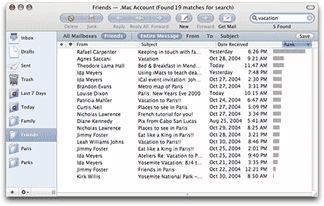 Apple's Mail 2.0 in Tiger (Mac OS X 10.4) is a major revision of Mail. We are not going to post a full tutorial on all of the new features of Mail 2.0. Apple has done a great job of describing them on this Web page and subsequent links. We are, however, going to comment on the good, ambivalent and bad aspects of Mail 2.0 based on our extensive use over the past two weeks since Tiger has been officially out. Apple's Mail 2.0 in Tiger (Mac OS X 10.4) is a major revision of Mail. We are not going to post a full tutorial on all of the new features of Mail 2.0. Apple has done a great job of describing them on this Web page and subsequent links. We are, however, going to comment on the good, ambivalent and bad aspects of Mail 2.0 based on our extensive use over the past two weeks since Tiger has been officially out.
The Good.
Search Speed--Searching your email among mailboxes is super fast. When we searched for the word "Kamas" (the best PowerBook stand) in the entire message of over 85,000 email messages accumulated over five years and sorted into a dozen or so mailboxes, it took but a few seconds to array the several thousand messages with "Kamas" somewhere in them in the mail list pane.
Stability--One corrupted email message won't cause you to lose your entire mailbox. This is because each email message is now treated as a separate file rather than the mailbox being treated as a file and each message a text addition to it. Unfortunately, this also has consequences for backup speed as noted below.
Smart Mailboxes--This is a cool feature. We have always sorted our incoming mail into a number of mailboxes based on the rules capability in Mail. The rules feature still exists to do this in Mail 2.0 but there is more. The new Smart Mailboxes can do this and much more because the ability to set criteria is more flexible. Just set up a Smart Mailbox and the email messages in your mailboxes meeting the criteria automatically flow to the Smart Mailbox. Any new messages meeting the criteria also end up in the Smart Mailbox. We found that this feature works very well.
The Ambivalent.
User Interface--Simply stated we prefer the user interface of previous versions of Apple's Mail. We think the design from both visual and functional perspectives was better but it's not a big deal.
Apple dropped the sliding mailboxes sidebar tray that protruded to the left or right (user's choice) of previous Mail 1.3's primary window in favor of a pane contained on the left within the outline of Mail 2.0's primary window. It may be six to one or a half-dozen to the other to most but not to us. We normally kept the tray out on the right, not the left, and we could snap it closed if we wanted to see or access something lined up down the right side on the desktop. The main application and everything within the window kept its size when doing so. With Mail 2.0, the mailbox pane is fixed on the left side. It can be closed but it just makes the mail list pane and message viewing pane larger--no desk space is revealed.
There is a new search filter bar in Mail 2.0 that appears above the the mail list after something is typed into the search window. That bar allows one to select the mailbox to be searched and whether it's "Entire Message", "To", "From" or "Subject". In Mail 1.3 and earlier, these selections popped up when the magnifying glass icon was clicked so that they could be selected before starting the search. The new paradigm may be easier to learn by doing than clicking on a magnifying glass icon but we find it to be logically backwards to select where one is searching and for what after the search has begun as happens in Mail 2.0.
Then there are the new colors. The background of the mailboxes pane is a light blue-gray in Mail 2.0 rather than white--we like the clarity of the white background in Mail 1.3. A darker blue-gray is used in the new filter selection bar that appears across the top of the mail list and in "bubbles" surrounding the action button icons. We tend to prefer not having this new color introduced. It is very Entourage-like so maybe switchers will feel better. We also like the original action button icon set against the almost white background in Mail 1.3 and earlier much better than those in Mail 2.0 surrounded by the blue-gray bubble. Well, we suppose the new icons do look a bit more like typical Aqua action buttons. This is a very minor deal anyway.
The Bad.
Backup Speed--One of the downsides of Mail 2.0's changes to improve stability and search speed and capability, is that each message is now treated as a separate file. While this is good from some aspects noted above, it has a major downside that is first encountered when importing messages from Panther's final version of Mail 1.3. It took almost 20 minutes to import some 85,000 messages that we have accumulated since 1998. Worse, it used to take less than 2 minutes to complete our nightly backup of email and other changed files with Tri-Backup v3.2.2. But with Mail 2.0's monstrous number of files to check for changes, it now takes nearly 30 minutes for the same amount of work, i.e. copying and deleting a net 500 or so files per day. Apple's Backup application takes just as long.
One solution would be to move our email archives for years prior to 2005 out of Mail's folder in ~/Library/Mail/Mailboxes since they do not ever change. The problem with this is that we occasionally have to search our archives for things like application serial numbers or customer orders, etc.
Stability--Probably the most critically important application to be stable is an email client, especially to those in business who rely on email as their primary communication and record system. Unfortunately, Mail 2.0 has done some weird things that shake our confidence. Occasionally, opening an email will cause Mail 2.0 to unexpectedly quit. That continues to happen with the same message until we reboot our computer. Sometimes, Mail 2.0 will temporarily lose all of the messages. Clicking on a mailbox results in a blank list and the application's header note that there are "0" messages when there may actually be 1000s. Quitting and relaunching Mail 2.0 usually fixes this. Occasionally, Mail 2.0 just freezes.
Junk Mail Handling--At one point several years ago, Mail's Junk filter was over 95% effective. Only a few spam escaped being filtered out and only a few emails were falsely tabbed as spam. That success rate has slowly declined over the updates to Mac OS X and the increase in sophistication by spammers in dealing with Bayesian filters. We currently get about 150-200 spam messages per day and Apple's Mail 1.3 was correctly filtering about 80% of them to the Junk folder. After the installation of Tiger, Mail 2.0's record is less than half as effective. We usually saw a modest drop in effectiveness with each Mail update, but it quickly recovered. This has not happened with Mail 2.0. In an attempt to improve Mail 2.0's low performance, we have set Mail 2.0's Junk mail preference back into training mode. We will see how good it gets.
In Summary.
Mail 2.0 has several significant technological advances over Mail 1.3 that we welcome. We have yet to use some of the new features, like using iSync and .Mac to keep our PowerBook synchronized with our Power Mac G5. This feature should be extremely helpful. We do it manually now and will be converting over as soon as some of the stability issues in Mail 2.0 are resolved, hopefully in 10.4.1 when it arrives. [Bill Fox]
[5/16] Spotlight on Innovation--Writing a Spotlight Plug-in Today for Mac OS X 10.4 Tiger: The upcoming Worldwide Developers Conference 2005, June 6-10, will focus on the latest edition of Mac OS X, i.e. "Tiger" or 10.4. At a hands-on session, learn how to create a Spotlight plug-in to make your custom file format searchable by Spotlight. Apple will show you how to write a Spotlight plug-in to export information from a basic file, create custom keys that the Finder can display, and debug your plug-in. Check out the details on what will be covered at WWDC 2005 on this Apple Web page. [Bill Fox]
[5/14] Microsoft Xbox 360 Demos Run on Apple Power Mac G5s: As most gamers know, Microsoft just announced its new Xbox 360 game machine. It will run on three 3.2GHz symmetrical core IBM PowerPC processors so similar to Apple's G5, also made by IBM, that Microsoft has been demoing its Xbox 360 graphics using Apple Power Mac G5s according to a quote appearing on CNet:
"We purchased a number of Apple G5's because very specific hardware components of the G5 allow developers to emulate some of the technology behind future Xbox products and services," a Microsoft spokesperson said in a statement. "This is an interim development tool that will be replaced with a more powerful and comprehensive solution later."
This raises the possibility of Power Mac G5s running faster than 3GHz by this December since that is when the Xbox 360s are scheduled to be released. More... [Bill Fox]
[5/14] Consumer Reports Still Being Kind to Macs as They Should: The June 2005 issue of Consumer Reports recently landed in our mail box. CR rates "Best laptops and desktops" on pp. 40-44. Apple comes out smelling like an Apple blossom. CR summarizes its findings with a caption on page 40 under a picture of a person using an iMac G5.
"TOPS. The Apple iMac was an excellent performer in our tests. Apple is also the leading desktop brand in reliability and satisfaction with tech support."
Under the headings "How to Choose>Decide between Windows and Macintosh" CR reports:
"More home and entertainment software is available for Windows computers than for Macs. Apple's computers, however, have attractions of their own. The brand repeatedly scores at or near the top in reliability and tech support. Our recent survey of desktop computer users, in fact, rated Apple more than 20 points ahead of the pack for tech support.* Viruses and spyware are also far less likely to target Macs than Window PCs, judging by the number of viruses estimated to target each computer platform - a ratio of about 1,000 to 1."
* Apple topped the list for laptop tech support, too, scoring 15 points better than its nearest rival. Apple scored tops in all four tech support categories for both desktops and laptops. No other brand came close.
Under "Quick Picks" "For the best reliability and support" amongst 11 desktops, CR picked the 17" iMac G5.
Under "Quick Picks" "For the best reliability and support" amongst 15 laptops, CR picked the 14" iBook Combo.
[Dana Baggett]
[5/14] Apple Updated Logic Pro and Express to v7.1 for $19.95ea: The improvements in the music production applications according to Apple are:
Logic Pro--"...take advantage of full native plug-in delay compensation, expanded Apple Loops integration, new Bass Amp and hybrid synthesizer plug-ins, easy re-ordering of plug-ins, and more."
Logic Express--"...take advantage of enhanced Apple Loops authoring, new plug-in effects and software instruments, easy re-ordering of plug-ins and much more."
The digital music production and audio application upgrades are $19.95 each. [Bill Fox]
[5/13] Brief Hands-On Report--May 2005 ATI Radeon X800 XT Mac Edition ROM Update: In April, ATI released ROM Update v107 for their new Radeon X800 XT graphics card and ATI Displays v4.5 software preference pane. We installed both, the firmware v107 in our newly received Radeon X800 XT graphics card and ATI Displays 4.5. On reboot we got a kernel panic right after the gray screen. On subsequent reboots we always got either the same kernel panic or a freeze at various stages of building the desktop. Others had the same problem so we posted a warning on April 25.
ATI subsequently released the April ROM updater again but with the ability to downgrade back to v104 and posted an update to ATI Displays v4.5.1. Installing these fixed our startup problems but left us without the functionality of the then new ROM 107, i.e. fan control in ROM rather than in the Mac OS X extension ROM Xtender.
ATI just released the May 2005 ATI Radeon X800 XT Mac Edition ROM Update v108. The release notes state that the only difference with v107 released in April is that the kernel panic at startup is fixed for those of us who experienced it--not everybody did.
We downloaded v108 which has to be installed in Safe Boot mode (hold down the "shift" key during startup) with Mac OS X 10.4. For some reason, we are unable to startup our dual Power Mac G5 in Safe Boot mode running Mac OS X 10.4. But we were able to do so using our second (backup) drive running Mac OS X 10.3.9. We installed v108 in Safe Boot mode running 10.3.9 even though ATI states that is not necessary for Mac OS X versions earlier than 10.4.
The ROM update to v108 went fine. But the restart into Mac OS X 10.4 was very slow. It took three restarts before our startup regained its usual 30+ second speed.
We started up a number of times and ran a number of applications, including the demanding 3D games Call of Duty and Halo, without any problems. We believe that ATI has done a good job in finding and fixing the bug in the April ROM update v107 and recommed updating with the May ROM updater v108. [Bill Fox]
[5/13] Mozilla Foundation Released Firefox 1.0.4 and Mozilla Suite 1.7.8: As we reported on Wednesday, the Mozilla Foundation released Firefox 1.0.4 and Mozilla Suite 1.7.8 with a security fix for the Java injection problems we noted then.
We downloaded and installed Firefox 1.0.4 and Mozilla Suite 1.7.8 without any problems. [Dana Baggett & Bill Fox]
[5/13] Apple Design Awards Deadline is Today: If you haven't already done so, be sure to submit your Mac OS X solution to the Tenth Annual Apple Design Awards. The deadline for submissions is this Friday, May 13, at 5:00pm PDT. Enter today at this Apple Web page. [Bill Fox]
[5/13] Apple Released Intermediate Codec and Pro Application Support 3.0: They are available for download as noted below:
Apple Intermediate Codec 1.0.1 -- Delivers improved compatibility and reliability for Final Cut Express HD and iLife ’05 uses. It is recommended for all users of Apple Intermediate Codec 1.0 who are using QuickTime 7.0.
Pro Application Support 3.0 (Mac OS X 10.4) -- This update improves general user interface reliability for Apple’s professional applications. It is recommended for all users of:
-DVD Studio Pro
-Final Cut Pro
-Logic Pro
-Logic Express
-Motion
-Soundtrack
Pro Application Support 3.0 (Mac OS X 10.3.9) -- Same as above but for Mac OS X 10.3.9.
[Bill Fox]
[5/12] Brief Hands-On Report--Diskwarrior 3.0.3 Update: The Tiger-compatible Diskwarrior 3.0.3 updater is now available for download from this Alsoft Web page. To make a 3.0.3 CD, you need the original disc of Diskwarrior 3.0.x, not an updated CD. To have a bootable CD, the original Diskwarrior 3.0.x CD must be able to boot your computer. If not, you need to order a new v3.0.3 CD from Alsoft. A new 3.0.3 CD costs $12.95 plus $7.95 for shipping and it will also boot the latest Power Mac G5s and iMac G5s.
We downloaded the Diskwarrior 3.0.3 updater and made new v3.0.3 CDs. One of us has an original 3.0 CD that does not boot our computer. However, we use an external FireWire drive for that. We simply copied the 3.0.3 application to the drive and it ran fine after deleting an older versions preference file. The other of us has a more recent 3.0.x version that boots his iMac G5 and the new 3.0.3 CD also boots it. Unfortunately, on boot with the new 3.0.3 CD the Bluetooth connection to his wireless keyboard and mouse does not work so he also has to use an external FireWire drive to boot in an emergency and use Diskwarrior 3.0.3. [Dana Baggett & Bill Fox]
[5/12] Apple DVD Player 4.6 Released for All Users of DVD Player: Curiously, like iTunes 4.8 before it, the v4.6 update is recommended for all DVD Player users but the update to this application that comes with Tiger did not appear in the System Preferences Software Update pane of any of our Macs. It is available only as a standalone updater from this Apple Web page. According to Apple,
DVD Player 4.6 delivers added support for DVD Studio Pro 4 authored HD DVDs. It is recommended for all users of DVD Player.
Key Updates include:
-Additional support for playing DSP 4 authored HD DVD folders from DVD discs and hard drives.
-Additional support of discs with both SD and DSP 4 authored HD content.
-Improved Global Player settings.
-Improved usage for last play and disc info dialogs.
We downloaded and installed v4.6 without problems. It runs the DVD movies that we have just fine.
But what is wrong with Apple's automatic Software Update software in Tiger? Why are the last two updates recommended for all users not available by Software Update? [Bill Fox]
[5/12] Apple Revised the Offerings from Three Hot Deals Retailers:
MacMall has fantastic prices on essential Mac products, including Sonnet PodFreq Premium iPod FM Transmitter, Adobe Creative Suite 2 Premium Upgrade with $100 mail-in rebate, Adobe Creative Suite 2 Standard, MacAlly PodSuit iPod Protective Sleeve, Griffin iTrip mini FM Transmitter, Nyko iPod Universal Car Mount, Logitech S100 Speakers, and much more.
CDW|MacWarehouse has great deals on cool Mac products, including Epson Stylus Photo R320 Photo Printer, Roxio Toast 6 Titanium, Hewlett Packard 17" LCD Display, Nikon D70s 6.1MP Digital SLR Camera with FREE 256MB Memory Card, Canon ZR100 DV Camcorder, Adobe Photoshop CS2 Upgrade, Sony CyberShot T33 Digital Camera, Hewlett Packard PhotoSmart 8750 Color Printer, and much more.
J&R has great prices on top quality Mac products, including Aspyr Media Doom 3, Belkin Hi-Speed USB 2.0 7-port Hub, Case Logic Full Grain Leather Case for iPod,, Canon GL2 3CCD MiniDV Digital Camcorder, Topics Entertainment 40 Years of the Amazing Spiderman, DVForge The Mouse, Final Draft 7, Gretag Macbeth Eye-One Display 1, Griffin Technology iMic USB Audio Adapter, and much more.
[Bill Fox]
[5/12] Tonight on The Tech Night Owl LIVE--Snell, Kissell and Lowrey: This week Gene and Grayson will continue coverage of the latest Mac OS, Tiger, with Jason Snell, Editorial Director of Macworld, Joe Kissell, author of "Take Control of Upgrading to Tiger" and John Lowrey, developer of Tiger Cache Cleaner. You can tune in tonight from 6:00 to 8:00 PM Pacific, 9:00 to 11:00 PM Eastern. [Bill Fox]
[5/11] Spotlight on Innovation--Create Your Own Mac OS X Tiger Dashboard Widgets: The upcoming Worldwide Developers Conference 2005, June 6-10, will focus on the latest edition of Mac OS X, i.e. "Tiger" or 10.4. Dashboard introduces a new breed of mini-application called a Widget. Based upon standard HTML, CSS, and JavaScript, Widgets are simple to build and easy to extend using the power of Mac OS X. Learn how to use the technologies you already know to build widgets that can enhance your Mac OS X application or bring new capabilities to the platform. There is also a hands-on session will provide you with the techniques you need to make a great Dashboard Widget on Mac OS X Tiger. Widget UI design will be discussed and explained, using sample code, how to implement scrollers and other common Widget interface elements. Check out the details on what will be covered at WWDC 2005 on this Apple Web page.
[5/11] Firefox and Mozilla Suite Critical Security Alert--Mozilla Foundation Security Advisory 2005-42: For those of you using either Firefox or Mozilla Suite web browsers, the Mozilla Foundation has released a critical security alert called "Code execution via javascript: IconURL." There are two script injection vulnerabilities for Firefox and one for Mozilla Suite that could be used to steal cookies or sensitive data or to perform malicious actions. To avoid the problem until an update is released, the Mozilla Foundation recommends disabling java in the browsers preferences. One may also use the release candidate of Firefox 1.0.4 noted below. More... [Dana Baggett]
[5/11] Firefox 1.0.4 Release Candidate Available--Fixes Two Java Script Security Flaws: Mozilla has posted for download the release candidate for Firefox 1.0.4. Version 1.0.4 is designed to fix the security flaws that could be used to steal cookies or sensitive data or to perform malicious actions as noted above. The final version of Firefox 1.0.4 should be out shortly. More... [Dana Baggett]
[5/11] Cool Mac Software--EyeConnect Media Streaming Software Released: Elgato Systems, creators of EyeTV for the Mac, just released EyeConnect, the Macintosh market’s first fully integrated media streaming software based on Universal Plug and Play Audio/Video (UPnP-AV). EyeConnect enables digital music, video, or photo content, including EyeTV recordings, iPhoto images and iTunes songs stored on a Macintosh, to be played on a broad variety of UPnP-AV certified devices throughout the home.
EyeConnect supports all digital media formats and is capable of streaming slideshows, music and even HDTV in full video quality with Dolby Digital sound. Starting today EyeConnect can be purchased online from Elgato for $99. A free, 30-day trial version is available for download.
Here are the system requirements:
• A Macintosh computer with a PowerPC G4 or G5 processor
• Mac OS X 10.3
• Minimum 20 MB free hard disk space
• iPhoto, iTunes installed for viewing photo and music content
• EyeTV installed for viewing EyeTV (digital TV recorder) recordings
This looks like the ideal software for our Mac mini. [Bill Fox]
[5/10] Brief Hands-On Report--Apple iTunes 4.8 with Security Update & Full Screen QuickTime Video: Apple released a newer version of iTunes, version 4.8. It is not available from the System Preferences Software Update pane as of publication time but is available for download from this Apple Web page. So what's new in iTunes 4.8? From the ReadMe file dated March 23, 2005:
iTunes 4.8 includes new Music Store features and support for transferring contacts and calendars from your computer to your iPod (requires Mac OS X version 10.4 on your computer).
System requirements: iTunes 4.8 requires Mac OS X version 10.2.8 or later (Mac OS X version 10.3.8 or later is recommended). AirPort Express with AirTunes requires Mac OS X version 10.3 or later, a compatible stereo system or powered speakers, and Internet access (fees may apply). Some ISPs are not currently compatible with Airport Express. For more information see [this Apple Web page].
iTunes 4.8 also delivers the following security improvement:
CVE-ID: CAN-2005-1248
Impact: A buffer overflow in iTunes could cause a denial of service and lead to execution of arbitrary code
Description: The MPEG4 file parsing code in iTunes versions prior to 4.8 contains a buffer overflow vulnerability. Parsing a maliciously-crafted MPEG4 file could cause iTunes to terminate or potentially execute arbitrary code. iTunes 4.8 addresses this issue by improving the validation checks used when loading MPEG4 files. Credit to Mark Litchfield of NGS Software for reporting this issue.
We downloaded and installed iTunes v4.8 and ran into no problems.
As we were first to note in yesterday's edition (actually the evening before), QuickTime full screen video plays through iTunes via the iTunes Music Store. iTunes 4.8 Preferences has a popup menu under "Advanced" that allows one to choose how video plays through iTunes (same window, new window or full screen). If you go to the iTunes Music Store's Movie Trailers section, there is a special section "Exclusive Movie Trailers" on the right that has movie trailers with the full screen option. iTunes 4.8 also has a new button at the right end the lower left row that plays full screen QuickTime movies dropped into its window. [Bill Fox & Dana Baggett]
[5/10] Cool Mac Software--iSMARTtrain 2.0.1 Polar Heart Rate Training Software: iSMARTtrain allows you to download from your Polar S610, S625x, S710, S720, S725, S810, XTrainer or Accurex II Heart Rate Monitor. Data can also be imported from other applications. You can download and review your performance during training and racing. Full control, including uploading exercise session and settings will be including in a future release. What's new in v2.0.1?
- See summary of week
- HR Zones now has %HRmax or Karvonen calculation methods
- Many other fixes and improvements
[Bill Fox]
[5/10] SendStation's PocketDock Line Out USB Now Available: SendStation Systems announced another member in its highly acclaimed series of thumb-sized iPod adapters, the PocketDock Line Out USB. It is the first iPod adapter on the market to feature a standard USB socket for instantly charging and syncing as well as a 3.5 mm (1/8") jack, offering stereo line out from your iPod. The PocketDock Line Out USB is available for $29.95 through Dr Bott. We carry a FireWire PocketDock in our "goody bag" and it has come in handy several times when we've needed our iPod mini's cable but it wasn't handy. [Bill Fox]
[5/10] A Tiger Issue Fix--Apple Mail Quits Frequently: Check to see if there are any third party "Bundles" in a Bundles folder at Home>Library>Mail. We had an old MailPictures Bundle that was causing unexpected quits in Tiger's new Apple Mail version. The latest v3.0b2 seems to work okay but Nikwest will probably come out with a Tiger-specific version. [Bill Fox]
[5/10] A Tiger Issue Fix--Widget Download Security Hole in Safari: According to reader's note on Slashdot, there is a security hole in Tiger's Safari 2.0 that allows a malicious widget "Zaptastic" downloaded by Safari to cause problems. One can close the hole by unchecking Open "safe" files after downloading in the General preferences. More... [Bill Fox]
[5/9] Cool Mac OS X 10.4 Tidbit--Tiger's QuickTime 7 Full Screen Movie Trailers: Have you tried QuickTime 7 yet? Not really tied to Tiger, QuickTime 7 works with Mac OS X 10.3.9 as well as 10.4. One of the features of the new codecs in QuickTime 7 is full screen video, even on older Macs and older graphics cards. In addition, the new QuickTime HD is terrific but needs some serious computing iron to work.
To try out the full screen video, launch QuickTime 7 and in the QuickTime window click on one of the movie trailers. We suggest either "War of the Worlds" or "The Island." The trailers run full screen even on our 450MHz G4 Cube with a stock ATI Rage 128 Pro graphics card with only 16MB VRAM and our 17" Apple Cinema Display. Curiously, they run through the iTunes Music Store.
To try out QuickTime HD with QuickTime 7, go to this Apple Web page and click on one of the HD selections. We suggest "Kingdom of Heaven" or "NASA Space Shuttle" or "WildlifeHD Reel." They run in the QuickTime Player window at full screen width and some with a 16x9 "letter box" aspect ratio. On our Cube the sound comes through fine but not the video. The video comes through very well on our 1.67GHz 17" PowerBook G4 with the processor performance set in the Energy Saver preferences pane on "Highest." Of course, QuickTime HD is absolutely, unbelievably fabulous on our dual 2.5GHz Power Mac G5 with an Nvidia 6800 Ultra DDL graphics card and 30" Cinema Display. [Bill Fox]
[5/9] Cool Mac OS X 10.4 Tidbit--Tiger has Built-In SoftRAID 3 Driver: The SoftRAID 3 driver is included with Tiger (Mac OS X 10.4). This includes all retail DVD's and CPUs which come pre-installed with 10.4. The SoftRAID 3 driver allows the OS X system to recognize SoftRAID volumes created with the SoftRAID 3 application. This means that a user can take their SoftRAID volumes to any machine with Tiger installed and the volumes will appear on the desktop and function normally, with or without the presence of the SoftRAID application. The SoftRAID application is necessary for the user to create and manage the volumes. [Bill Fox]
[5/9] Cool Mac OS X 10.4 Tidbit--Tiger has Restart Option After App Crash: After an application crashes in Tiger, the dialog box that pops up has a new optional button "Restart". Clicking it re-launches the application. Unfortunately, it seems that we need the "Restart" button more in Tiger than in any Mac OS X version in recent memory. [Bill Fox]
[5/9] Macs Running Strong as Game Machines: According to a recent report in the The Daily Collegian,
NexTag Inc., a San Mateo, Calif.-based comparison-shopping company, ranks what it calls the "most popular" computers based on a combination of sales and sales leads from reports by its several thousand merchant partners.
Garth Chouteau, public relations director for NexTag, said that based on the company's criteria, Dell's Dimension XPS machines are the first and fifth most-popular gaming PCs. However, Apple Computer's Power Mac and iMac G5 systems claimed the No. 2, 3 and 4 spots, but Apple doesn't even market those machines as gaming computers.
Well, well! Now, that's a real pleasant surprise to us. [Dana Baggett]
[5/9] Mac/PC Systems Shootouts Upddated for New Power Mac G5s: Charles Gaba's Mac/PC System Shootouts have been updated, with head-to head comparisons in the following categories, with extra comparison fields including Metadata Search, Task Scripting and Font Management:
- $2,500 Desktops: 1.8GHz PowerMac G5 vs. Dell Dimension 8400
- $3,000 Desktops: Dual 2.0GHz PowerMac G5 vs. Dell Dimension 8400
- $3,500 Workstations: Dual 2.3GHz PowerMac G5 vs. Dell Precision 670
- $4,000 Workstations: Dual 2.7GHz PowerMac G5 vs. Dell Precision 670
In addition, the Apple Professional Desktop Lineup chart has been completely updated. [Bill Fox]
[5/8] Get FREE StuffIt Expander 9.0.2 for Mac OS X 10.4 Tiger: StuffIt Expander is free and available as a download from this Allume Web page. There's a 9.0.1 to 9.0.2 updater if you have version 9.0.1 installed. Otherwise, download the full application included with StuffIt Standard. Tiger decodes .zip files natively but you will need StuffIt Expander for files encoded as .sit and .sitx. Be aware that after applying the 9.0.2 update, the application will still say it's 9.0.1--Allume says to ignore that. [Dana Baggett]
[5/7] Apple Revised the offerings from Three Hot Deals Retailers:
The Apple Store has updated it's selection of special deal products, such as Apple Certified Refurbished iMac G5's starting as low as $899. There are also great prices on Refurbished Power Mac G5's, iPod mini's and eMac models. But, hurry as supplies are limited and products are removed from the Apple Store when supplies are sold out. All details available under the "Special Deals" tile.
MacZone has fantastic prices on essential Mac products, including LaCie 16x DVD±RW Drive with Lightscribe and Toast 6, Planar PL1700 17" LCD Display with $30 mail-in rebate, Sonnet PodFreq Premium FM Transmitter for iPod, Roadtrip FM Transmitter & iPod Charger, Harman Kardon JBL Duet Multimedia Speakers, Markzware FlightCheck Designer 5.5 Full Version with $50 mail-in rebate, and much more.
Publishing Perfection has great deals on a variety of design and print products for your Mac, including nik multimedia Color Efex Pro 2 Standard Edition, Logic Arts InDesign Ideabook, QuarkXPress 6.5, Microtek ScanMaker i700 Office Edition Flatbed Scanner, Evovia Carrara 4 STD, Adobe Photoshop CS2, AutoFX Mystical Lighting, and much more.
[Bill Fox]
[5/6] Spotlight on Innovation--Harness the Power of PDF in Mac OS X 10.4 Tiger: The upcoming Worldwide Developers Conference 2005, June 6-10, will focus on the latest edition of Mac OS X, i.e. "Tiger" or 10.4. Learn how to take advantage of Mac OS X's PDF capabilities, an important capability for all application developers. Learn how Quartz 2D and PDF Kit benefit your application by giving easy access to the robust graphics and final form document capabilities of the PDF format. Also learn how Mac OS X's PDF-based printing architecture can increase the features and capabilities of your application via its PDF Workflow feature. Don't miss the opportunity to harness the power of PDF in your application. Check out the details on what will be covered at WWDC 2005 on this Apple Web page. [Bill Fox]
[5/6] Apple's FREE Online Seminars--May Listing: These online events are available 24 hours a day, 7 days a week from any computer with internet access. They are designed to be no more than 30 minutes in length and offer a wide variety of resources and information for your review. Topics cover solutions using Apple and partner products and technologies. Here is a listing of current seminars online.
A Blueprint for Tiered Storage--Steve Duplessie, recognized independent expert on storage technology, discusses the practicalities of tiered storage & set-up of a solution that works.
Asset Management for Creative Workgroups: With Xserve G5 and Extensis Portfolio Server--Learn how you can better manage your photographs and creative assets with the winning combination of Apple Xserve and Extensis Portfolio Server.
Biotech is in our DNA--Michael Athanas, Ph.D., of The BioTeam will show how to install a fully provisioned informatics cluster on one or more Xserve servers using iNquiry.
Color Management for Your Digital Workflow--This free online seminar helps demystify color management and gives you the knowledge you need to incorporate it into your workflow.
Color Management for Your Digital Workflow--This free online seminar helps demystify color management and gives you the knowledge you need to incorporate it into your workflow.
Color Management: From Input to Edit and Print with Mac OS X Panther & ColorSync--Join Steve Upton, industry consultant on color, as he gives you an overview of color management from displays to applications and output.
Computational Clusters for Bioinformatics--Elizabeth Kerr, Ph.D., Director of Science and Technology Markets at Apple, moderates this informative webcast discussion of the Apple Workgroup Cluster.
Desktop Management Made Easy with Apple Remote Desktop 2--Join Apple Product Mgr Nader Nafissi to learn why Apple's new, easy to use desktop management software is the essential tool for any Mac system administrator.
Developers win with Mac OS X - Reap the rewards--Built on a rock-solid UNIX core and standards-based technologies, Mac OS X is hailed as the world's most advanced operating system.
Getting Started with High Performance Computing--On-demand rebroadcast of the Dec 16, 2004 webcast discussion of the high-level concepts of high performance computing, issues & obstacles, and more.
Guitarists and the Mac: A Conversation with Pat Metheny--Join Pat Metheny in this free online seminar and learn how the Mac can help you take your music to the next level.
Improve Your Presentation Skills--Watch this free online seminar and find out how to improve your presentation skills.
Information Lifecycle Management--Steve Kenniston, an Enterprise Storage Group analyst will offer insights as to how to manage vast amounts of data while keeping your overhead low.
Maximizing Mac OS X Application Performance--Re-broadcast of the webcast discussion of the basics of optimization, how and why developers should turn a critical eye to the code they've just written.
Mobile Creative Studio, Portable Workstation, Office-on-the-Go--Join Gail Nishimura, PowerBook product manager, to learn about the latest advancements in the PowerBook G4 line and discover which model is right for you.
Mobile Field Editing with Journalist Dr. Bob Arnot--Join Dr. Bob Arnot to learn how the Mac can help you become a more successful storyteller and videographer by editing video on-the-go using tools from Apple.
Optimize Your Creative Workgroups with Mac OS X Server, Xserve, and Xserve RAID---Join Brent Haley, Apple senior marketing manager for design and print, and learn how you can remove barriers to creativity while streamlining mundane IT tasks.
Perfect Color Starts Here With Apple Cinema Displays--Join the Apple Cinema Displays product manager to learn how adding an Apple display to your creative system can boost your color-viewing experience.
Perfectly Focused - Digital Photography on Mac OS X--This seminar will show you why you should take the plunge to digital--and how to get started with your own digital photography workflow on Mac OS X.
The Ultimate Creative Workstation. Discovering the Apple Power Mac G5--Todd Benjamin provides a tour of the Power Mac G5, describing what makes them so innovative and how they will benefit your creative endeavors.
Third-party HPC Solutions for Mac OS X--Apple will be joined by representatives from companies who develop their software or hardware for the platform to talk about their products.
Unwire Your Business--Take this free online seminar and find out how Apple's wireless and mobile solutions let you take your computing environment with you wherever you go.
[Bill Fox]
[5/6] MacMagic 1.1.1 is Out. MacMagic adds powerful enhancements to OS X for mining, editing, printing, and saving data when working with virtually any OS X application (including Safari and Mail). New in MacMagic 1.1.1:
* Cosmetic display issues when using MacMagic in OS X 10.4 (Tiger) have been eliminated.
* Some code has been optimized for improved performance when using MacMagic in Tiger.
* Several small enhancements have been added to MacMagic.
[Bill Fox]
[5/5] Cool Mac OS X 10.4 Tidbit--Tiger Supports Pivoting Monitors [Updated]: Has anyone noticed that Mac OS X 10.4 Tiger now supports pivoting montors in the Displays pane of System Preferences? Reader Andy Grobengieser wrote,
If you own such a monitor (I own an HP L2335), you're now presented with an extra option, called "Rotate", which allows immediate rotation of the display to 90, 180, or 270 degrees.
A nice surprise, as I hadn't been able to use this functionality of my external monitor until now.
We don't have a pivoting monitor on our 17" PowerBook G4 but the option shows up in our Displays pane if we launch System Preferences and hold down the "option" key while clicking on the Displays pane. Basically this feature is available if your Mac has an ATI graphics card that supports it. [Updated to correctly state how to get the "Rotate" option to appear.] [Bill Fox]
[5/5] Cool Mac OS X 10.4 Tidbit--Many New Dashboard Widgets Available: There are already 63 free and demo widgets available for download from this Apple Web page. There's Package Tracker, TV Tracker, Yahoo! Local Traffic and 60 more.... After downloading, they should be in Home Folder>Library>Widgets [Bill Fox]
[5/5] Apple Tiger Tip of the Week--Make Your Own Dashboard Tile Game Image: Open the Tile Game widget in Dashboard and you will see that it is the scrambled image of a tiger on 15 tiles. The object is to slide the tiles around to re-assemble the image. You can replace the tiger image with your own. Here are the steps... [Dana Baggett]
[5/5] Tonight on The Mac Night Owl LIVE--Ihnatko, Rizzo and Van Buskirk: This week co-hosts Gene and Grayson Steinberg will talk Tiger with Mac experts Andy Ihnatko, author of the forthcoming "Mac OS X Tiger Book" and John Rizzo, author of "Mac Annoyances." You'll also learn about the latest in the world of digital music, including competitors to the iPod and iTunes Music Store, from Eliot Van Buskirk of mp3.com. You can tune in to the internet radio broadcast on Thursday night from 6:00 to 8:00 PM Pacific, 9:00 to 11:00 PM Eastern. An archive of the show will be available for listening at your convenience within eight hours of the original broadcast. [Bill Fox]
[5/5] SwitchXS 2.0 LayoutKitchen 1.0 and KeyStrokes 3.5.1 Boost Accessibility of Mac OS X Tiger: AssistiveWare announced the release of SwitchXS 2.0, LayoutKitchen 1.0 and KeyStrokes 3.5.1. SwitchXS is a switch access solution that provides virtually complete access to Mac OS X and all standard Mac applications for people who cannot use a mouse or keyboard. It offers full mouse and keyboard emulation by means of a so-called scanning mode. With each click on the switch the user selects an action, such as "move the cursor up" or "type B", from a "scanning" menu. LayoutKitchen provides an advanced layout editor to make custom scan panels for SwitchXS. KeyStrokes is an award-winning on-screen keyboard that provides virtually complete access to Mac OS X and all standard Mac applications for people who cannot use a keyboard. [Bill Fox]
[5/5] Doorstops? The Envision Show of the Week is of DoorStop X Firewall: Normally an Envision show of doorstops would be pretty unexciting. But they're very excited this week about their new DoorStop X firewall, so check out their product. BTW, Open Door Networks shipped the first Mac firewall ever, in 1998. The Envision Web Show of the Week can be downloaded from the Show of the Week Web site. Previous Shows of the Week are available in the Show of the Week archive. [Bill Fox]
[5/5] Apple Revised the Offerings from Three Hot Deals Retailers:
Sweetwater has fantastic deals on a wide range of audio products for your Mac, including Mackie Control Universal, M-Audio Pro Tools M-Powered, Make Music PrintMusic, Roland DM-2100 Monitor Speakers, Pro Tools Clinic, M-Audio Ozonic 37-key MIDI Controller, and much more.
MacMall has fantastic prices on essential Mac products, including Adobe Creative Suite 2 Premium Upgrade with $100 mail-in rebate, Adobe Creative Suite 2 Standard, Nyko Technologies iBoost Rechargeable Booster Battery Pack for iPod, Logitech Internet Navigation Keyboard, Micronet miniMate 400GB External USB/FireWire Hard Drive, XtremeMac SportWrap Armband for iPod Shuffle, and much more.
AudioMIDI has fantastic deals on a wide range of audio products for your Mac, including M-Audio Trigger Finger, M-Audio iControl, Edirol R1 Recorder, Cycling 74 Mode, Presonus Eureka, Izotope Ozone 3, Celomony Melodyne Uno, and much more.
[Bill Fox]
[5/5] The Apple Developer Connection Published Three New Tiger Articles:
Getting Going with Tiger: Guide to ADC Resources. Learn about the many valuable resources on the ADC website that are available to help you get going with your Tiger development.
Exploring Tiger Server. Tiger Server is loaded with technologies that provide great opportunities for developers, including Xgrid, 64-bit support, Access Control Lists, and more. Tiger Server is the easiest server in the world to set up and deploy, and it's also the simplest way to deploy powerful server solutions.
Tiger Early Adopter: Bare Bones Embraces Automator. Bare Bones Software provided powerful Automator Actions in BBEdit as soon as Tiger started shipping. Read this article to learn how they did it, and why Automator makes BBEdit a more powerful and useful program to its users, and makes money for Bare Bones Software.
[Bill Fox]
[5/4] Mac OS X 10.4 Tiger Speed Tests Revisited--Quartz Graphics Update: Monday's "How Fast Is It?" article on Mac OS X 10.4 Tiger showed that Tiger's 2D Quartz graphics tested much slower using Xbench than with 10.3.9 Panther on three of five computers: dual 2.5 GHz Power Mac G5, 1.25GHz G4 Mac mini and 1.67GHz 17" PowerBook G4. We speculated that Xbench's Quartz graphics test may need to be updated for Apple's new Quartz 2D Extreme graphics engine.
Well, no. Reader Chris Adams pointed out an Ars Technica article by John Siracusa that states that the default setting in Tiger's new Quartz 2D Extreme technology is OFF! It's hard to believe that but this is what the author had to say:
"There's one final barrier to hardware-accelerated bliss. Quartz 2D Extreme is disabled by default in Mac OS X 10.4.0. That's right, the whiz-bang new technology you just read all about is not actually used in Tiger unless it's explicitly enabled using the Quartz Debug application. Even then, it only applies to applications that are launched after it was turned on. It also appears that Q2DE is re-disabled when you quit the Quartz Debug application."
"Why develop something as impressive as Quartz 2D Extreme and then leave it turned off by default? My inquiries to Apple have gone unanswered, so I can only speculate about the reasoning behind this decision. My best guess is that all of the bugs could not be excised from Q2DE in time for Tiger's launch date, and that it will be enabled by default in a subsequent update—perhaps as early as version 10.4.1."
We located the application Quartz Debug in the Xcode 2.0 performance tools folder, enabled Quartz 2D Extreme and re-ran our Xbench Quartz and User Interface speed tests on the three Macs that showed a decrease in Quartz performance between Mac OS X 10.3.9 and 10.4. Here are the results:
Xbench Quartz 2D Tests with Quartz 2D Extreme Enabled (score*)
|
Computer/Test
|
10.3.9
|
10.4
Q2DE Off
|
10.4
Q2DE On
|
% Increase w/Q2DE On
|
|
PM G5
|
|
|
|
|
|
- Quartz Graphics
|
348
|
295
|
525
|
+78
|
|
- User Interface
|
415
|
454
|
521
|
+15
|
|
Mac mini
|
|
|
|
|
|
- Quartz Graphics
|
160
|
132
|
NS**
|
-
|
|
- User Interface
|
217
|
233
|
NS**
|
-
|
|
PB G4
|
|
|
|
|
|
- Quartz Graphics
|
190
|
160
|
248
|
+55
|
|
- User Interface
|
232
|
263
|
291
|
+11
|
*Average of 3 runs. **Not supported.
Check out the right column in the table above. Enabling Quartz 2D Extreme in Mac OS X 10.4 Tiger makes a big difference, more so in the dual 2.5GHz Power Mac G5 than in the 1.67GHz 17" PowerBook G4. Unfortunately, Quartz Debug states that Quartz 2D Extreme is not supported in the Mac mini. [Bill Fox]
[5/4] Retrospect 6.0 Updates for Tiger are Out and available for download from Dantz's Web site (scroll down). The client, express and driver all have updaters. The new versions support Mac OS X 10.4 Tiger. [Dana Baggett]
[5/4] Apple Sigificantly Boosted Their iMac G5 Line and Lowered 20" Price: Yesterday, Apple announced that the iMac G5 will get 2GHz G5 CPUs for the mid and upper models instead of 1.8GHz, which also get 8x dual-layer DVD-burning SuperDrives. The lower level iMac G5 with a CD-RW optical drive gets a 1.8GHz G5 CPU. All three get much faster ATI 9600 graphics cards with a full 128MB of video RAM, gigabit ethernet ports, 512MB of fast 400MHz DDR SRAM, included AirPort Extreme card, included Bluetooth 2.0+EDR wireless module and Mac OS X 10.4 Tiger, of course.
Unless we've been napping, we believe that Apple also lowered the price for the 20" iMac G4 from $1899 to $1799. The other two models remain priced same at $1299 and $1499.
[5/4] Details on Apple's Security Update 2005-005 for Mac OS X 10.3.9 Client and Server: Security Update 2005-005 is now available via the System Preferences Software Update pane in Mac OS X 10.3.9, client and server editions, or as standalone updaters from this Apple Web page. It delivers the following extensive security enhancements:
Apache
CVE-ID: CAN-2005-1344
Available for: Mac OS X v10.3.9, Mac OS X Server v10.3.9
Impact: The htdigest program contains a buffer overflow, which if
used improperly in a CGI application, could allow a remote system
compromise
Description: The htdigest program could be used in a CGI application to manage user access controls to a web server. htdigest contains a buffer overflow. This update fixes the buffer overflow in htdigest. Apple does not provide any CGI applications that use the htdigest program. Credit to JxT of SNOsoft for reporting this issue.
AppKit
CVE-ID: CAN-2004-1308, CAN-2004-1307 CERT: VU#125598, VU#539110
Available for: Mac OS X v10.3.9, Mac OS X Server v10.3.9
Impact: An integer overflow in the handling of TIFF files could
permit arbitrary code execution
Description: A malformed TIFF image could contain parameters that result in image data overwriting the heap. This issue has been
addressed by adding additional tests when calculating the space
needed for an image.
AppKit
CVE-ID: CAN-2005-1330
Available for: Mac OS X v10.3.9, Mac OS X Server v10.3.9
Impact: A Cocoa application will quit through an unhandled exception from NXSeek()
Description: A malformed TIFF image can cause a call to NXSeek()
with an offset outside the image. This raises an exception which is
not handled. The default handler then causes the application to
exit. This update causes an error to be returned to the
application. Credit to Henrik Dalgaard of Echo One for reporting
this issue.
AppleScript
CVE-ID: CAN-2005-1331
Available for: Mac OS X v10.3.9, Mac OS X Server v10.3.9 Impact:
Scripts created using the applescript: URI mechanism could display
code differently than that which would actually run
Description: The applescript: URI mechanism is a feature that allows AppleScript code to be distributed via a hyperlink. When an
applescript: URI is clicked, the AppleScript Editor opens and
displays the code that has been downloaded. If the code is then
compiled and run, it may not execute exactly as it is displayed.
This issue has been addressed by rejecting URIs containing characters that could be used to mislead the user. Credit to David Remahl of www.remahl.se/david for reporting this issue.
Bluetooth
CVE-ID: CAN-2005-1332
Available for: Mac OS X v10.3.9, Mac OS X Server v10.3.9
Impact: Bluetooth-enabled systems may allow file exchange without prompting users
Description: The Bluetooth file exchange service is enabled by
default on systems with Bluetooth capability. This could allow
files to be shared without properly notifying the user. In
addition, the default directory for file sharing may be used by other
applications, leading to unintentional file sharing. Security Update
2005-005 disables Bluetooth file exchange and changes the location of the default transfer directory on systems where the old default directory is set. In addition, new users of a system must now enable Bluetooth file exchange before it is allowed. Users with
Bluetooth-enabled systems should read the article at
http://docs.info.apple.com/article.html?artnum=301381 for more
information on the changes provided by this update. Credit to
kf_lists[at]digitalmunition[dot]com for reporting this issue.
Bluetooth
CVE-ID: CAN-2005-1333
Available for: Mac OS X v10.3.9, Mac OS X Server v10.3.9
Impact: Directory traversal via Bluetooth file and object exchange
Description: Due to insufficient input checking, the Bluetooth file
and object exchange services could be used to access files outside of the default file exchange directory. Security Update 2005-005
addresses this issue by adding enhanced filtering for path-delimiting characters. Credit to kf_lists[at]digitalmunition[dot]com for reporting this issue.
Directory Services
CVE-ID: CAN-2005-1335
Available for: Mac OS X v10.3.9, Mac OS X Server v10.3.9
Impact: chfn/chpass/chsh could be manipulated to give privileges to an unprivileged user
Description: chfn/chpass/chsh is a hard-linked set of SUID
programs. Certain code paths use external helper programs in an
insecure manner which could lead to a privilege escalation. This
update provides secure mechanisms for running helper programs.
Finder
CVE-ID: CAN-2005-0342
Available for: Mac OS X v10.3.9, Mac OS X Server v10.3.9
Impact: Unsafe handling of .DS_Store files could be used by local
attackers to overwrite files and lead to privilege escalation
Description: Finder uses .DS_Store files to store and retrieve
information used to display folders on the system. When writing
these files, Finder could follow a link resulting in the overwrite of
an arbitrary file. In addition, these files could contain data
supplied by malicious users, allowing them to gain privileges by
altering system configuration files. Security Update 2005-005
addresses this issue by updating Finder to check that .DS_Store files are not links before writing to them.
Foundation
CVE-ID: CAN-2005-1336
Available for: Mac OS X v10.3.9, Mac OS X Server v10.3.9
Impact: Buffer overflow via an environment variable for applications
using the Foundation framework
Description: The incorrect handling of an environment variable
within the Foundation framework can result in a buffer overflow that may be used to execute arbitrary code. This issue has been addressed by improved handling of the environment variable.
Help Viewer
CVE-ID: CAN-2005-1337
Available for: Mac OS X v10.3.9, Mac OS X Server v10.3.9
Impact: Help Viewer could be used to run Javascript without the
restrictions normally imposed
Description: When Javascript is loaded for a remote site, it is
executed in a restricted environment. The environment restrictions
are not applied for local Javascript files loaded by the Help
Viewer. Security Update 2005-005 addresses this by only allowing
Help Viewer to load registered pages. Credit to David Remahl of
www.remahl.se/david for reporting this issue.
LDAP
CVE-ID: CAN-2005-1338
Available for: Mac OS X v10.3.9, Mac OS X Server v10.3.9
Impact: Passwords could initially be stored into LDAP in plain text
when using an LDAP server not running on Mac OS X
Description: When a system is bound to an LDAP server that has
"ldap_extended_operation" disabled or not supported, and new accounts are created using the Workgroup Manager, then the initial password can be stored in the clear. If the password is modified using the Inspector it will be correctly stored in a hashed form. This issue does not occur when using the Apple supplied Open Directory server. For servers not supporting "ldap_extended_operation", this update now stores new passwords in the hashed form.
libXpm
CVE ID: CAN-2004-0687 CERT: VU#882750
Available for: Mac OS X v10.3.9, Mac OS X Server v10.3.9
Impact: A vulnerability in the parsing of malformed XPM files could
allow arbitrary code execution
Description: The xpmParseColors() function in the XFree86 libXpm
library contains a vulnerability in the parsing of malformed image
files that may lead to a stack overflow and could allow arbitrary
code execution. Images downloaded via a web browser may use the XPM format and allow remote exploitability. libXpm is not installed by default on Mac OS X or Mac OS X Server systems. It is an optional install item via the X11 package. Credit to Chris Evans
<chris@scary.beasts.org> for reporting this issue.
libXpm
CVE ID: CAN-2004-0688 CERT: VU#537878
Available for: Mac OS X v10.3.9, Mac OS X Server v10.3.9
Impact: A vulnerability in the parsing of malformed XPM files could
allow arbitrary code execution
Description: Multiple libXpm routines contain integer overflow
vulnerabilities that may allow an attacker to cause a
denial-of-service condition or execute arbitrary code. Images
downloaded via a web browser may use the XPM format and allow remote exploitability. libXpm is not installed by default on Mac OS X or Mac OS X Server systems. It is an optional install item via the X11 package. Credit to Chris Evans <chris@scary.beasts.org> for
reporting this issue.
lukemftpd
CVE-ID: CAN-2005-1339
Available for: Mac OS X v10.3.9, Mac OS X Server v10.3.9
Impact: When using the chroot feature of ftp, users can bypass the restriction by using their full name
Description: The ftp server allows users to login with either their
full name or their short name. In order to restrict users to their
home directory, all permitted login names must be listed in
/etc/ftpchroot. Users are permitted to change their full name.
This issue has been addressed by mapping full names to short names before checking the /etc/ftpchroot restriction list. Credit to Rob Griffiths of macosxhints.com for reporting this issue.
NetInfo
CVE-ID: CAN-2005-0594
Available for: Mac OS X Server v10.3.9
Impact: The Netinfo Setup Tool (NeST) contains a buffer overflow
that could permit arbitrary code execution
Description: NeST is a SUID tool. It contains a buffer overflow
that could permit arbitrary code execution. This update prevents the buffer overflow from occurring. Credit to iDEFENSE Labs for reporting this issue.
Server Admin
CVE-ID: CAN-2005-1340
Available for: Mac OS X Server v10.3.9
Impact: Enabling the HTTP proxy service also enables it for users
not on your network if there are no access restrictions
Description: When the HTTP proxy service is enabled in Server Admin it does not restrict which networks can access it. If there are no external access controls, then users on the Internet can also use the proxy. The HTTP proxy service is disabled by default. This update adds a user interface component to Server Admin which allows the HTTP proxy to be restricted to local networks.
sudo
CVE-ID: CAN-2004-1051
Available for: Mac OS X v10.3.9, Mac OS X Server v10.3.9
Impact: Bash scripts run via sudo can be subverted
Description: Sudo versions prior to 1.6.8p2 do not properly
sanitize their environment . A malicious local user with
permission to run a bash shell script could exploit this to run
arbitrary commands. Apple does not provide any pre-authorized bash shell scripts by default. This issue is addressed by removing bash shell functions from the environment before running subsequent commands.
Terminal
CVE-ID: CAN-2005-1341 CERT: VU#994510
Available for: Mac OS X v10.3.9, Mac OS X Server v10.3.9
Impact: Malicious input could cause data to be inserted into a
user's Terminal command line
Description: The Terminal utility allows window titles to be read
as input via a particular escape sequence. This could allow
malicious content to inject data when it is displayed in a Terminal
session. Security Update 2005-005 addresses the issue by removing handlers for this insecure escape sequence. Credit to David Remahl of www.remahl.se/david for reporting this issue.
Terminal
CVE-ID: CAN-2005-1342 CERT: VU#356070
Available for: Mac OS X v10.3.9, Mac OS X Server v10.3.9
Impact: Escape characters embedded in x-man-path URIs could insert commands into a user's Terminal session
Description: The x-man-path URI scheme provides support for
displaying manual pages via the Terminal utility. Insufficient
validation of these URIs can allow data to be inserted a Terminal
session. Security Update 2005-005 addresses this by adding escape sequence validation to the URI handler. Credit to David Remahl of www.remahl.se/david for reporting this issue.
VPN
CVE-ID: CAN-2005-1343
Available for: Mac OS X v10.3.9, Mac OS X Server v10.3.9
Impact: A local user can obtain root privileges if the system is
being used as a VPN server
Description: A buffer overflow in "vpnd" could be used by a local
user to obtain root privileges if the system is configured as a VPN
server. This problem does not occur on systems that are configured as a VPN client. This issue cannot be exploited remotely. This update prevents the buffer overflow from occurring. Credit to Pieter de Boer of the master SNB at the Universiteit van Amsterdam (UvA) for reporting this issue.
Unfortunately, this security update does not include a fix for the Java problem in Safari 10.3.9 that we covered yesterday. [Dana Baggett & Bill Fox]
[5/3] AirPort Automatic Re-Connection Problem in Tiger Resolved for iMac G5: Well, at least we think so. Dana Baggett, our New England Editor and owner of the recalcitrant iMac G5 wrote:
I may have solved my problem of getting Tiger to join an existing Airport network automatically. I went to System Preferences>Network>Location/Network Status>Configure>Options and under "If no networks are found" I switched from "Automatically join an open network" to "Keep looking for recent network."
Somewhat counter-intuitive. But I thought, if the iMac can't "see" that the network is open, perhaps it can remember the last connection. In any event I've had four in a row successful automatic connections at bootup including MUMenu connecting automatically. That hasn't happened until the change of settings. Let's hope this resolves the issue.
Later, he added:
So far, I'm batting 1000%. Every bootup since the config change has resulted in an automatic Airport connection. That's a total of probably 8 to 10 times. Enough to suggest a dramatic turnaround.
We use "Ask before joining an open network" selected on all of our Macs. But we have also selected "Preferred networks" in the "By default, join:" popup menu instead of "Automatic" and have had no further automatic AirPort re-connection problems at Macs Only!'s global HQ. We'll see if that works at the next airline WiFi that we hit. One or both of these settings may work for you if you are having an automatic AirPort re-connection problem with Tiger and have to enter the network name and password manually.
Unfortunately, Dana's flaky connections to his Apple Bluetooth Wireless Keyboard continue despite new batteries. But we are not having that problem with other Macs and a Bluetooth keyboard.
[Bill Fox]
[5/3] Java Problems With Safari 1.3 (10.3.9) and 2.0 (10.4) and Firefox 1.0.3: We know it doesn't help much to just point out a problem without a solution (well, use Opera) but we have been having problems with various web sites since, we believe, updating our Java 1.4.2 installation with "Java Update for Mac OS X 10.3.9" the week before last. For example, using Safari 1.3 (Mac OS X 10.3.9) or 2.0 (Mac OS X 10.4) go to Edmunds.com, the car price web site and click on the link: "NEW Prices, Reviews, Information." The ensuing pages will not load without clicking Safari's reload button each time. There are numerous other web pages, many of them online stores, that no longer work properly with Safari.
We have confirmed this issue with numerous Macs that had been updated to 10.3.9 and had the Java Update for Mac OS X 10.3.9 installed, both before and after updating to 10.4.
Firefox 1.0.3 works with Edmunds.com (the first page that Safari chokes on asks for one's zip code) but gives us an empty page when we use Netscape Messenger Express to get our email--this too, has been confirmed on the same Macs.
Fortunately, Opera 8.0b1 seems to work with all pages that we have had problems with Safari and Firefox.
We tried restoring the Java Shared Archive that Java Update for Mac OS X 10.3.9 deleted as presented in Apple KBase document #301382. But this had no effect.
We tried to re-apply Java 1.4.2 Update 2 but the installer would not run, stating "This volume does not contain a version of Java that needs updating." The same with Security Update 2005-002 since all of the Macs are now using Mac OS X 10.4.
Finally, we installed the new Java 2 SE 5.0 Release 1 noted below. Again, the problems persisted in Safari and Firefox.
So, we will put up with Opera's banner ads for the moment until this issue is fixed by Apple and/or Mozilla.org. Actually, Opera is a pretty impressive web browser. You should try it. [Bill Fox]
[5/3] Apple Released QuickTime Broadcaster 1.5--Stream H.264 Video: Yesterday, the QuickTime Broadcaster 1.5 update showed up in the automatic Software Update window of our Cube running Mac OS X Server 10.3.9 with QuickTime 7.0 installed. It is available as a standalone update from this Apple Web page. QuickTime Broadcaster is needed for an MPEG4 webcast with QuickTime. Apple says:
What's New in QuickTime Broadcaster
- H.264 live broadcasting: When combined with QuickTime 7, QuickTime Broadcaster supports broadcasting in the new H.264 video codec delivering stunning quality live streams at remarkably low data rates with H.264 video.
- Dramatically increased performance: Broadcast in full, 640 x 480, 30 fps video with QuickTime Broadcaster to deliver your audience a TV-like experience on their Mac.
- Increased support for 3G streaming: QuickTime Broadcaster includes enhanced support for live streaming to mobile devices that support the 3GPP standard.
We downloaded and installed it with no problems. [Bill Fox]
[5/3] Apple Released the New Java 2 Platform Standard Edition (J2SE) 5.0 Release 1 last Friday along with Mac OS X 10.4 Tiger since it needs Tiger to work. But should you install it? Apple says:
The Java 2 Platform Standard Edition (J2SE) 5.0 Release 1 software update provides support for cross-platform J2SE 5.0 applications and J2SE 5.0-based applets in Safari on Mac OS X 10.4 "Tiger."
This update does not change the default version of Java on your Mac from Java 1.4.2 to J2SE 5.0, though Java applications that require J2SE 5.0 may specifically request it. If you want to change the default Java version for applications and applets, use the new Java Preferences utility that is installed by the J2SE 5.0 update at /Applications/Utilities/Java/J2SE 5.0/.
So, we downloaded and installed Apple's Java 2 SE v5.0 Release 1 with no apparent problems. Unfortunately, that did not fix the Java problems we are having with Safari noted in the article above. We are now equipped if we need to run Java 2 applications or applets in Safari--but we are not using Safari until its Java problems are fixed. [Bill Fox]
[5/3] Get Mac OS X 10.4 Tiger for $79 from Micro Center: Reader Joe Sacco wrote:
Micro Center has extended their $50 off coupon for Tiger until May 22nd. Not a bad deal. Their link.
[Bill Fox]
[5/2] Mac OS X 10.4 "Tiger"--How Fast Is It? On Friday, April 29, Apple officially released Mac OS X 10.4 Tiger, the latest version of it Unix-based operating system. As frequent readers know, we have benchmarked virtually every release of Mac OS X from the original 10.0 release through 10.3.9 to keep track of the improvements in its speed, a major complaint initially about Mac OS X. With the evolution of Mac OS X, Apple has made great strides in speeding it up. That, along with the release of Apple's Power Mac G5 and iMac G5, have mostly eliminated any significant OS speed concerns for its desktop computers. Even on the remaining G4s (i.e. PowerBooks, iBooks and Mac mini) and many legacy G4s and G3s, Mac OS X runs very well these days.
While we have been working with versions of Tiger off and on since last summer's Worldwide Developers Conference, we purchased retail copies from Apple's online store and they arrived Thursday. Since then, we have installed Tiger on a 450MHz G4 Cube, a dual 2.5GHz Power Mac G5, a 1.8Ghz iMac G5, a 1.25GHz Mac mini and a 1.67GHz 17" PowerBook G4 and have run our usual suite of speed tests on them. We used the Upgrade installation option on three: G4 Cube, iMac G5 and PowerBook G4. We used the Archive & Install option on the other two: Power Mac G5 and Mac mini. Installation took about 30 minutes and went smoothly with all.
We recommend the Archive & Install saving network settings and preferences, although we did not follow our recommendation on three installations. The reason for our recommendation is that if one has not been dilligent in updating and maintaining Mac OS X, then glitches can show up more readily with an Upgrade Install. However, with an Archive & Install one has to remember to re-install any software that adds things, like Internet Plugins, to the System folder. Examples of this are RealPlayer, MUMenu and TypeIt4Me.
We also recommend that one repair disk and repair permissions from the Tiger installation DVD using Disk Utility before installing Tiger. And, of course, we strongly recommend backing up your important data before installation.
So how fast is it? To determine this we ran our usual suite of speed tests on our two test-bed Macs and three others. The speed tests are comprised of a series of "canned" benchmark applications and several so-called "real world" tests that anyone can repeat on their own Mac for comparison by following the steps that we perform.
Our long-term test Mac (since Mac OS X 10.0) has been a mostly stock, 2000-vintage 450 MHz Power Mac G4 Cube with 704MB RAM. With Mac OS X 10.3, Apple began including improvements that are aimed mainly at the G5 CPU and graphics cards with 32MB of video RAM or more (the Cube's has only 16MB) so we also began using our dual 2.5GHz Power Mac G5 with 1.5GB RAM and an Nvidia GeForce 6800 Ultra DDL graphics card in the speed tests.
For Tiger, we also ran our speed tests on a 20" 1.8GHz iMac G5, a 1.25GHz Mac mini and a 17" 1.67GHz PowerBook G4 to more broadly cover the Mac field. Note that Apple recommends 512MB of RAM for Tiger, so we upgraded our Mac mini to that minimum.
Here are the results for the G4 Cube using Mac OS X 10.4 (Tiger) vs the last update of each "cat" version, i.e. 10.3.9 (Panther) and 10.2.8 (Jaguar) and 10.1.5 (Puma). Other versions back to 10.0 can be found in our previous articles:
450MHz G4 Cube Speed Tests (average* scores or secs).
| Test |
Cube 450 MHz |
| Mac OS X Version: |
10.1.5
|
10.2.8
|
10.3.9
|
10.4
|
| Benchmarks: |
|
|
|
|
| Altivec Fractal (GFLOPS) |
-
|
1.5
|
1.5
|
1.5
|
|
Cinebench 2003 - Rendering
|
-
|
49
|
48
|
48
|
|
- OpenGL Hardware Lighting
|
-
|
92
|
91
|
90
|
| Let1kWindowsBloom 1.0 (sec) |
57
|
61
|
53
|
30
|
| Xbench - CPU |
-
|
52
|
54
|
54
|
| - Threading |
-
|
34
|
42
|
42
|
| - Memory |
-
|
64
|
76
|
77
|
| - Quartz Graphics |
-
|
63
|
74
|
73
|
| - OpenGL Graphics |
-
|
84
|
80
|
88
|
| - User Interface Graphics |
-
|
60
|
102
|
150
|
| - Hard Disk |
-
|
66
|
54
|
56
|
| "Real World" Tests: |
|
|
|
|
| Startup (sec) |
98
|
54
|
52
|
53
|
| Shutdown (sec) |
5
|
7
|
15
|
16
|
| Launch Classic Mode (sec) |
43
|
-
|
25
|
36
|
| Dup. 700 MB Folder 3600 Files (sec) |
-
|
131
|
152
|
128
|
| Scroll 142p Acrobat Reader File (sec) |
71
|
57
|
55
|
55
|
| Encode MP3 in iTunes (sec) |
-
|
105
|
105
|
104
|
| Export QT FQDV Movie in iMovie (sec) |
-
|
32
|
36
|
38
|
| Quake III Arena 1.32 (frames/sec) |
-
|
22
|
34
|
32
|
*Average of three runs. Green is much faster. Red is much slower.
There are significant performance improvements in Mac OS X 10.4 for the G4 Cube, the oldest Mac tested. All of the improvements are related to the speed of the Finder. Let1kWindowsBloom measures how fast 1000 Finder windows can be opened and closed and its performance improved over 40 per cent. The Finder speed improvement is also evident in Xbench's User Interface Graphics score (up 47%) and in the time it took to duplicate a folder full of 3600 files (down 16%). OpenGL is also faster in Xbench. For some reason, launching Classic mode in Tiger took much longer than in Pather. Still we are pleasantly surprised to see some speed improvements, particularly in the Finder, in five year old technology. The Cube has an ATI Rage 128 Pro graphics card with only 16MB of video RAM.
Here are the results for the Power Mac G5 comparing 10.4 with several previous versions of Mac OS X 10.3.x:
Dual 2.5GHz Power Mac G5 Speed Tests (average* scores or secs).
| Test |
Dual 2.5 GHz Power Mac G5 |
| Mac OS X Version: |
10.3.5
|
10.3.7
|
10.3.9
|
10.4
|
| Benchmarks: |
|
|
|
|
| Altivec Fractal (GFLOPS) |
12.7
|
12.7
|
12.9
|
12.9
|
|
Cinebench 2003 - Rendering
|
647
|
644
|
647
|
649
|
|
- OpenGL Hardware Lighting
|
1569
|
1579
|
1601
|
1608
|
| Let1kWindowsBloom 1.0 (sec) |
11
|
11
|
11
|
6
|
| Xbench - CPU |
243
|
243
|
241
|
242
|
| - Threading |
241
|
260
|
262
|
268
|
| - Memory |
340
|
335
|
333
|
385
|
| - Quartz Graphics |
300
|
342
|
348
|
295
|
| - OpenGL Graphics |
209
|
178
|
202
|
233
|
| - User Interface Graphics |
374
|
410
|
415
|
454
|
| - Hard Disk |
110
|
108
|
106
|
105
|
| "Real World" Tests: |
|
|
|
|
| Startup (sec) |
45
|
38
|
40
|
35
|
| Shutdown (sec) |
9
|
9
|
10
|
8
|
| Launch Classic Mode (sec) |
9
|
9
|
10
|
11
|
| Dup. 700 MB Folder 3600 Files (sec) |
62
|
56
|
66
|
58
|
| Scroll 142p Acrobat Reader File (sec) |
13
|
12
|
11
|
12
|
| Encode MP3 in iTunes (sec) |
54
|
54
|
54
|
52
|
| Export QT FQDV Movie in iMovie (sec) |
20
|
19
|
20
|
22
|
| Quake III Arena 1.32 (frames/sec) |
417
|
407
|
411
|
405
|
|
Halo 1.0.5.3/1.5.1 (frames/sec)
|
57**
|
61***
|
63***
|
67***
|
|
Call of Duty 1.4 (frames/sec)
|
n/a
|
84
|
85
|
86
|
*Average of 3 runs. **Halo 1.0.5.3 with ATI Pixel and Vertex Shaders. ***Halo 1.5.1 with Advanced Shaders. Green is much faster. Red is much slower.
For the now next-to-latest Power Mac G5, there are the same performance improvements related to the Finder and OpenGL in Xbench. In addition, memory is faster and startup is faster. Curiously, Quartz Graphics is measured as slower by Xbench, about the level in 10.3.5. Of the 3D games tested, only Halo shows that it may be benefitting from the faster OpenGL graphics. Halo was consistently faster but not by much. Perhaps, the updated Nvidia graphics drivers (v1.40) in 10.4 need more tweaking.
Here is a table comparing Tiger (10.4) vs Panther (10.3.9) using the 20" iMac G5, Mac mini and 17" PowerBook G4:
iMac G5, Mac mini and PowerBook G4 Speed Tests (average* scores or secs).
| Test |
20" iMac G5**
|
Mac mini
|
PowerBook G4
|
| Mac OS X Version: |
10.3.9
|
10.4
|
10.3.9
|
10.4
|
10.3.9
|
10.4
|
| Benchmarks: |
|
|
|
|
|
|
| Altivec Fractal (GFLOPS) |
2.6**
|
2.4**
|
4.5
|
4.5
|
5.7
|
5.7
|
|
Cinebench 2003 - Rendering
|
242
|
246
|
116
|
115
|
145
|
150
|
|
- OpenGL Hardware Lighting
|
680
|
936
|
444
|
442
|
854
|
857
|
| Let1kWindowsBloom 1.0 (sec) |
18
|
12
|
33
|
12
|
36
|
15
|
| Xbench - CPU |
88
|
114
|
150
|
152
|
197
|
194
|
| - Threading |
70
|
97
|
110
|
110
|
142
|
140
|
| - Memory |
154
|
240
|
136
|
132
|
128
|
128
|
| - Quartz Graphics |
171
|
202
|
160
|
132
|
190
|
160
|
| - OpenGL Graphics |
169
|
173
|
108
|
123
|
134
|
147
|
| - User Interface Graphics |
204
|
314
|
217
|
233
|
232
|
263
|
| - Hard Disk |
83
|
85
|
56
|
55
|
76
|
77
|
| "Real World" Tests: |
|
|
|
|
|
|
| Startup (sec) |
49
|
38
|
53
|
48
|
57
|
49
|
| Shutdown (sec) |
9
|
7
|
15
|
11
|
-
|
-
|
| Launch Classic Mode (sec) |
-
|
-
|
13
|
15
|
13
|
16
|
| Dup. 700 MB Folder 3600 Files (sec) |
84**
|
80**
|
102
|
103
|
100
|
74
|
| Scroll 142p Acrobat Reader File (sec) |
99**
|
105**
|
26
|
30
|
22
|
23
|
| Encode MP3 in iTunes (sec) |
-
|
-
|
100
|
98
|
66
|
64
|
| Export QT FQDV Movie in iMovie (sec) |
-
|
-
|
44
|
37
|
37
|
32
|
| Quake III Arena 1.32 (frames/sec) |
-
|
-
|
89
|
88
|
112
|
104
|
|
Halo 1.0.5.3/1.5.1 (frames/sec)
|
-
|
-
|
-
|
-
|
-
|
-
|
|
Call of Duty 1.4 (frames/sec)
|
-
|
-
|
26
|
26
|
41
|
40
|
*Average of 3 runs. **Run by a different person using different but consistent within-iMac test files. -Not available. Green is much faster. Red is much slower.
The results from the additional computers are very similar to our usual test-bed computers. The G5s are faster in more categories than the G4s. The key Finder-related tests show significant improvements in all computers. Startup is significantly faster in all computers tested.
We didn't expect a down side but Quartz graphics scores are significantly lower for three computers. Perhaps, the Xbench test needs a revision for changes in Tiger's Core Graphics.
[Update 5/4/05--We discovered that Tiger's Quartz 2D Extreme technology which employs the graphics card's processor is disabled by default. Hard to believe but true. We enabled it using Quartz Debug and re-ran the Xbench Quartz and User Interface tests for the three slowed Macs. The Mac mini is not supported but enabling Tiger's Quartz 2D Extreme on the Power Mac G5 and PowerBook G4 increased the scores drastically. See our note with results on our 5/4/05 news page.]
After improving over the previous versions, Classic mode in Tiger also takes longer to launch in all computers testing this function and significantly so in most.
Curiously, Quake III Arena runs much slower on the PowerBook with Tiger than Panther. We ran Quake many times, checked our settings, tried another drive using 10.3.9 and 10.4 but the results were the same. Quake runs on OpenGL which tested faster using Xbench so the results are confusing.
In summary, Mac OS X 10.4 Tiger is noticeably faster when using Finder operations, particularly with G5 Macs. Fortunately, the Finder speed improvements also extend to our older G4 Cube. We have encountered some wireless networking glitches, both with AirPort and Bluetooth as carried in our notes posted Saturday and Sunday, but otherwise Tiger is a terrific new Mac OS X. [Bill Fox]
[5/1] Update: Notes on Mac OS X 10.4 Tiger--AirPort & Bluetooth Glitches & Performance Drop:
AirPort: We can confirm another instance of a Mac not reconnecting automatically to an AirPort network. This time it's a 17" 1.67GHz PowerBook G4 and an AirPort Extreme Base Station. After sleeping and waking and restarting a G4 Cube, a 17" PowerBook G4 and a Power Mac G5 many times with automatic reconnection to our AirPort network, set for 802.11b/g to use the Cube which needs the "b" protocol, we thought the iMac G5 issue might be an isolated instance. Then, we used the AirPort Admin Untility from the PowerBook to reset the ABS to the 802.11g-only protocol and to restart the ABS. After the ABS restarted, the PowerBook did not reconnect automatically. We had to manually enter the network name and password to connect just like with the iMac G5. A reader suggested that in the Network preference pane for Airport we switch from "By default join: Automatic" to "Preferred networks" which we have done.
Bluetooth: We still have to occasionally manually reconnect our Bluetooth keyboard and iMac G5 after a restart. However, we have not had this problem with a G4 Cube using a D-Link adapter to connect with a Bluetooth keyboard.
Performance Drop: We have mostly completed our speed tests that will be posted on Monday's edition. The news is basically good, very good with G5s, but we have experienced an unexpected, confusing and significant performance decrease in our 1.67GHz 17" PowerBook G4. We are still investigating this result but we are afraid that it is real, having reverted to 10.3.9 and back to 10.4 with a different hard drive but with the same resulting performance drop. [Bill Fox]
[Go to the April Archive]
[Return to Macs Only!'s Current News]
|
|
|
Click On Images
 
 |
 |
 |
 |
Mac Products Guide |
 |
 |
 |
 |
 |
New Arrivals
New and updated products added to the Guide.
Hot Deals
Great prices on hot selling Mac products from your favorite Macintosh resellers.
Special Offers
Promotions and offers direct from Macintosh developers and magazines.
Software
Browse the software section for over 17,000 Macintosh applications and software titles.
Hardware
Over 4,000 peripherals and accessories such as cameras, printers, scanners, keyboards, mice and more.
|
|
 |
 |
 |
 |

Advertising Info

|
|