macOS 27.3 Beta 2 is Out--Build 26C5047e Splits Device Control and Data Access Into Accessibility and System & App Protection Override, Offers an App a Chosen Folder Before It Offers the Whole Disk, Puts an Indicator in the Menu Bar When One App Controls Another, Keeps Every Permission You Already Granted, and Promises Backup Apps an Entitlement
macOS 27.3 beta 2 is out for developers. Apple's developer releases page lists it as build 26C5047e, dated November 16; beta 1 came November 3, as our November 4 report said. The payload is a rebuilt Full Disk Access. Apple's developer news post of the same day announces "increased transparency and more granular options" for two APIs, Device Control and Data Access and Full Disk Access, and says that before granting an app such access "users should understand that it puts all of the data on their Mac at risk." The dialog now offers a folder before it offers the disk.
The dialog offers a folder first
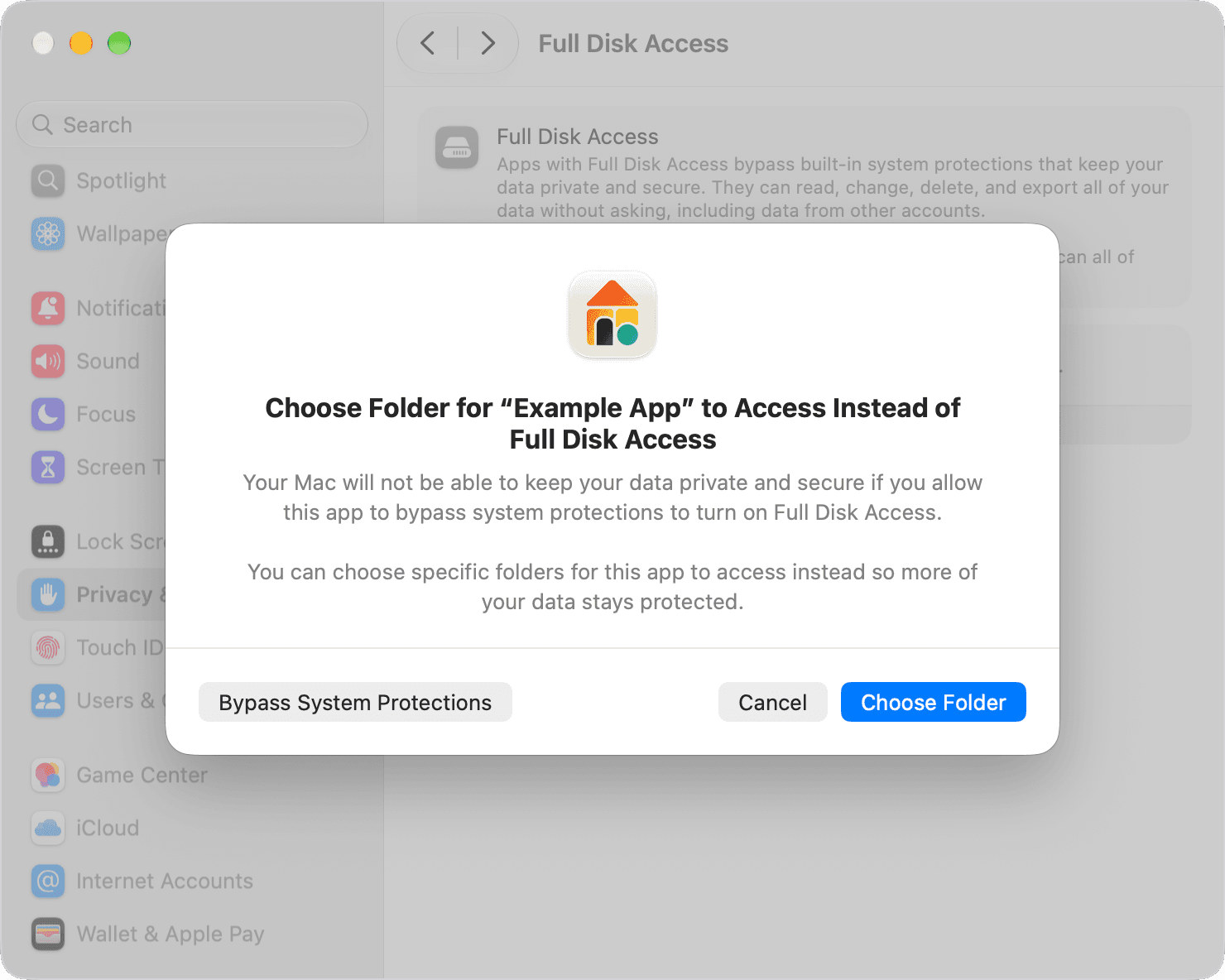
Apple's support article, published November 16, opens: "Starting in macOS 27.3, when some apps ask for Full Disk Access or System & App Protection Override, you have the option to choose only specific protected folders or apps for the app to access." In its screenshot, the picture above, the dialog is titled "Choose Folder for 'Example App' to Access Instead of Full Disk Access," Choose Folder is the blue button, and Bypass System Protections sits at the far left. To give an app the whole disk you click Bypass System Protections, then "Turn On Full Disk Access or Allow System & App Protection Override, then enter your password and click Modify Settings." Backup apps and screen readers keep a plain allow-or-not prompt, the article says.
Device Control and Data Access becomes two settings
Apple's post lists six changes. Device Control and Data Access splits into System & App Protection Override and Accessibility; there is "a single method for granting permissions by selecting the requesting app from a list"; guidance steers you toward only the apps or folders a workflow needs; there is more visibility into the data an app would get; apps can be configured "to ask every time they require access"; and there is "a transparency indicator when a requesting app is controlling another app using System & App Protection Override." For the override, the support article says, "Use the menu next to each app to choose Ask First or At Any Time." 9to5Mac's report puts it as "you could give an app access to the Mail app, but not Messages," and MacRumors' report says the indicator "will be displayed in the Mac menu bar." Apple's October 2 post had named the target: "As AI agents become increasingly capable and autonomous, the risks associated with this level of access will grow substantially."
What you already approved stays
Apple's post says "Users will see these updates when approving new app permission requests. All app permissions previously granted by users will remain in effect." Developers of backup apps, and of assistive technologies under the new Accessibility setting, "can request entitlements to deliver the same experience for new installations that they offered before macOS 27.3," and "Currently, known apps aren't affected and will keep the same experience without an entitlement. Additional entitlement details will be available soon." 9to5Mac's line is "Crucially, Apple isn't removing the ability to give an app Full Disk Access." To narrow an app that already has it, the support article says to remove it under Privacy & Security and add it again, choosing folders if the Mac prompts you.
The first week found the edges
John Gruber's Daring Fireball note of November 16 says the changes "add clarity and give users more, not less, control over their Macs." Howard Oakley's Eclectic Light test of November 18 found that an app needing several folders in ~/Library must have each added individually, and that Terminal "can't access some folders such as ~/Library/Safari at all, but can be given specific access (by user consent) to ~/Library/Photos." His verdict: "They need to be redesigned for ordinary users, not security engineers." Michael Tsai's post of November 17 adds that "there remains no API for any of this"; his November 18 update says the URL that opened the Full Disk Access pane now opens only the top-level Privacy & Security pane, and his November 20 update says macOS "won't let you select the whole Library folder or even certain subfolders of it," showing a dialog that reads "This protected folder contains too many other folders. Choose a more specific folder."
Then and now
Our November 21, 2007 report relayed Intego's warning that Leopard's new quarantine, the dialog that asked whether you really wanted to open a download, let a Mail attachment posing as an image run without it. Nineteen years on the gate faces the other way: the question is no longer whether a file may run but what a running app may read. We'll post a hands-on report after we install it, and we will take the folder every time an app lets us.
Sources
- Apple Developer News, “Updates to Device Control and Data Access, and Full Disk Access in macOS - Latest News - Apple Developer” accessed Nov 21, 2026
Dated November 16, 2026: "In macOS 27.3 beta 2 today, we're introducing increased transparency and more granular options for two of the APIs: Device Control and Data Access, and Full Disk Access. Before granting an app such extraordinary access, users should understand that it puts all of the data on their Mac at risk."; the six changes: "A split of Device Control and Data Access into two settings: (1) System & App Protection Override, and (2) Accessibility", "A single method for granting permissions by selecting the requesting app from a list", "Guidance to encourage users to grant access to just the specific apps (for System & App Protection Override) or folders (for Full Disk Access) that are required for their workflows", "Increased visibility into the wide range of data apps will receive access to or control over if full permissions are granted", "The option for users to configure apps to ask every time they require access", "A transparency indicator when a requesting app is controlling another app using System & App Protection Override"; "Users will see these updates when approving new app permission requests. All app permissions previously granted by users will remain in effect."; "Developers of apps that use Full Disk Access for disk backup, or the new Accessibility settings to provide assistive technologies, can request entitlements to deliver the same experience for new installations that they offered before macOS 27.3. Currently, known apps aren't affected and will keep the same experience without an entitlement. Additional entitlement details will be available soon." Accessed November 21, 2026.
- Apple Support, “If an app asks for Full Disk Access or System & App Protection Override on your Mac - Apple Support” accessed Nov 21, 2026
"Published Date: November 16, 2026"; the opening sentence "Starting in macOS 27.3, when some apps ask for Full Disk Access or System & App Protection Override, you have the option to choose only specific protected folders or apps for the app to access."; the allow-or-not-allow option "appears for some apps, such as backup apps that ask for Full Disk Access, and screen readers and voice control tools that ask for Accessibility."; "When your Mac prompts you, click Choose Folder or Choose Apps"; "Use the menu next to each app to choose Ask First or At Any Time."; "If you're absolutely sure that you want to give the app Full Disk Access or System & App Protection Override, click Turn On Full Disk Access or Allow System & App Protection Override, then enter your password and click Modify Settings."; under "Change or remove an app's access", System Settings, Privacy & Security, and "Limit an app with Full Disk Access or System & App Protection Override to specific protected folders or apps: Remove the app's access, then click the Add button (+) to add the app again. If your Mac prompts you, choose specific folders or apps." The picture is the page's one image, Apple's screenshot of the Full Disk Access pane with the Choose Folder dialog. Accessed November 21, 2026.
- Apple Developer News, “Releases - Apple Developer” accessed Nov 21, 2026
"macOS 27.3 beta 2 (26C5047e)", November 16, 2026; "Xcode 27.3 beta 2 (27C5035i)", November 16, 2026; the newest entries, "iOS 27.3 beta 2 v2 (24C5049f)" and "iPadOS 27.3 beta 2 v2 (24C5049f)" of November 19, carry no macOS build, so beta 2 is the current macOS 27.3 beta. Accessed November 21, 2026.
- Apple Developer News, “Updates to Full Disk Access in macOS - Latest News - Apple Developer” accessed Nov 21, 2026
Dated October 2, 2026: "As AI agents become increasingly capable and autonomous, the risks associated with this level of access will grow substantially." Accessed November 21, 2026.
- MacRumors, “macOS 27.3 Warns Against Giving AI Apps Full Mac Control” accessed Nov 21, 2026
Juli Clover, November 16, 2026, 1:08 p.m. Pacific: "The indicator will be displayed in the Mac menu bar." Accessed November 21, 2026.
- 9to5Mac, “macOS 27.3 includes new privacy controls for Full Disk Access and more” accessed Nov 21, 2026
Chance Miller, November 16, 2026, 10:12 a.m. Pacific: "Crucially, Apple isn't removing the ability to give an app Full Disk Access."; of System and App Protection Override, "you could give an app access to the Mail app, but not Messages." Accessed November 21, 2026.
- Daring Fireball, “MacOS Golden Gate 27.3b2 Includes New Privacy Controls for Full Disk Access (and More)” accessed Nov 21, 2026
John Gruber, November 16, 2026: "I actually think they add clarity and give users more, not less, control over their Macs." Accessed November 21, 2026.
- The Eclectic Light Company, “Privacy protected folders in macOS 27.3” accessed Nov 21, 2026
Howard Oakley, November 18, 2026, on "the latest beta of macOS Golden Gate 27.3": "Apps that need access to specific folders in ~/Library face an even greater challenge, as the user is expected to select and add each individually."; of Terminal, "Without Full Disk Access, it can't access some folders such as ~/Library/Safari at all, but can be given specific access (by user consent) to ~/Library/Photos."; "They need to be redesigned for ordinary users, not security engineers." Accessed November 21, 2026.
- Michael Tsai, “Full Disk Access in macOS 27.3” accessed Nov 21, 2026
November 17, 2026, with updates dated November 18 and November 20: "Crucially, there remains no API for any of this."; the November 18 update, "Apple broke the longstanding URL for opening the Full Disk Access settings.", which now opens only the top-level Privacy & Security pane; the November 20 update, "macOS won't let you select the whole Library folder or even certain subfolders of it.", with the dialog headed "Choose Specific Folder" that reads "This protected folder contains too many other folders. Choose a more specific folder." Accessed November 21, 2026.
Saw something? Send a tip or a correction
The archive ran on reader tips. What did you see, where, and do you want the credit? Something wrong on this page? Say so and it gets fixed.