August 2007 News Archive
Return to Macs Only!'s Current News Page.
Copyright 2007 by Bill Fox All rights reserved.
Last Updated: August 31, 2007
Note: Use "Find" under your browser's "Edit" or "Search" Menu to search each month's archive.
Older Archives: July | June | May | April | March | February |
[8/31] Macs Only! Reader Poll this Week--Last Day
This week we want to gauge our readers' interest in the kinds items that we post to Macs Only!. Primarily for financial reasons, Macs Only! will be undergoing a significant change in the near future and we want to ensure that our future efforts are focused on what best meets your interests.
Please click on the "News tips" link above and at least give us your top three features from the list below of our principal features. Those who want to be more helpful by ranking all of them (from 1=top) will be greatly appreciated.
- Daily news items
- Commentary on Mac-related issues
- Product reviews--hardware and software
- Troubleshooting fixes
- Speed tests--hardware and software
- Brief bleeding-edge reports on problems or not encountered while installing just-out software updates
We thank you very much for helping us shape our future. [Today is the last day of the poll. Many thanks to those of you who have taken the time to provide your opinion.] [Bill Fox]
[8/31] Brief Hands-On Report--Flip4Mac WMV Player 2.1.3.5 Beta
Telestream released a new version of Flip4Mac WMV Player v2.1.3.5 beta. Flip4Mac allows Microsoft Windows Media Player files to be played by QuickTime. It is available for download via MacUpdate.com. According to the Read Me file, the new version:
Fixed issue with failed exports in Sorenson Squeeze.
We downloaded the new version and installed it. Then, we checked several Web sites with WMV content and they worked fine. [Bill Fox]
[8/31] Software Special of the Day: DOT.iPhone 1.0 (Universal) for 50% Off--$9.99 Today Only
Are you frustrated with the 4 or 8 gig limit on your iPhone? The DOT.iPHONE Plug-in gives you the ability to stream your ENTIRE iTunes library directly to your iPhone wherever you are.
With this plug-in, a custom DOT.TUNES/iPhone interface is displayed on your iPhone. You can view all of your movies and videos, listen to all of your music, it's like having your entire iTunes library in your pocket.
The DOT.iPHONE Plug-in will help you remember why you bought your iPhone in the first place.
To Demo the DOT.iPhone service please direct your iPhone to this URL <http://music.dottunes.net:9998>.
Normally $20, DOT.iPhone 1.0 (Universal) is offered for $9.99 today only--that's 50% off as Today's MacUpdate Software Promo. [Bill Fox]
[8/30] Brief Hands-On Report--Apple released Firmware 7.2.1 for AirPort Extreme "n" Base Stations
Apple released Firmware 7.2.1 for AirPort Extreme "n" Base Stations and it is available for installation via AirPort Utility or as a stand-alone file from this Apple Web page. According to the Read Me file,
The AirPort Extreme Base Station with 802.11n* and Firmware 7.2.1 is Wi-Fi certified for 802.11n draft 2.0. This update also includes bug fixes and security updates.
The details of the security fix are:
CVE-2007-2242--Remote attackers may be able to adversely affect network performance. A design issue exists in the IPv6 protocol's handling of type 0 routing headers. Depending on network topology and capacity, the reception of specially crafted IPv6 packets may lead to a reduction in network bandwidth. This update addresses the issue by disabling the support for type 0 routing headers. This issue does not affect the Gigabit Ethernet version of AirPort Extreme Base Station with 802.11n*.
We installed the firmware update via AirPort Utility. No problems were encountered during installation nor in the performance of our AirPort Extreme "n" Base Station afterward. [Bill Fox & Dana Baggett]
[8/30] Software Special of the Day: TaskTime 4.3.7 (Universal) for 40% Off--$11.95 Today Only
TaskTime provides a straightforward method of tracking time spent on jobs you do for your clients. It can generate invoices which can be emailed, printed, and saved to disk. Features include:
- Simple, easy to use interface.
- Automatic calculation of total time spent on projects.
- Automatic calculation of total amount owing.
- Creation of clear and attractive invoices.
- Ability to save, print, and copy invoices.
- Work with any number of clients.
- Track multiple projects for each client
Normally $20, TaskTime 4.3.7 (Universal) is offered for $11.95 today only--that's 40% off as Today's MacUpdate Software Promo. [Bill Fox]
[8/29] Apple Special Event on September 5--New iPods?
Members of the media have been invited by Apple to a special event at 10 am on September 5 in San Francisco's Moscone West Conference Center.
The invitation, containing the phrase "The beat goes on.," leaves little room for doubt that Apple will announce new iPods at the event. Still, with Apple, you never really know until it happens. Stay tuned. [Bill Fox]
[8/29] Brief Hands-On Report--Apple released iPhoto '08 v7.0.2
Apple released iPhoto '08 v7.0.2 and it is available for download via Software Update or as a stand-alone file via MacUpdate. According to the Read Me file,
This update to iPhoto addresses issues associated with publishing to .Mac Web Gallery, rebuilding thumbnails, and editing books. It also addresses a number of other minor issues.
We downloaded and installed iPhoto 7.0.2 on several Macs with no problem. We opened our iPhoto library of 1,600+ travel snapshots and no conversion occurred. All photos that we tried opened and closed with no problem and the events mode worked fine as well. [Bill Fox & Dana Baggett]
[8/29] Apple Small Business Quick Tip Video--Pictures in Email
Apple's latest Small Business Quick Tip Video is available on this Apple Web page. It shows how to include images in email and how to resize them. [Dana Baggett]
[8/29] Software Special of the Day: FileChute 2.8.2 (Universal) for 40% Off--$8.95 Today Only
FileChute is a simple application that makes it very easy to send small or large files to another person across the Internet.
If you've had problems sending large files via email (which is common), FileChute is an alternative solution.
Normally $14.95, FileChute 2.8.2 (Universal) is offered for $8.95 today only--that's 40% off as Today's MacUpdate Software Promo. [Bill Fox]
[8/28] Brief Hands-On Report--RealNetworks released RealPlayer 10.1 (503)
RealNetworks released a new Build of RealPlayer 10.1 (503). The previous version released in April was Build 412. It is available for download from this MacUpdate Web page.
The changes are:
- Several security vulnerabilities fixed
- Improvements for Intel autoupdate components
We downloaded Build 503 and tried it on numerous Web sites with RealPlayer media files and encountered no difficulties. [Bill Fox & Dana Baggett]
[8/28] Software Special of the Day: FxFactory Editing Pack 1.0.7 (Universal) for 51% Off--$49 Today Only
FxFactory is a revolutionary visual effects package which powers the largest collection of plug-ins for Final Cut Pro and Motion. The Editing Pack offers 40 GPU-accelerated plug-ins based on the FxPlug architecture for the highest performance inside Final Cut Pro and Motion.
Normally $99, FxFactory Editing Pack 1.0.7 (Universal) is offered for $49 today only--that's 51% off as Today's MacUpdate Software Promo. [Bill Fox]
[8/27] Brief Hands-On Report--Parallels Desktop for Mac 3.0 Build 5120 Beta 2
Parallels released a new build of its Desktop for Mac 3.0 Beta 2 (Build 5120). Note that this build is still a beta and not a final version. The last "final" build remains as 4560. Build 5120 is available for download via MacUpdate or from this Parallels Web page.
The most important fixes and improvements include:
Primary OS support
- Leopard (only build 9a499) may become unusable after installing Parallels Desktop - fixed
Stability and resources usage
- Kernel Panics on Mac Mini when VT-x is disabled - fixed
- Memory allocation errors - fixed
- Running 3D applications may freeze iMac with ATI Radeon 2600 graphic card - fixed
- Fatal error E064.07.010 on virtual machine startup - fixed
- Memory leak in llipd - fixed
Coherence
- Transparent windows display incorrectly - fixed
- Incorrect Z-order - fixed
- Windows moving speed - improved
- Double-clicking the Windows application icon in Dock doesn't bring its window to foreground - fixed
- Issues during windows moving - fixed
- Tooltips slowness - fixed
- Cascade and Tile Windows work with artifacts and windows falls - fixed
Parallels Tools Center
- CPU usage - optimized
- Parallels Tools Center in Windows 95 can't be started due to a missing symbol - fixed
Applications sharing and SmartSelect
- Incorrect Shared Web Applications state after build upgrade - fixed
- Can't edit SmartSelect options for paused virtual machine - fixed
- Other SmartSelect improvements
Video and 3D
- OpenGL performance - improved
- Parallels Desktop window resizing issues - fixed
- Java applications don't work in VM - fixed
- Many DirectX and OpenGL fixes
Snapshots
- Check for available free disk space on Mac for snapshots reverting/deleting - added
Parallels Image Tool
- Problem with converting old virtual disk image file format to new (BSOD on prlfs.sys in Vista) - fixed
Parallels Explorer&Mounter
- Drag-and-drop issues due to some Unicode problems - fixed
Other fixes
Parallels Compressor
- Compressor doesn't execute compacting stage - fixed
That's a lot but there are still known issues with Build 5120. They are:
Stability and resources usage
- In some rare cases, fatal error E054.01.002 may occur on virtual machine startup
Coherence
- Windows desktop may show up when transparent windows are used
- Transparent windows may be displayed incorrectly
- Small artifacts in Expose may appear
- In some cases, selected applications may refuse to move to foreground
- Automatically bring to front for Windows applications works wrong
- Problems with VirtueDesktops
- Leopard Spaces are not fully supported
Parallels Tools
- Mouse scroll works wrong in Acrobat 8
- Parallels Tools Center may use 100% CPU after drag-and-drop operation
Disks and folders sharing
- Error may occur during Windows disk mounting to Finder
Snapshots
- Segmentation fault may occur while reverting to specific snapshot
Parallels Explorer&Mounter
- Some problems during drag-and-drop operations still may occur
- Incorrect disk size may be showed
We uninstalled Build 5060 and downloaded and installed Build 5120. Then we updated Parallels Tools in our Windows XP SP2 and Vista Ultimate virtual machines. No problems were encountered in the process. Build 5120 proposes a number of shared folders, a new feature, when the virtual machine is started. From our experience, we recommend unchecking all of the boxes until you know what you want to do. Moving or changing something shared on your virtual machine performs the same operation on your Mac.
We encountered no problems while installing Windows updates on either virtual machine nor during brief use: Web browsing, email and Office 2007. However, remember that Build 5120 is still a beta and there are known issues. [Bill Fox]
[8/27] Cool Mac Software--iPhoney 1.2 is Out for Developers and for Fun
Design capabilities have just gotten better for iPhone developers with the newest version of iPhoney 1.2 released by Marketcircle. iPhoney 1.2's added capabilities include the often requested "view source" and French, German and Norwegian localizations. "View source" enables iPhone web developers, actually anybody, to view the source code of any specialized, iPhone specific web page.
iPhoney is a pixel-accurate, full-featured browser that Web 2.0 developers can use to ensure their designs look great on the iPhone. iPhoney 1.2 will open any Web site that works with Safari, in a shell that simulates the iPhone Web browsing user experience.
Prospective iPhone customers may want to use iPhoney 1.2 to check out the iPhone's Web experience.
Download iPhoney 1.2 and check it out yourself--it's free. [Bill Fox]
[8/27] Software Special of the Day: Toon Boom Storyboard 1.0 (Universal) for 30% Off--$174.99 Today Only
Toon Boom Storyboard is the leading storyboard software solution for creative and professional storytellers. Storyboard’s rich toolset allows users to quickly and easily develop a shot-by-shot plan of an animated or live-action production. Storyboard is an easy to use solution for translating ideas and scripts into a visual story. Users can easily sketch a story in scenes and shots with immediate reference to a script. Storytellers can draw using vector-based drawing and text tools or import artwork to create assets for use and reuse in a project.
- Draw, sketch or import artwork into system
- Access libraries to use and reuse content
- Write notes, dialogues and actions in panels
- Add, group and organize panels in scenes
- Insert transitions between shots
- Import scripts to follow screenplay
- Create camera moves with pan, zoom and tilt
- Publish user defined storyboards to PDF
Normally $249.99, Toon Boom Storyboard 1.0 (Universal) is offered for $174.99 today only--that's 30% off as Today's MacUpdate Software Promo. [Bill Fox]
[8/24] The Pi August General Meeting is Tomorrow
The August general meeting of the Washington Apple Pi (Pi) is tomorrow, Saturday, August 25. Pi is the metro Washington DC AMUG.
Two great presenters will host the meeting about some other facets of making movies. Robert Rhodes and Grant Peacock, both Pi members, will show us how to use photos in iMovie and various details of getting the right video footage.
This looks to be an interesting and informative event! Pat Fauquet will be Master of Ceremonies.
The meeting will begin at 9:30 and will wrap up between 12 and 12:30. The address is 3020 Gallows Road, Falls Church, VA. Check out the directions on this Pi Web page. [Bill Fox]
[8/24] AssistiveWare introduced new British voice for Infovox iVox (Universal)
Acapela Group and AssistiveWare introduced the brilliant new Peter text-to-speech voice that will be available as part of Infovox iVox's British voice pack. The already available naturally sounding Graham and Lucy voices have been significantly improved as well. With these voices the Mac has never sounded so great and so British! Until the end of October the updated British voice pack is available at a 55% introductory discount.
Infovox iVox provides naturally sounding voices that work with virtually any Speech Manager compliant Mac OS X application, including Preview, TextEdit, AssistiveWare VisioVoice, ConvenienceWare GhostReader, and Adobe Acrobat. The voices also work great with the leading educational software, such as Kurzweil 3000 for Macintosh Version 3.0.4 and 4.0 and TextHelp's Read and Write Gold for Mac version 2.1.0 and later. This means that teachers can now use this best-of-breed software with the industry leading Infovox iVox voices to enhance the learning experience of their students.
Infovox iVox is a Universal Binary and can be used on PowerPC and Intel Macs and requires Mac OS X 10.3.9 or higher. The product include all voices available for a language of choice. Available languages include: American English, British English, French, Canadian French, German, Italian, Dutch, Flemish, Spanish, American Spanish, Portuguese, Brazilian Portuguese, Norwegian, Swedish and Finnish. [Bill Fox]
[8/24] Cool Mac Software--Smart Scroll X 2.7 (Universal) is Out
Smart Scroll has been developed by Marc Moini since Classic Mac OS and now for Mac OS X as Smart Scroll X. It offers smooth and easy iPhone-like scrolling:
- Super Wheel makes your scroll wheel smoother, faster and more comfortable. And it lets you reverse scrolling on the Mac to match your iPhone. Try it!
- Grab Scroll gives you a Hand tool to easily move (and "throw"!) any window's contents.
Other features include Universal Scroll Keys that let you scroll from the keyboard, FileMaker Pro and AppleWorks enhancements, and more.
New in version 2.7:
- Super Wheel and Grab Scroll support for Eudora, Netscape 9, Papyrus, RagTime, and many other Carbon applications. Thanks to Eelco Houwink, Myles Harris, and David Ianni!
- Various fixes and improvements (Camino, FileMaker Pro 8.5 & 9, Google Earth, Pages).
Smart Scroll X is shareware ($19 single user license) and runs on Mac OS X 10.3.9 or newer (universal). [Bill Fox]
[8/24] Software Special of the Day: ProStockMaster 1.3.2 (Universal) for 40% Off--$29.50 Today Only
ProStockMaster streamlines your stock photography workflow, allowing you to concentrate on what you really love to do: create your images.
ProStockMaster saves your time and frees your hands for your camera. While you are shooting, the application will upload your images to selected stock photography sites.
Normally $49, ProStockMaster 1.3.2 (Universal) is offered for $29.50 today only--that's 40% off as Today's MacUpdate Software Promo. [Bill Fox]
[8/23] Brief Hands-On Report--Apple released iMovie Update 7.0.1
Apple released iMovie Update 7.0.1 and it is available for download via Software Update or as a stand-alone updater from this Apple Web page.
According to Apple,
This update addresses issues associated with publishing to .Mac Web Gallery. It also improves overall stability and addresses a number of other minor issues.
We downloaded and installed the update via Software Update on a MacBook Pro Core 2 Duo (LED), a white iMac Core 2 Duo and an aluminum iMac Core 2 Duo. We encountered no problems doing so. [Bill Fox & Dana Baggett]
[8/23] AppleWorks Living on Borrowed Time--Get it or the v6.2.9 Updater Now
We noted last Friday that maybe one could still buy AppleWorks from Apple's education online store, although its Web page cites a 2-4 week shipping wait.
Reader Ron Evry pointed out that the education store order page for the hybrid Win/Mac version. He wrote that schools are still buying it in large numbers, at least until supplies of the education-oriented hybrid are exhausted.
Reader Stan Kline let us know that someone he knows actually bought a copy from the Apple education store online and received notice that it has shipped. He also said that Apple employees present at a local AMUG meeting indicated that copies would be sold from the education store until supplies ran out, confirming suspicions. There is no longer any support for AppleWorks.
The v6.2.9 AppleWorks updater (not the whole app) is still available for download from this Apple Web page, so if you need a copy get it soon. [Bill Fox & Dana Baggett]
[8/23] Seiko released High Capacity Label Tray for Its Smart Label Printers
 Seiko Instruments makes a really cool line of Smart Label Printers for the Mac. Now, Seiko is the first supplier to offer a high capacity label tray for its compact, desktop label printers. The new label tray allows suppliers, distributors and other business users to quickly print shipping and address labels, inventory tags, business and appointment cards and other kinds of high volume label printing.
"Seiko Instruments' new High Capacity Label Tray gives anyone who needs to print in high volume a convenient tool that will make their lives easier and their day more productive," said Dennis Cox, director of sales and marketing, Business and Home/Office Products Division, Seiko Instruments USA. "It's great for healthcare facilities, government offices, retail stores, factories and schools - and only available from Seiko."
The new Smart Label Printer High Capacity Tray is compatible with all current 400 series printers from Seiko Instruments, including the 420, 440 and 450 models. It works with Mac OS X v10.3 and above and is now available for purchase starting at $24.99 from the Seiko's Web site. [Bill Fox]
[8/23] Tonight on The Tech Night Owl LIVE--iPhone, iMovie '08, Argentinean Tech and Internet Domain Name Registration
Tonight, host Gene Steinberg, the Night Owl, once again explores the nearly two-month-old iPhone with Macworld Senior Editor Christopher Breen, who is in the final stages of preparing a book on the subject. Chris also voices his concerns about the new version of iMovie, which has had a mixed reception.
In another segment, Gene returns to "The David Biedny Zone," where his Special Correspondent holds forth on technology in Argentina, his personal Apple "war story," and his viewpoint about the major changes in iMovie. You'll also get some hints and tips about registering your Internet domain from HostICan's Denis Motova.
You can tune into the audio Web broadcast tonight from 6:00 to 8:00 PM Pacific, 9:00 to 11:00 PM Eastern.
[8/23] Software Special of the Day: Kandalu X 5.05 (Universal) for 40% Off--$14.95 Today Only
Kandalu X A new multifunctional software, this new Kandalu X version includes new functions as:
- Creation CD cover.
- Conversion DVD source to H.264/MPEG-4
- Management your's iTunes on your Home Network
- Creation Web Content from iTunes/iPod
The controls are designed to replicate those on your iPod. Functions are easy to find and use.
Normally $25, Kandalu X 5.05 (Universal) is offered for $14.95 today only--that's 40% off as Today's MacUpdate Software Promo. [Bill Fox]
[8/22] Hands On Review--QuickerTek Wireless "n" Upgrades for Mac
The wireless network in our New England office had been equipped with two Apple Airport Express Base Stations that work with Wi-Fi standards "b" and "g" since July of 2004 when we favorably reviewed them.
With the advent of Apple's faster Airport Extreme "n" Base Station which we reviewed last February (also here), our New England staff has waited impatiently for any third party solution that would enable their Macs to be retrofitted to be n-capable. Being thrifty Mainers, they have been "making do" with an early 2006 20" iMac Core Duo and a Dual 2 GHz Power Mac G5, both of which are "b/g" Wi-Fi capable, plus a vintage Titanium 500 MHz PowerBook G4 that shipped in 2001 with an original Airport "b" Wi-Fi card. All have been working flawlessly with the AirPort Express network. But, the new Airport Extreme "n" Base Station offers the prospect of a faster wireless connection to the cable internet modem installed there. Plus the new draft "n" Wi-Fi standard reaches further, as well as being faster, eliminating the need for two Base Stations.
The gear
We spotted the QuickerTek nQuicky 802.11n Wireless USB adapter on line, a one-size fits all solution that QuickerTek notes is "For all Macs with USB. Yes, all." We ordered a couple to ship "soon." But, after discussion with the helpful QuickerTek sales staff about our particular Macs, we learned of other QuickerTek Wireless N adapters that were more specific solutions for our equipment and that are also currently shipping. So, we ordered one each of three different types:
We note, incidentally, that at no time did we indicate our interest in reviewing the QuickerTek products nor did we seek a discount from the posted retail prices. Our experience, therefore, should be typical of any consumer.
While waiting for them to ship, we ordered and installed an Apple Extreme "n" Base Station. All Macs are running Mac OS X 10.4.10.
Early 2006 20" iMac Intel Core Duo Installation and Speed
 The Ncard for our Early 2006 20" iMac Intel Core Duo arrived first at a cost of $99.95 plus shipping/handling. The kit included installations tools. Although QuickerTek describes the installation difficulty as a Level 3 and "Not for the tool belt challenged," we decided to give it a try as the alternative involved shipping the iMac to QuickerTek's offices in Wichita, KS, at our expense round trip and paying an added fee for installation there. Plus the loss of the use of the iMac in the meantime was not acceptable to us. We gathered around for the anticipated iMac autopsy necessary to replace the Airport card only to discover that the tiny Torx wrench enclosed with the card was not the right size for the Torx screws on the bottom of our iMac. QuickerTek claims on its Web site that no additional tools are needed other than the ones they provide. Not so in our case. Further, while we have several sets of Torx wrenches, none happen to fit our iMac. The autopsy had to be postponed 24 hours until we obtained the right size, which turned out to be a No. 9.
Back for another try 24 hours later, we opened the iMac case very carefully following the printed QuickerTek directions. We readily found the existing Apple Airport "g" card and noted that the QuickerTek N replacement - not Apple-branded - called for attachment of two antennas. But, there was only one antenna inside the iMac. A quick call to QuickerTek support indicated that we needed an additional $50 external antenna. When we asked why it wasn't shipped with the QuickerTek Ncard in the first place, we were told that some iMacs do have two internal antennas and don't need the external QuickerTek one. Disappointed by the delay, we ordered the $50 external antenna. It shipped quickly, along with the other "n" adapters at $149 each plus shipping/handling.
Back a few days later for a third iMac autopsy, we successfully installed the Ncard and attached the internal and external antennas to it. By this time, we'd had some practice! We discovered in the process that the tiny Torx wrench provided by QuickerTek was needed for card removal and installation. We never did need/use the small Phillips screw driver. Perhaps some other iMacs use Phillips screws where ours used Torx.
One advantage of the Ncard upgrade is that it utilizes Apple's own software. We did not have to install any proprietary drivers. The iMac sees the card as an Airport "n" card. System Profiler identifies it as a Broadcom BCM43xx 1.0 (4.80.79.1).
Using Apple's Network Utility we determined that the iMac's original "b/g" Airport card link speed was 54MB. After installation and with the "n" base station set to "n-only" and 2.4 GHz, the link speed indicated 130MB. When we set the "n" base station at "n-only" and 5 GHz, the iMac link speed jumped to 270! But, we later found out that neither of the two other QuickerTek nQuicky adapters could connect to the "n" network at the 5 GHz setting.
Dual 2 GHz Power Mac G5 Installation and Speed
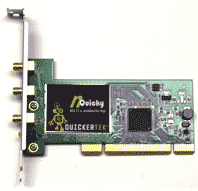 By comparison with the iMac autopsy, installation of the nQuicky PCI Upgrade card on the Dual 2 GHz Power Mac G5 was a breeze since we had a PCI slot available. Insert the card in the slot, attach the three (!) stub external antennas to it, and we were almost done. Next we turned off the Apple Airport software and installed the QuickerTek software from the provided CD and activated it. With the Power Mac G5 operating on the old "b/g" network, its link speed according to Network Utility was 54MB. With the QuickerTek upgrade card and software, the link speed according to Network Utility measured 300MB! Network Utility identifies the nQuicky PCI card as a Ralink RT2860.
Titanium PowerBook G4 Installation and Speed
 Installation of the nQuicky PCMCIA/CardBus on the Titanium PowerBook proved the simplest yet. Insert the CardBus into its PCMCIA slot = almost done! Turn off the Apple Airport software, install and activate the QuickerTek software. Finished. The vintage PowerBook G4 now indicates a link speed of 300 MB versus the former link speed of 54 MB as measured by Network Utility. Users of the Titanium claim it has new life. Network Utility identifies the nQuicky PCMCIA card as a Ralink RT2860.
In summary
The QuickerTek "n" Wi-Fi adapters were easy to install once we had the right Torx screw driver and right antenna adapter. In the end, each cost $149 plus shipping and handling and they are working as advertised. QuickerTek provides a one-year warranty on parts an labor. [Dana Baggett]
[8/22] Brief Hands-On Report--iPhone Software Version 1.0.2 Update
Apple released iPhone Software version 1.0.2 last night. You can obtain it via iTunes by connecting your iPhone to your Mac. iTunes should launch automatically if set to do so. If not, just launch iTunes and click on the iPhone icon in the left sidebar after all sync'ing has finished.
According to the Read Me file, iPhone Software 1.0.2 provides:
Bug fixs--This version of the software includes bug fixes and supersedes all previous versions.
Pretty arcane.
Anyway, to install the update we had to click the "Check for Update" button since the next automatic check was not for another 5 days. A dialog box popped up asking whether we want to download and install or just download--we chose the former. The updater first verified the existing software, then updated the iPhone's firmware and software and finally verified the updated software all while showing the silver Apple logo and progress bar on our iPhone.
If your iPhone has been hacked, you might have to perform a "Restore" before you can install the new software.
We tried all of the functions on our iPhone, well most anyway, and didn't find anything to be different after the update. [Bill Fox]
[8/22] Brief Hands-On Report--Adobe Flash Player 9 Beta Code-named Moviestar
Adobe released Flash Player 9 beta code-named Moviestar. According to Adobe, Flash Player 9 beta
"...includes H.264 standard video support – the same standard deployed in Blu-Ray and HD-DVD high definition video players – and High Efficiency AAC (HE-AAC) audio support, as well as hardware accelerated, multi-core enhanced full screen video playback. These advancements will extend Adobe’s leadership position in Web video by enabling the delivery of HD television quality and premium audio content through the ubiquitous Adobe Flash Player and pave the way to expand rich media Flash experiences on the desktop and H.264 ready consumer devices."
Of course, QuickTime has had H.264 support for some time.
Adobe Flash Player 9 beta is available for download from this Adobe Web page. You can see what version you have installed by visiting this Adobe Flash Web page.
Note that Adobe recommends that you uninstall any previous version of Flash Player before installing the new beta version. Download the uninstaller from this Adobe Web page.
We had Flash Player 9.0.47.0 installed on our Macs so we uninstalled it on our Mac mini Core Duo and 15" Mac Book Pro Core 2 Duo (LED) as recommended by Adobe. Then, we installed the beta (9.0.60.184) without any problems. And finally, we visited a number of Adobe Flash showcase sites to ensure it works well and it does.
We also installed the beta on our iMac Core Duo but without uninstalling the previous version first. It worked fine, too, but we still suggest that you follow Adobe's recommendation to use the uninstaller first. [Bill Fox & Dana Baggett]
[8/22] Apple Small Business Quick Tip of the Week Video--PowerPoint to Keynote
Apple's latest small business Quick Tip of the Week video is entitled "PowerPoint to Keynote." The video shows how one can easily import a Microsoft PowerPoint presentation into Apple's Keynote and then spice it up with great graphics and transitions. [Dana Baggett]
[8/22] Software Special of the Day: PDF Studio 4.5.2 (Universal) for 33% Off--$39.95 Today Only
PDF Studio is an easy to use yet powerful program to work with PDF documents within your workflow.
- View & Print: Open any pdf document and send it to the printer. Documents will be automatically resized to fit the paper size. PDF Studio supports all types of pdf fonts.
- PDF Interactive Forms: Fill any pdf form and save it locally. Once the form is filled, you can flatten form fields to obtain a non-editable version of the form.
- Sticky Notes: Open any pdf document and add your sticky notes or comments to the document using text and graphic markup tools. You can add free text notes, or draw shapes such as lines, circles, rectangles to work with the existing content of the pdf document.
- Audio Comment: Record or import a sound and add it to a pdf document.
- Text Selection and Markups: Highlight, cross out or underline text.
- Rubber Stamps: Mark your documents as urgent, paid, confidential. You can also create your own Signature Stamp. All stamps can be saved to be reused later.
- Headers and Footers: Add titles, page numbers to your pdf documents.
- Hyperlinks: Add hyperlinks to your pdf documents.
- Modify Pages: Append, merge or split documents. Delete, insert, replace pages in a pdf document. Or extract pages to create a new pdf document.
- Passwords and Permissions: Add passwords or change permissions on your pdf documents. You can set /remove permissions to print, to modify, to copy, to annotate and to fill form fields. PDF Studio encrypt pdf documents using the higher security level (128-bit RC4 encryption).
- Scan to PDF: Scan documents from any Twain compliant scanner into a new or existing pdf document.
- Batch functions: Stamp, Print, or Encrypt multiple documents with a single click as a batch.
- PDF To Images: Converts pages of a pdf documents to JPG images or TIFF images (optimized for scanning).
- Import/Export: Import and Export comments and form data in FDF or XFDF format.
Any platform, no third party programs required: Works on Macintosh, Linux, Windows, AIX. And because PDF Studio uses Qoppa's proprietary technology to view and modify PDF files, it doesn't require Adobe Reader or any other other software to run.
Normally $60, PDF Studio 4.5.2 (Universal) is offered for $39.95 today only--that's 33% off as Today's MacUpdate Software Promo. [Bill Fox]
[8/21] Hands-On Review--Laptop Desk Futura
Lapworks continues to innovate products for MacBook, MacBook Pro, iBook and PowerBook owners who wish to use their notebooks on their laps or desk. Lapworks' latest product is the Laptop Desk Futura.
The Futura
The Futura is similar to the Laptop Desk 2.0 that we previously favorably reviewed in that it sits on your lap when unfolded, sits on your desk when folded and is made from high impact ABS plastic. But it is distinguished from the other fine products in Lapworks line by being thinner and lighter and having ventilation slots and elevating rubber pads for better cooling. The hinge also has a new rounded design that appears stronger to us although we've never had a problem with the hinge of the Laptop Desk 2.0 in a year's use.
When unfolded, the Futura is a very nice platform for your lap. It's hinge is very strong and the surface is stable. All Apple notebooks from a 12" iBook to a 17" MacBook Pro fit on the Futura. However, because of the Futura's design, if you want to use a mouse with your 'Book while on your lap, check out the Laptop Desk 2.0 and Ultralite models instead. They provide a mousing surface while the Futura does not.
Folded, the Futura forms a desk stand for your 'Book. It has five positions for five different angles to choose from to optimize for a comfortable position. The highest position raises the back of your 'Book by about 3.75" for a much better viewing angle than if your 'Book is flat on your desk. When completely folded, the Futura is about 3/8" thick and weighs a hair over a pound so it's very transportable.
Aside from providing a stable platform for working with your 'Book on your lap or raising the 'Book's rear on your desk for better ergonomics in viewing the screen and typing, the Futura protects your lap from heat and helps cool your 'Book as well. The Futura's rubber pads raise your 'Book an 1/8" off the Futura's base to expose more of the 'Book's bottom surface to air circulation. The Futura's ventilation slots also provide a much better environment for air circulation.
Our use
We tried the Futura with our 12" PowerBook G4, 17" PowerBook G4 and 15" MacBook Pro and found it to be very stable when used as a lap stand. Since we don't use a mouse when working on one of our 'Book's on our lap, we like the smaller and lighter Futura better than the Laptop Desk 2.0 that we've used for a year.
As a desktop stand, the Futura will work in a pinch, like when traveling, or for short periods of time. However, it is less stable for typing than we prefer. In addition, the rubber pads do not grip our 'Books as well as we would like and there is no ledge to keep them from slipping a bit. Really, no portable stand can match the stability and utility of a well-made, specially designed desktop stand for 'Books. Lapworks makes them, too.
The Futura is good for travel because of it is thin and light. If you predominantly use your 'Book on your lap, the Futura is an especially good travel stand. If you predominantly use a 'Book on a desk while traveling, you might check out the ingenious Lapworks Aluminum Desktop Stand that we favorably reviewed in June.
In summary
Lapworks Laptop Desk Futura is a great on-lap platform for using any of Apple's 'Books on your lap. It's very stable and you won't feel excessive heat from your 'Book. Because of its smaller size and improved cooling design, we like it over the Laptop Desk 2.0 because we do not use a mouse while using a 'Book on our lap. The thin and light Futura is an especially good travel stand for those who predominantly use their 'Books on their lap. At $29.95, the Laptop Desk Futura from Lapworks is a very good buy. [Bill Fox]
[8/21] [Updated] iWeb '08 Personal Domain Name Follow Up--Web Forwarding
Yesterday, we posted an article on how to make it easy to set up a personal domain name like MyBog.com using an alias for your .Mac-hosted Web site produced by iWeb '08. Several readers (Ryoichi Morita was first) pointed out that there are registrars, such as EasyDNS.com, that provide a service called "Web forwarding."
Web forwarding is similar to creating an alias in that people type in your personal domain name like MyBlog.com and are sent (forwarded) to your .Mac Web site like web.mac.com/YourDotMacID. The difference is that with plain Web forwarding, once people are at your .Mac Web site they no longer see MyBlog.com in their web browser but instead see the real URL, i.e. web.mac.com/YourDotMacID. With an alias, they always see MyBlog.com.
There is an additional service with web forwarding called "masking" that accomplishes the same thing as an alias. Most registrars charge for web forwarding, but not for the additional masking, while setting up an alias is free. This may be a minor difference to you and, if so, then Web forwarding is easy to set up and can be done with .Mac Web sites created with earlier versions of iWeb. [Update: Added "masking" service pointed out by reader Scott Newman.] [Bill Fox]
[8/21] iWatermark 3.0.11 is Out
iWatermark is one of the leading watermarking packages for Mac OS X. It combines ease of use with speed to secure graphics and photos. Beginner and professional photographers can use iWatermark to protect their work.
Version 3.0.11 has the following changes:
- [Mod] Auto Saves the watermark changes.
- [Mod] Created a workaround for incorrect meta data (Nikon DX2 & Photoshop CS Mac)
- [Mod] updated the help system to reflect changes in the program
- [Bug] Fixed a bug when it was accidentally corrupting non-JPEGs when saving
- [Bug] Fixed a bug with converting dates
- [Bug] Fixed a problem that may occur when unable to create backup location.
- [Bug] Fixed a problem when overwriting files from the Watermark Editor.
- [fr] Ability to draw the filename without the file extension.
- [fr] Insert only the year from EXIF
- [fr] Set Correct Orientation for Thumbnails
If you own a digital camera and you email or put your images on the web then anyone can take and use them for whatever they want. iWatermark gives you the protection and recognition for your digital photos and artwork. Like the master painters, you can now sign your art work with iWatermark. iWatermark is easy to use on 1 or 1000 images at a time. Add your signature, url, email address or logo to all your photos.
You can download iWatermark from Script Software and try it out for free. [Bill Fox]
[8/21] Software Special of the Day: PageSender 4.0.3 (Universal) for 38% Off--$24.95 Today Only
PageSender presents a fully-functional email or fax envelope when you print - just fill in the envelope, click "Print", and your document is on its way. Send and receive documents using your fax modem or send via any of the popular fax-by-email services.
Developed by Smile Software, Page Sender takes the hassle out of sending documents. Page Sender emails printouts as Portable Document Files (PDF), viewable with Adobe Acrobat Reader on Windows, Mac OS, and Linux. Email your documents in a format anyone can read using your favorite email client.
Normally $39.95, PageSender 4.0.3 (Universal) is offered for $24.95 today only--that's 38% off as Today's MacUpdate Software Promo. [Bill Fox]
[8/20] iWeb '08--Using a Personal Domain Name can be Easy
One of the best new features of iWeb '08 is the ability to use a personal domain name for a .Mac-hosted Web site produced by iWeb. It seems simple to do but we found out that it's not as simple as it could and should be.
iWeb '08 is, of course, the iLife '08 application that allows you to easily produce simple and very attractive Web pages. If one also has a .Mac account, then iWeb can very easily publish the pages on the Web by clicking a button to create a Web site hosted by .Mac for the world to see.
However, the URL for the Web site in previous versions of iWeb has been limited to the lengthy:
http://web.mac.com/YourDotmacID/
Wouldn't it be cool if you could be creative and choose the Domain Name for your .Mac Web site instead of using web.mac.com with the necessary addition of your .Mac ID? Something like www.MyBlog.com which would look like:
http://www.myblog.com
iWeb '08 allows you to do this. All three steps are easy but the third can be a bit problematic.
The first step is to choose and register a domain name with a so-called registrar. In the beginning of the Web, the only U.S. registrar was Network Solutions and they charge $34.99 for a one-year registration of a .com domain name. Now there are many registrars with some charging less that $10 per year and many other domain names that don't end in .com for less than $5 so you have a lot of choices.
All of our domain names, including macsonly.com, were originally registered by Network Solutions and still are. Some of the domain names have never be used, one being wwfox.com so we decided to use it to test iWeb '08's new personal domain name feature.
The second step is to tell .Mac via iWeb '08 that you will be using a personal domain name for your .Mac-hosted Web site and what that name is.
1. Launch iWeb '08
2. Under the "File" menu select "Setup Personal Domain"
3. Safari opens and you have to login to your .Mac account
4. Click the "Personal Domain" button in the buttons on the right
5. Add the Personal Domain Name and click "Continue"
Step three is the only potentially difficult step, i.e. creating a so-called alias for your registered domain name so that when someone enters www.myblog.com in their Web browser they go to your .Mac Web site which is really web.mac.com/YourDotMacID. We wrote "potentially" difficult because the best way to do this is to not do it yourself. Call your registrar and ask them to do it for you. And don't use Apple's words but simply ask:
"I want it set up so that when someone types www.myblog.com into their Web browser, it actually goes to web.mac.com."
The problem that we initially found is that the tech's at Network Solutions did not know what we were talking about and did it wrong. We even read slowly the exact words Apple uses in the screen after sub-step 5 above. After unsuccessfully trying ourselves with the online Account Manager and calling Network Solutions again, the tech we reached said that an internal bulletin about iWeb and .Mac had been circulated, she knew exactly what I was talking about and she did it right. Two hours later, our .Mac Web site popped up when we typed www.wwfox.com in Safari. Note that it must include the "www."
Apple gives very arcane and general instructions on how to do this in the window appearing after sub-step 5 of step two above. But it is really not completely Apple's fault if you have problems calling your registrar or doing it yourself. First, it seems that every registrar has different jargon on their Web site form (CNAME record) for creating the alias. This stuff is really for the knowledgeable and not for average Mom, Pop, Kid and Grandparent trying to setup a simple Web site. Second (and what tripped us up trying to do it ourselves), the registrar enters their own IP addresses (so-called "A" records) for "www", "@" and "*" when you first register your own domain name. They do this basically to advertise their company at your "expense" until you actually set up a Web site that uses your domain name. So, first you have to delete these IP addresses from the "A" records or you can't alias "www" as "web.mac.com" in the "CNAME" records.
Our .Mac Web site (www.wwfox.com) explains, with images, how to make web.mac.com an alias of your own domain name using Network Solutions' online Account Manager. It is actually quite simple when you know what you are doing. But we recommend that you do yourself a favor and ask your registrar to do it for you. [Bill Fox]
[8/20] Four Top EA Games for Mac finally Shipping--Harry Potter, Need for Speed, Battlefield 2142 and C&C 3
Electronic Arts (EA) co-founder Bing Gordon announced at Apple's Worldwide Developers Conference in June that EA would ship four of its top tier games for the Mac in July: Harry Potter and the Order of the Phoenix, Need for Speed Carbon, Battlefield 2142 and Command & Conquer 3 Tiberium Wars. The games are a month late but a press release from EA states that the Apple Retail Stores will have two on Tuesday, August 21, (Harry Potter and Need for Speed) and two more on Tuesday, August 28, (Battlefield 2142 and C&C 3). They may be ordered from the online Apple Store now (3-5 days or 7-10 days to ship respectively).
Macs Only! was the first to note that the EA games for the Mac will run on TransGaming's Cider interpreter rather than being completely re-written for the Mac.
Two more EA games announced for summer delivery for the Mac, Madden NFL 08 and Tiger Woods PGA Tour 08, are still under development. EA is now expecting to deliver them in the September/October timeframe. [Bill Fox]
[8/20] Maine High School Teacher Training on MacBooks in Full Swing
Macs Only! broke the story in July, at least among Mac news Web sites, that Apple had won another large notebook contract with the State of Maine this year. This time the Maine Learning Technology Initiative project was for teachers and administrators at all of the state's high schools and career and technical education centers and for MacBooks rather than iBooks. While the Maine Department of Education had budgeted for Dell laptops, Apple got the contract for MacBooks instead.
The full delivery of Macbooks for all high school teachers and administrators will be next month according to The Times Record, but due to the need to be up to speed when school starts, administrators and teachers are going to "summer school" to learn how to best use the MacBooks, software and wireless networks.
Featured are three-way video conferencing and nine-way audio conferencing using the built-in iSight cameras along with the usual burning of optical disks and movie-making using iMovie. The teachers and administrators are also receiving an education in computer sociology involving the changing world that students face, including such facts as that 70 percent of 4-year-olds in the U.S. have in some way used a computer, 12 percent of U.S. couples met on line and the population of visitors of MySpace.com is the size of the world's eighth largest country.
That's the latest from the most Mac-centric state in the Union. [Dana Baggett & Bill Fox]
[8/20] 50 Percent more Range from AirPort Extreme "n" Base Station
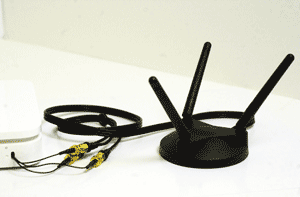 QuickerTek has developed an upgrade for the Apple AirPort Extreme 802.11n Base Station that offers even better wireless performance, up to 50 percent greater range.
The QuickerTek N Antenna Array brings the antenna outside the Base Station case, which enables better signal gathering capabilities. The "array" is a set of matched antennas to extend the 802.11n specification requiring multi-input, multi-output (MIMO) to deliver the high speed "n" wireless networking experience.
Using the included 4-foot coax cable, customers can position the AirPort Extreme N Base Station for best wireless performance in their own office or home. Often placing the Base Station up and out of the way of common office clutter at desktop level, provides the highest possible performance.
Once an AirPort Extreme Base Station is upgraded, it retains backward compatibility with previous wireless standards. It works with all IEEE 802.11 b/g/n networks and performs to it's full speed (near 300 mbps) potential with 802.11n rated hardware.
The new QuickerTek N Antenna Array Upgrade can be purchased three different ways: a customer-installed upgrade is available for $129.95 USD; QuickerTek can install it on the customer's Base Station for $179.95 USD and finally an already-upgraded Base Station is available for $349.95 USD for plug-and-play use. [Bill Fox]
[8/20] Software Special of the Day: ZigVersion 1.2b3 (Universal) for 40% Off--$59.00 Today Only
ZigVersion is an easy to use Subversion client. Its features include:
- Review and Check In your changes in a single step.
- Easily browse repository and working copies in a single view.
- Does not require the command line subversion client.
- Quick access to the history of a file.
- Quick access to frequently used subversion commands.
- Instant notification of changes to a files contents or subversion status.
- Quick access to recently used repositories.
- Browse multiple repositories at once.
Normally $99, ZigVersion 1.2b3 (Universal) is offered for $59 today only--that's 40% off as Today's MacUpdate Software Promo. [Bill Fox]
[8/17] Brief Hands-On Report--Apple released iWeb 2.0.1, Part of iLife '08
iWeb 2.0.1 is available via Software Update if one has iLife '08 installed. As of publication time, it was not (yet?) available for download as a stand-alone updater from Apple's support downloads page.
According to the Read Me file,
This update addresses issues with upgrading and publishing iWeb 1.x websites.
We updated iWeb 2.0 via Software Update with no problems. In brief use, we encountered no issues. [Bill Fox]
[8/17] AppleWorks is Dead but Available on Apple's Education Store--Maybe
A number of Web sites have already proclaimed the death of AppleWorks (formerly ClarisWorks), Apple's nice and easy-to-use business suite (word processing, spreadsheet, database, drawing, painting and presentation). Unfortunately, following the release of iWork, AppleWorks was never updated. While it never made it to a Universal Application, AppleWorks still works fine under Rosetta on our MacBook Pro Core 2 Duo (LED). Now AppleWorks is, indeed, no longer available from Apple's regular retail online store.
However, if one logs into the Apple online Education Store and searches on "AppleWorks," then version 6.2.9 for Mac/Windows pops up for $39 with a 2-4 week shipping date. If one uses the "Software" link on the left sidebar, it's not listed--only if one uses the search box can AppleWorks be found.
Could it be that a supply of AppleWorks is still available to those in the know in education or is it simply a forgotten page that wasn't removed? [Dana Baggett]
[8/17] Cool Mac Software--Mactracker X 4.3.1 is Out
Mactracker X 4.3.1 is available as an update from within the application or as a download from MacUpdate. According to the release notes, Version 4.3.1:
- Adds iMac (24-inch Mid 2007) and iMac (20-inch Mid 2007)
- Adds Mac mini (Mid 2007)
- Adds optical drive interface information for iMac models
- Separates graphics card connection from Graphics Card entry for models with integrated graphics cards
- Fixes an issue where duplicate entries were created under the warranty coverage categories in "My Mac models"
- Fixes an issue where "View Options" settings would not be retained for eMac and iMac categories
- Other minor changes and additions
We downloaded v4.3.1 via the update function and from MacUpdate. Both worked fine.
No true macophile should be without this comprehensive electronic Apple history "book." Mactracker is donationware. [Dana Baggett & Bill Fox]
[8/17] Software Special of the Day: MacDust 1.5 (Universal) for 58% Off--$2.50 Today Only
MacDust is a small and lightweight application designed to clean up your computer. MacDust performs many tasks that could easily take you another five seconds if you weren't using MacDust. The application also removes hard to get at files, and even files you forget about. The Caches folder can get rather large, so using MacDust at least once a week can save you hundreds of megabytes.
Normally $5.95, MacDust 1.5 (Universal) is offered for $2.50 today only--that's 58% off as Today's MacUpdate Software Promo. [Bill Fox]
[8/16] Brief Hands-On Report--Nanosaur II v2.0.3 (Universal) Update
Pangea Software released Nanosaur II v2.0.3 Update and it is available for download via MacUpdate.com. According the the Revision History,
v2.0.3 Fixed a jitter issue with certain newer video cards, plus some performance increases on certain video cards.
We downloaded and installed the update. Then, we played a number of Nanosaur II games and it runs very well on our 2.4 GHz 15" MacBook Pro Core 2 Duo (LED) with Nvidia GeForce 8600M GT graphics. No new issues were encountered.
The original Nanosaur (Classic Mac OS) and Nanosaur II (Universal) are two of our all-time favorite Mac games. [Bill Fox]
[8/16] Intel to release New Round of Quad-core CPUs in November--Are the Penryns coming to the Mac
Intel's newest multi-core CPUs based on a smaller 45-nanometer process code-named Penryn are due to ship in November according to a CNet article (here) based on an errant price sheet posted to Intel's Web site. The Penryn's are quad-core CPUs with 12MB of L2 cache memory and will first be released as server CPUs. Apple's Mac Pro is currently using Intel quad-core "Woodcrest" Xeon CPUs, single (5100) or dual (5300), based on the larger 65-nanometer process with 8MB of L2 cache memory and at clock speeds up to 3GHz.
A smaller process allows higher clock speeds (GHz) for the same electrical energy and heat or less energy and heat for the same clock speed. While the first chips will be for servers, as used in the Mac Pro, Penryns for notebooks will follow shortly thereafter.
It is unknown if Apple will take advantage of the newer CPUs but we hope so. [Bill Fox]
[8/16] Cool Mac Software--Billings 2.5.1 is Out
The key feature of Billings 2 is its terrific invoices. Billings 2.5.1 adds two new features:
- Added feature so that any running timers will be paused when another timer is started. One timer policy
- You can now put Group Bys, Tables and Text Areas directly into print layouts and report Bodies now. You no longer need to put a Strip first. When you use this new technique, the element will stretch to match the Body's width automatically
There are also many fixes listed on this Billings 2 Web page.
We "discovered" Billings 2 by Marketcircle at Macworld 2007 and featured it in our Expo show floor finds. We noted at the time that "If you bill hourly by project, you can't go wrong with this application in our opinion." [Bill Fox]
[8/16] Microsoft updated Virtual PC 6 for Mac to v6.1.2 and Virtual PC 7 for Mac to v7.0.3--Security Fix
Microsoft updated Virtual PC 6 to v6.1.2 and Virtual PC 7 to v7.0.3. The updaters are available for download as stand-alone files from this Microsoft Web page.
According to Microsoft, the issue fixed is the same for both versions of Virtual PC
This update fixes a vulnerability that an attacker can use to overwrite the contents of your computer's memory with malicious code.
We no longer use Virtual PC to run Windows applications but use Parallels Desktop for Mac or Apple Boot Camp instead. [Bill Fox]
[8/16] Apple Pro Tip of the Week--Keep Images as RGB Files
This week's Apple Pro Tip is to keep all of your images as RGB files, with a backup, for as long as possible to preserve the flexibility to use them in multiple situations. Only convert RGB files when they are output from an application as a specific product that requires a certain file type. For example, Adobe InDesign and QuarkXPress do conversions within the applications with Indesign being comparable to Photoshop. More... [Dana Baggett]
[8/16] Tonight on The Tech Night Owl LIVE--Apple's Latest Macs, Mac Speed and Online Blogging
Tonight, host Gene Steinberg as the Night Owl explores the good, bad and ugly aspects of Apple's recent Mac-related announcements with Macworld Senior Editor Rob Griffiths, and author and commentator Kirk McElhearn.
You'll also hear the latest benchmark results of the latest Apple hardware from Rob-ART Morgan, of BareFeats. In addition, HostICan's Denis Motova will be on hand to give you a brief introduction to online blogging.
You can tune into the Web audio broadcast tonight from 6:00 to 8:00 PM Pacific, 9:00 to 11:00 PM Eastern.
[8/16] Software Special of the Day: Keyboard Maestro 2.1 (Universal) for 50% Off--$9.95 Today Only
Keyboard Maestro is your hot key solution that allows you to perform a multitude of tasks simply by pressing a keystroke! Keyboard Maestro also incorporates the wildly popular MacOS Classic utility Program Switcher, which allows you to launch, switch, and quit applications with a simple keystroke. Current hot keys include:
- Switch to last application
- Open files
- Launch URL
- Many, many more to come in final release
- Public API for 3rd Party hot keys in final release
Normally $20.00, Keyboard Maestro 2.1 (Universal) is offered for $9.95 today only--that's 50% off as Today's MacUpdate Software Promo. [Bill Fox]
[8/15] Brief Hands-On Report--Microsoft Office 2004 Update 11.3.7
Microsoft released Update 11.3.7 for Office 2004 for Mac. It is available via Microsoft AutoUpdate or as a stand-alone file download from this Microsoft Web page. According to Microsoft,
Version 11.3.7 fixes a vulnerability that an attacker can use to overwrite the contents of your computer's memory with malicious code.
The details are on this Microsoft Web page.
We downloaded and installed the update via Microsoft AutoUpdate without any problems. In brief use of all Office 2004 apps, except Entourage, we encountered no difficulties. [Bill Fox]
[8/15] Brief Hands-On Report--Flip4Mac WMV Player 2.1.3.3
Telestream released Flip4Mac WMV Player 2.1.3.3 beta and it is available for download via MacUpdate.com Flip4Mac is necessary to play Windows Media Video (WMV) files with QuickTime.
According to Telestream, version 2.1.3.3,
Fixed issue with failed exports after installing QuickTime 7.2
We downloaded and installed the new version with no problems. We tried several WMV streams and encountered no issues. [Bill Fox]
[8/15] Software Special of the Day: Path Analyzer Pro 2.6 (Universal) for 63% Off--$14.95 Today Only
Path Analyzer Pro integrates advanced route tracing software with performance measurements, DNS, whois, and specialized network resolution to help investigate network issues.
It has several advanced graphical features including beautiful mapping and charting of locations and performance metrics. By incorporating all of these powerful features into one simple graphical interface, Path Analyzer Pro is a must-have tool for any network, systems, or security professional.
Normally $39.95, Path Analyzer Pro 2.6 (Universal) is offered for $14.95 today only--that's 63% off as Today's MacUpdate Software Promo. [Bill Fox]
[8/14] Brief Hands-On Report--AirPort Base Station Update 2007-002
Apple released AirPort Base Station Update 2007-002 and it is available for download within the AirPort Utility application or via Software Update or as a stand-alone file from this Apple Web page.
According to Apple's Read Me file,
The AirPort Base Station Update 2007-002 includes general fixes and compatibility updates for the following applications:
- AirPort Utility
- AirPort Disk Utility
- AirPort Base Station Agent
AirPort Utility v5.2.1 for Mac OS X 10.4.x or later software supports the AirPort Extreme Base Station with 802.11n, AirPort Extreme Base Station and AirPort Express Base Station.
We downloaded and installed it with no problems on an iMac Core Duo and a MacBook Pro Core 2 Duo (LED) with previous version 5.1 installed. After the update and a restart, AirPort Utility showed v5.2.1. [Dana Baggett & Bill Fox]
[8/14] What a Deal! K-12 500-Seat Site License of iLife '08 or iWork '08 for just $249 Each
Tim Holt's blog points out a deal from Apple that's truly incredible. Apple is offering iLife '08 or iWork '08 500-seat licenses to K-12 education for just $249 for each suite (or $498 for both for the math challenged). The licenses also allow 50 additional licenses at no cost for teachers for class preparation. The site licenses have been offered since August 7th.
Check it out on this Apple Education Web page. [Bill Fox]
[8/14] Apple Pro Tip of the Week--Drag and Drop Import from Title Bar
When you have a document open in an application, it shows up as a mini icon on the top bar of its window, i.e. the title bar. You can drag and drop the icon anywhere to make a copy or on a compatible application to open the document in that application. Pretty cool, eh? Check out more details on this Apple Web page.
[8/14] Software Special of the Day: Tangerine! 1.2.2b (Universal) for 40% Off--$14.95 Today Only
Tangerine! lets you easily create playlists of upbeat music, or playlists for relaxing. It works by analyzing the BPM and the beat intensity of your music. Spend your time listening to music, not making playlists.
Normally $24.95, Tangerine! 1.2.2b (Universal) is offered for $14.95 today only--that's 40% off as Today's MacUpdate Software Promo. [Bill Fox]
[8/13] Hands-On Review--iSkin Revo Case for the iPhone
Intro
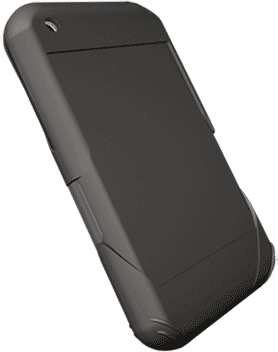
If you carry your iPhone in a pocket or purse and want a case, check out the revo from iSkin because of its usability, protection and style. Our review unit is black (iSkin calls it Nighthawk) but the revo also comes with a variety of other color accent choices: light blue (Rah--shown), medium blue (Blade), hot pink (Zahra), red (Diablo) and yellow (Mohave).
iSkin claims that the revo provides "Premium Protection" for your iPhone and, indeed, it does. The screen is covered with an adhering protective shield that reduces glare and adds privacy preventing viewing the screen from and angle. The case itself is flexible silicone with an anti-microbial agent built in to reduce harmful bacterial growths. The case is thin generally but thicker at the corners and sides to provide some shock protection. There are covers for the headphone port and data port and thicker areas over the switches to assist in using them with the case on. Finally, there is a clear visor that clips over the iPhone's front screen in protection mode and then clips over the back to use the phone.
 Our Use
The protective anti-glare film was easy to apply to our iPhone's screen. It doesn't use an adhesive so it was easy to pull up and re-apply to ensure that we did not capture any bubbles beneath it. It was easy to rub a few tiny bubbles to the edge and out to complete the application.
Our iPhone slipped easily into the revo case and the fit is very, very good. The thicker areas fit perfectly over the switches and the headphone, camera lens, ringer, microphone, data and speaker ports aligned perfectly. The data port is covered by a plug and the headphone port by a flap. There's no cover for the camera lens, ringer switch, microphone and speaker ports.
The silicone case feels like a textile material rather than the usual sticky silicone rubber sensation. We think you will like it a lot as we do.
Finally, the clear visor clipped over the front or back easily.
We had no problems using three of the iPhone switches: on/off, volume  and home through the case. In fact, all were actually easier to use with the case on. The headphone flap worked fine. Our only difficulty was with the ringer switch, needing an adventurous fingernail to flip it between ring and silent modes. The data port plug is snug but it will be easy for some to misplace it since it is an separate part, i.e. not on a flap. The visor does not cling as tightly to the front or back as we would like but it is probably okay.
Our iPhone's touchscreen seemed to be not affected by the protective anti-glare shield. We tried every function, including typing, and each one worked well. In fact, there may be a very slight desensitization caused by the shield that allowed the touchscreen to work even better, in our opinion.
In Summary
If you carry your iPhone in your pocket or purse instead of on a clip at your waist, you will not be disappointed by the iSkin revo. The $39.99 revo is tops in usability, protection and style. It is probably the best protective case of its kind, certainly the best we have seen. [Bill Fox]
[8/13] Glance increased Session Size from 15 to 100 Guests
Glance is a cool one-button-simple desktop sharing service and today its session size was increased to 100 guests, with no change in price. Now any small- or medium-sized business can effortlessly host large-scale online training sessions and webinar events from any Mac or even a PC. Guests connect instantly using their favorite web browser. The session host can easily show slide presentations, websites, software applications – virtually anything the host sees, guests also see.
Previously, Glance subscribers were limited to 15 guests at a time. Now they can use Glance on a much broader scale to support large training classes and webinars. Glance provides an instinctive and effortless way to meet online with just a click. Glance's recent introduction of its StreamShaping technology makes hosting large sessions possible by ensuring that every guest views the host's screen at the fastest speed his or her network allows. Guests on fast connections get the fastest possible updates. Those on slower networks see updates as fast as their connections allow. Everyone enjoys the best web meeting experience possible and no one falls behind. Glance is available for users to sign up for a free trial.
Macs Only! featured Glance during our 2007 Macworld Expo Show Floor Tour. [Bill Fox]
[8/13] Apple posted Quick Tip of the Week Series--Small Business Video Tips
Apple began posting a Quick Tip of the Week series. The tips are for small businesses in the form of short videos. The eleven already posted are:
- No More Squinting
- Keynote at a Distance
- Snapshots of Your Screen
- Applications All Together
- That Perfect Word
- Setting Favorite Fonts
- Customizing Finder
- View Multiple Inspectors
- Easily Create PDF's
- Presentations Uninterrupted
- Keyboard Shortcuts
[Dana Baggett]
[8/13] Software Special of the Day: Mental Case 1.0.1 (Universal) for 48% Off--$14.95 Today Only
Mental Case is many things - a drop box for your thoughts; RSS for your head; an index of your knowledge - but ultimately, it's just a fun way to remember stuff. And 'stuff' can be anything, from your new mobile phone number to the Presidents of the United States - Mental Case can even help you remember to stick to a diet.
All you do is gather tidbits of information in 'mental notes'. Enter some text, drop in an image, take a screen shot, or even snap a picture with your iSight. Mental Case schedules the note to reappear at future dates. When you have a few minutes to spare, you watch the scheduled notes in a slide show. Mental Case makes learning a pleasure.
Normally $29.00, Mental Case 1.0.1 (Universal) is offered for $14.95 today only--that's 48% off as Today's MacUpdate Software Promo. [Bill Fox]
[8/11] Apple's iMac Support Page updated for New Aluminum iMacs
Apple's iMac Support Page has been updated for the new Aluminum iMacs. It has sections on getting started, troubleshooting, links to discussion topics, software updates and repair and support. [Dana Baggett]
[8/11] Apple released Keyboard Software Update 1.1 for New Aluminum Keyboards
Apple released Keyboard Software Update 1.1 for the new aluminum keyboards, wired and wireless. It is available via Software Update or as a stand-alone file from this Apple Web page.
According to the Read Me file,
Install this software to use your aluminum Apple Keyboard and take advantage of the special features.
Our new CTO 2.8GHz 24" aluminum iMac is due August 20. Look for our review shortly thereafter. [Bill Fox]
[8/11] Freeverse released v1.5 of Heroes of Might and Magic V for Mac
Heroes of Might and Magic V for the Macintosh, under exclusive worldwide license from Ubisoft has been updated to version 1.5. Originally developed by Nival Interactive, Heroes of Might and Magic V brings the popular and long running strategy franchise into a new era with cutting-edge technology and a breathtaking, fully 3D animated world.
The game features a deep, scalable turn-based battle system for challenging tactical combat as well as the option of a brand new Active Battle System for faster play. Players can choose from more than 200 skills, 170 creature abilities and 40 spells to build up heroes and armies. This is a new, darker, heroic fantasy universe that's more mature with six unique factions and more than 80 different creatures.
The engaging storyline features special objectives, side quests and exciting plot twists for the finest tactics, management and role-playing adventure ever brewed.
Changes in this update include:
- Profile corruption fixed
- Save game corruption fixed
- Random crashing fixed
- Memory leak fixed
- Autosave function improved
- Wider range of display resolutions supported
- OS X 10.4.9 or later is now required (originally required OS X 10.4.8)
[Bill Fox]
[8/11] Software Special of the Day: Mahjong Solitarus 1.6 (Universal) for 41% Off--$9.99 Today Only
Most Mahjong solitaire players suffer from the same problem: once they've completed all levels, they run out of fresh layouts to play.
Now, with Mahjong Solitarus, your experience is only limited by your imagination, and the imagination of other players! Mahjong Solitarus features 5 exquisite tile sets enhanced by a fully working layout editor that allows creative players to share custom layouts over the Internet. The possibilities are virtually endless, and you'll probably never run out of new levels to play.
Try Mahjong Solitarus now for free. Then, register your copy to get immediate access to all of the built-in 20 game levels and to enable the layout editor.
Normally $17.00, Mahjong Solitarus 1.6 (Universal) is offered for $9.99 today only--that's 41% off as Today's MacUpdate Software Promo. [Bill Fox]
[8/10] Brief Hands-On Report--Apple released MacBook Pro Software Update 1.1
Apple released MacBook Pro Software Update 1.1 and it is available via Software Update or as a stand-alone file from this Apple Web page. The v1.1 update is for the latest MacBook Pros with 2.2/2.4GHz "Santa Rosa" Intel CPUs and Nvidia graphics.
According to the Read Me file,
This update provides important bug fixes and improves stability with Motion 2 and Motion 3. It is recommended for all 2.2/2.4GHz MacBook Pro models.
We downloaded and installed the update on our 15" 2.4GHz MacBook Pro Core 2 Duo-LED via Software Update. The good news is that several of the Nvidia graphics drivers were updated from version 1.5.2 to 1.5.6. The bad news is that in several initial preliminary tests, the latest MacBook Pro with GeForce 8600M GT graphics is no faster than before and still exhibited disappointing performance on our OpenGL benchmark applications when compared with the previous MacBook Pro Core 2 Duo with ATI Radeon X1600 graphics. Look for more on performance in Macs Only!'s next edition. [Bill Fox]
[8/10] 1GB/2GB RAM Modules for Apple's New Aluminum iMac Intel Core 2 Duo from TransIntl.com
Trans International has 1Gigabyte (1GB) and 2 Gigabyte (2GB) 667MHz DDR2 (PC2-5300) SO-DIMM RAM modules for the newly-released Apple aluminum iMac Intel Core 2 Duo (2.0GHz, 2.4GHz and 2.8GHz). The iMac has two memory slots so the main memory of the system can be upgraded to 2GB, 3GB and 4GB.
TransIntl.com is currently shipping the 4GB Kit for $214.00 (2X2GB), 2GB (Single Module) for $109.00 and 1GB (Single Module) for $46.00.
More memory (RAM) increases overall performance and enables the computer to run more applications at the same time. TransIntl.com memory modules conform to Apple's stringent electrical and mechanical design guide lines. [Bill Fox]
[8/10] Software Special of the Day: Media Catalog 3.7.1 (Universal) for 48% Off--$12.95 Today Only
Media Catalog Media Catalog indexes your removable media, such as Backup CDs and DVDs so that you can quickly and easily find your files.
Don't remember where you put your 2004 financial statements? Media Catalog will tell you it's on your January 2004 Backup CD. Just double click on it to have Media Catalog ask for the CD, and open the file for you!
Normally $24.95, Media Catalog 3.7.1 (Universal) is offered for $12.95 today only--that's 48% off as Today's MacUpdate Software Promo. [Bill Fox]
[8/9] Brief Hands-On Report--Apple released Boot Camp 1.4 Public Beta
Apple released Boot Camp 1.4 Public Beta and it is available for download as a stand-alone file from this Apple Web page. According to Apple, version 1.4 public beta includes:
- Support for keyboard backlighting (MacBook Pro only)
- Apple Remote pairing
- Updated graphics drivers
- Improved Boot Camp driver installer
- Improved international keyboard support
- Localization fixes
- Updated Windows Help for Boot Camp
- Support for the latest Mac models
Boot Camp's file size has grown from 274MB to 347MB. Our problems with Boot Camp 1.3 on our 15" 2.4GHz MacBook Pro C2D-LED running Windows Vista Ultimate on a Boot Camp partition have been that (1) the new Nvidia GeForce 8600M GT graphics are not supported, (2) we haven't been able to get the iSight driver to load and work, (3) we haven't been able to get our external 30" Cinema Display to work and (4) occasionally we have to unplug and re-plug our power cable to get Vista to recognize that our MacBook Pro is plugged into the AC adapter.
We downloaded 1.4, made a CD of the new Mac Windows Drivers using the Boot Camp Assistant and installed them in Windows Vista Ultimate on the Boot Camp partition of our MacBook Pro with no problems.
We noticed immediately that there now is an Nvidia graphics control panel that fixes problem (1) and partially problem (3). There are a lot of new graphics settings to work with so we'll report on them later. Our external 30" display is recognized but it has a split screen that we couldn't eliminate immediately. The graphics scores in the Vista speed test go from 1.0 for Aero and 3D to 5.9 and 5.4 respectively, very high scores.
Vista no longer "complains" about the iSight and its driver--problem (2)--so we'll have to find a Vista application to try it out.
Problem (4) still occurs.
The Boot Camp control panel now integrates several settings, including the function keys, like the brightness controls, so that the special Apple actions of the function keys work.
We recently had to use Vista in Boot Camp in order to use proprietary software that connected us to an internet service in South Korea. Our Parallels Desktop for Mac 3 installation running Windows XP SP2 would not work due to a Parallels Wi-Fi card driver issue. Boot Camp 1.4 public beta makes Vista much less problematic with our MacBook Pro. But, of course, the experience is still no where near as pleasant as that of Mac OS X 10.4.10 on the Mac side. [Bill Fox]
[8/9] Apple released iMac Software Update 1.0 for the New Aluminum iMacs
Almost before you can even get one, Apple released iMac Software Update 1.0 for the new aluminum iMacs. It is available for download as a stand-alone file from this Apple Web page. According to Apple, regarding iMac Software Update 1.0:
This update provides important bug fixes and is recommended for 20-inch and 24-inch iMac models with 2.0, 2.4, or 2.8GHz processors.
[Bill Fox]
[8/9] Apple released Mac Pro SMC Firmware Update 1.1
Apple released Mac Pro SMC Firmware Update 1.1 and it is available for download via Software Update, we presume since we do not have a Mac Pro, and as a stand-alone file from this Apple Web page along with installation instructions that you do not want to miss.
According to Apple,
The SMC Firmware Update adjusts fan behavior in the Mac Pro.
After this update has completed successfully, your SMC Version will be:
1.7f10 (Mac Pro)
1.5f3 (Mac Pro 8-core)
[Bill Fox]
[8/9] Apple Special Event--Some Unnoted Apple Upgrades
Yesterday, we posted that the Mac mini Core 2 Duo upgrades (CPU, RAM and Drive) that were not announced by Apple at Tuesday's Special Event nor in a press release. But, thanks to Night Owl Gene Steinberg's article, we now notice that there were at least two more unnoted upgrades released by Apple at the same time.
The first is that the AirPort Extreme "n" Base Station now sports gigabit ethernet LAN ports rather than just 10/100Mb ports. This is extremely (excuse the pun) useful to a relatively small set of us, i.e. pros who copy large numbers of very large files among computers over a wired ethernet local area network. This basically may save them from having to buy a gigabit LAN switch as Gene pointed out.
The second is the $999 Mac Pro/Xserve RAID card. According to Apple,
For the ultimate in data protection and enhanced performance, add the optional Mac Pro RAID card to your system. With 256MB of RAID cache, a 72-hour cache protecting battery and hardware RAID levels 0, 1, 5 and 0+1, the Mac Pro RAID card delivers sequential read performance up to 304MB/s in RAID 0 and up to 199MB/s in RAID 5 – without the need for any external drive enclosures, power bricks, or cables.
Have you spotted any other upgrades? Let us know with the "Tips" link above. [Bill Fox]
[8/9] Apple Revised the Offerings from Three Hot Deals Retailers
Hot Deals from Developers- Hot Deals exclusive prices on software direct from the developers: Sandvox Pro from Karelia Software is an easy, elegant website creation tool for people who want to spend time developing their lives, not their website. Only $63!; Mail Factory for designing and printing envelopes, postcards and labels from BeLight Software. Only $19.95!; Speed Download 4 download manager from Yazsoft. Only $20!; Kinemac 3D realtime animation and video titling made easy for only $174!; Serene Saver 2HD video wallpaper from Amuse for only $19.95; DoorStop X Security Suite from Open Door Networks. Only $69!; Typinator 2.0 automates typing frequently used text and images from Ergonis Software. Only $12.99!; and much more.
AudioMIDI - has deals on a variety of Mac compatible hardware and software products including: GrooveLab gives you everything you need to mix music like a pro from M-Audio for only $59.42!; Pianoteq real-time piano modeling software from Modartt for only $279; MPD24/Battery 3 Bundle includes the Akai professional MPD24 velocity sensitive pad controller and Battery 3 drum sample library from Native Instruments. Only $319.63!; FX Percussion features percussion instruments that mimic nature from Vienna Symphonic Library for only $155.63!; GarageBand Tutorial DVD from ASK Video for only $30!; and much more.
Publishing Perfection - has deals on a variety of Mac compatible hardware and software products including: Eye Candy Effects Collection get Eye Candy 5 and dozens of effects from Alien Skin for only $398.95!; Genuine Fractals 5 photoshop plug-ins for image resizing from onOne for only $159.95!; Coolscan V ED 35mm film scanner from Nikon for only $589.95!; Stock Layouts Design Collection Vol. 1 from nik Software has 126 templates, 607 graphic elements, pre-designed layouts and more for only $485.95!; Epson Stylus Photo R1800 for archival printing for only $549.95!; and much more.
[Bill Fox]
[8/9] Software Special of the Day: AlienConverter 3.0 (Universal) for 47% Off--$9.99 Today Only
AlienConverter (formerly known as iFile) makes file format conversions easy and simple. You can convert single or multiple files at once into the following formats:
Microsoft Word (.doc), Rich Text Format (RTF) - (RTFD), Simple Text (.TXT), HTML Documents, (HTML Web Archives), and (XML) Documents. XHTML is supported through convenient conversions from HTML and to HTML
You can also instantly convert multiple formats into single file format. An Additional feature is the multiple and simultaneous file-folder locking-unlocking. File conversions can be done also with Files-Documents directly from-to External Drives, USB Devices, iPods, etc. This also applies to Locking-Unlocking Folders, Volumes and Files. iFILE enables you to quickly make Audio (.aiff) from most document formats mentioned above.
Normally $19.00, AlienConverter 3.0 (Universal) is offered for $9.99 today only--that's 47% off as Today's MacUpdate Software Promo. [Bill Fox]
[8/9] Tonight on The Tech Night Owl LIVE--New iMacs/Apps and Negative Fakery about Apple
Tonight, host Gene Steinberg, the Night Owl, explores Apple's new product announcements, which included an aluminum-clad iMac, upgraded consumer applications and a few new things that didn't even get a press release. You hear all about it from Macworld's Peter Cohen.
In addition, cutting-edge commentator Daniel Eran, of Roughly Drafted Magazine, comes onboard to expose all the fakery surrounding attempts to create stories that cast a negative light on Apple Inc.
You can tune into the Web audio broadcast tonight from 6:00 to 8:00 PM Pacific, 9:00 to 11:00 PM Eastern. [Bill Fox]
[8/8] [Updated] It's a New iMac, iLife '08 and iWork '08 at the Apple Special Event
 Although it doesn't look exactly like Apple's Cinema Displays as rumored, the new iMac is indeed cased in aluminum just like the Cinema Displays, MacBook Pros and Mac Pros. It's thinner than the old iMac and with a glossy screen but it retains the "chin" below the screen.
There are now only 2 sizes, 20" and 24". The 17" iMac is no more. The prices are as rumored: $1199, $1499 and $1799 with the 24" model coming in at $1799, $200 less than its predecessor.
The new iMacs use the same "Santa Rosa" Intel Core 2 Duo CPUs at 2.0 to 2.4GHz as the latest MacBook Pros. However, the 24" model has an optional 2.8 GHz Intel Core 2 Duo Extreme CPU for $250.
The graphics are ATI's latest Radeon HD models, the low-end 2400 GT with 128MB VRAM in the $1199 model and the mid-range 2600 PRO with 256MB VRAM in the $1499 20" and the 24" models. The graphics are ATI's state of the art offerings and are much faster and better than the previous offerings.
A new Apple keyboard, wired and wireless, was introduced. It, too, is aluminum with white "chicklet" keys. Though inclined, it is much lower to the desktop than the previous model and looks really cool.
The only issue that we have is that the wireless model lacks a numeric keypad so it's like a notebook keyboard.
The other details, including more base RAM (1GB), of the new iMacs are available from this Apple Web page.
We got the iMac correct but blew it on iLife '08. We should have realized that iLife would be updated since it has been tied strongly to the iMac. iPhoto is substantially improved, including the new organizing mechanism of storing and searching photos by "events". iMovie is an all-new application with "event" organization, skimming though videos and expanded format support. iWeb can post a Web page under your personal domain name obtained from registrars. GarageBand and iDVD are also improved. iLife '08 comes with the new iMac or is $79 ($99 family 5-pack) alone.
Apple also issued iWork '08 so we blew that too. Pages and Keynote are substantially improved but the big news is that a "spreadsheet for the rest of us" called Numbers was added as a third application.
Pages was introduced largely as a layout application but one can now switch between a word processing mode and a layout mode. In addition, change tracking was added which, hopefully, is compatible with tracking changes in Microsoft Word.
We use Excel a lot, so we'll have to try out Numbers which looks very easy to use. [Update: Get a trial copy of iWork '08.]
iWork '08 is still $79 ($99 family 5-pack) alone.
The $99 .Mac service was upgraded. It now includes 10x the storage split between iDisk and Mail, up to 20MB attachments, and Web hosting using your own personal domain name from a registrar. It still costs $99.95 and there is a $179.95 family 5-pack with full service for each sub-account.
A rebroadcast of the Apple Special Event can be viewed from this Web page.
The new iMac and consumer software are significantly improved. We immediately ordered a new 24" iMac with 2.8GHz Core 2 Duo Extreme CPU to replace our 20" iMac Core Duo. We'll do a review when it is received. [Bill Fox & Dana Baggett]
[8/8] The Mac mini Lives with 1.83-2.0GHz Core 2 Duo CPUs, More RAM and Bigger Drives
It's great to know that the tremendously useful Mac mini is still in the Mac lineup. Not mentioned at Apple Special Event nor in the Apple press release, the Mac minis are still $599 (1.83GHz CPU) and $799 (2.0GHz CPU) but with 1GB of RAM (2GB optional)and 80-120GB (160GB optional) 2.5" hard drives.
They still sport the Intel integrated GMA 950 graphics and 802.11b/g Wi-Fi.
Further details are available on this Apple Web page. [Bill Fox]
[8/8] Brief Hands-On Report--Apple released Front Row 1.3.1 Update
Front Row 1.3.1 is available for download via Software Update or as a stand-alone file from this Apple Web page. According to Apple,
This Front Row update provides for improved iPhoto compatibility.
We downloaded Front Row 1.3.1 and installed it on a number of Macs including: Mac mini Core Duo, 15" MacBook Pro Core 2 Duo (LED) and 24" iMac Core 2 Duo. No problems were encountered with brief use. [Bill Fox]
[8/8] Apple released Aperture 1.5.4 Update
Aperture 1.5.4 is available for download via Software Update or as a stand-alone file from this Apple Web page. According to Apple,
Aperture 1.5.4 is required for compatibility with iLife '08. This update is recommended for all Aperture users.
We don't have Aperture so we can't test the update for you. [Bill Fox]
[8/8] Apple released iPhoto 7.0.1 Update for iLife '08
iPhoto 7.0.1 updates iPhoto that ships with iLife '08. It is available for download via Software Update or as a stand-alone file from this Apple Web page. According to Apple,
This update to iPhoto addresses issues associated with publishing photos from an upgraded library to .Mac Web Gallery.
We don't have iLife '08 yet so we can't test the update for you. [Bill Fox]
[8/8] Software Special of the Day: PDFKey Pro 3.4.4 (Universal) for 50% Off--$9.99 Today Only
PDFKey Pro is a Mac OS X utility to unlock and decrypt password-protected PDF documents. It removes editing and printing passwords if these have been forgotten. PDFKey Pro can now also protect your PDF files with a password to prevent unauthorized access and/or restrict usage permissions. PDFKey Pro can also integrate in complex workflows using command-line and Automator tools (included).
Normally $19.99, PDFKey Pro 3.4.4 (Universal) is offered for $9.99 today only--that's 50% off as Today's MacUpdate Software Promo. [Bill Fox]
[8/7] Today's Special Apple Event: Focus on Mac--Our Take
Today, Apple will host select members of the press at its Cupertino campus in a Special Event to talk about the Mac. 2007 so far has been the year of the iPhone, from Steve Jobs Macworld keynote address to the iPhone's end of June debut and through all of the subsequent silly chatter about the number sold in the first 30 hours that is still reverberating in some circles.
Somewhat masked by all the iPhone hoopla is that Macs, especially notebooks, are flying off the shelves at stores and via FedEx at a record pace. More Macs were sold last quarter that ended June 30th than in any quarter in Apple's history, over 1.7 million of them. Macs are selling at a rate three times that of the PC industry and, as a result, Apple's Macs are gaining significant market share both at home and abroad!
All this is really great news. It is especially satisfying to those of us who endured years in the pit of derision created by the market success of Windows 95, a Mac OS ripoff, and the dark ages of Apple vision at the very top of the company. During that time three great ideas were irretrievably fumbled--the Newton, the PowerPC CPU and Mac OS licensing--and the Mac almost passed into oblivion.
As long-time readers know, we, more than most (possibly any), give credit to Gil Amelio for laying the right foundation blocks for recovery. If nothing more, one simply has to give him some credit for committing CEO sacrifice by bringing Steve Jobs back to Apple along with the operating system that became Mac OS X whether under the spell of the infamous Jobsian reality distortion field or not. Of course, it has been the leadership, vision and savvy of Steve Jobs that has brought Apple the winning sequence of iMac, iBook, Mac OS X, Apple Store, iPod, Intel, iPhone and the current Mac marketplace explosion. What better time to strike?
During Apple's third quarter financial conference call with analysts, CFO Peter Oppenheimer mentioned product transition costs as one of three significant reasons for the projected decrease in gross margins for the fourth quarter, the one we are currently in. The other two were increased part costs and the usual back-to-school promotional activities. Significant "product transition costs" means one thing to many of us--new and/or radically redesigned hardware products.
Well, yes, there will be the transition to Mac OS X 10.5 "Leopard" but how much can it cost to print up a bunch of DVDs after most all of the labor spent to produce the code has already been booked? So, it must mean new Macs, right? We think so. Even though it has been awhile since the last iPod refreshment, we think that will wait until the big holidays season, giving the iPhone ("...the best iPod ever made..." according to Jobs) time to get more traction. It's gotta be new Macs and Macs are the topic of today's Special Apple Event.
Okay, so which Macs? The Displays? And what about iLife, iWork and .Mac? The latter is easy since Apple sent .Mac members a fairly direct message as follows:
Due to scheduled maintenance, .Mac members might be intermittently unable to access some .Mac services from 10 AM to 12 PM PDT on 08/07/2007. We apologize for any inconvenience.
Since that is the exact time of the Special Apple Event, an update to .Mac appears to be a no brainer but what feature(s)? We don't know.
iLife and iWork haven't seen a significant update since January of 2006 so that is why we called their update at Macworld a no brainer. We were dead wrong. Our guess is that they will wait for Leopard, probably after its release and during Macworld 2008.
Back to the Macs--iMacs, Mac minis, Xserves and Mac Pros haven't been significantly updated for a long time and, as we pointed out last week, the heaviest bets are on iMacs. There are rumors like new iMac pricing that is the same as the old pricing except at the high end and a thin brushed aluminum keyboard along with reported scarcity of the current design but we are unsure of their authenticity. Still, and we agree on the iMacs. The iMacs are consumer goods and a well-received significant refresh would contribute to increased sales.
If the Mac minis are not killed off as rumor would have it, they should get upgraded. We think that recent sales trends will determine if the Mac mini survives another cycle. It just may be that with Apple TV and schools purchasing MacBooks and low end iMacs, the people with good monitors and keyboards moving relatively cheaply to a Mac desktop may not be sufficient. After all, a comparable iMac is a real bargain. But we're hoping that these cool Macs hang in there and get an upgrade--a much larger hard drive, more base memory and faster Core 2 Duo CPUs. A slightly changed case so as to incorporate a desktop 3.5" hard drive rather than a 2.5" notebook hard drive would be great.
We don't see anything for the Xserve server or Mac Pro. The latter received a new more efficient internal case design the last bump to quad and dual quad core CPUs. Perhaps some improvement in the graphics and hard drive departments might be in order to keep up with the market.
The only potential new Mac we see is a replacement for the 12" PowerBook G4 that did not make the transition to Intel. A very thin and light ultra portable Apple notebook has been rumored for some time. While we would certainly like to see Apple make one since we're holding onto our 12" PowerBook G4 with that hope, we think it would take something wildly new that would allow Apple to make money in this specialized road warrior market.
New LED backlit Cinema displays could be a lot thinner, lighter and cooler but it is hard to conceive how Apple could significantly improve its gorgeous displays in other ways unless they did something radical like curve them for better 3D visual effects.
We'll know in just a few hours. Look for our report and commentary late today. [Bill Fox & Dana Baggett]
[8/7] Apple Revised the Offerings from Seven Hot Deals Retailers
Apple Store Special Deals - has just added the following Apple Certified Refurbished products: for a limited time get Apple Certified Refurbished 2GB iPod nano for only $99!; Apple Certified Refurbished current generation 2.0GHz Intel Core 2 Duo MacBook, 1GB memory, 80GB hard drive for only $949!; Apple Certified Refurbished 17-inch MacBook Pro, 2.33GHz Intel Core 2 Duo, 2GB memory, 160GB hard drive for only $2,199!; and much more.
CDW Mac Warehouse - has deals on a variety of Mac compatible hardware and software products including: Powershot TX1 7.1-megapixel compact digital camera from Canon for only $499.99!; FWD-32LX1R/B 32-inch widescreen LCD display from Sony for only $889.99!; AccuSync LCD193WXM 19-inch widescreen LCD display from NEC for only $219.99!; PhotoFrame Pro from onOne Software for only $163.99!; DataTraveler II 512MB USB flash drive from Kingston for only $8.33!; and much more.
ClubMac - has deals on a variety of Mac compatible hardware and software products including: Age of Empires III from Destineer for only $48.99!; 500GB Titanium II external USB 2.0 hard drive from Fantom for only $99.99!; EyeTV Hybrid USB 2.0 interface for streaming TV to your Mac from Elgato for only $127.99!; iHome iH5 clock radio with built-in iPod dock from SDI Technologies for only $100!; HDRHC7 high definition camcorder from Sony for only $1,089.99!; and much more.
MacMall - has deals on a variety of Mac compatible hardware and software products including: Office 2004 Student-Teacher Edition from Microsoft for only $99.99!; Porsche Design 500GB USB 2.0 compact external hard drive from LaCie for only $117.98!; PJ588D DLP portable projector from Viewsonic for only $1,180!; iPod connection kit for home and auto from Marware for only $34.99!; Stylus Photo R260 color inkjet printer from Epson for only $89.99!; Nikon Coolpix L10 5.0-megapixel compact digital camera for only $119.95!; and much more.
MacZone - has deals on a variety of Mac compatible hardware and software products including: Acrylic case with built-in stand for iPhone from Belkin only $12.99!; Sport Armband for iPhone also from Belkin for only $12.99!; Stylus Photo R380 6-ink photo printer from Epson for only $28.98 after mail-in rebate!; 250GB d2 Big Disk Extreme II external hard drive with FireWire 400/800/USB 2.0 from LaCie for only $139.99!; and much more.
Small Dog Electronics - has deals on a variety of Mac compatible hardware and software products including Hot Deals exclusive prices on the following products: Keystation Pro 88 hammer-action USB MIDI keyboard controller from M-Audio for only $389.99!; Lil Buddy SS Cooler/iPod Speaker bag from Burton for only $44.99!; Xerox Phaser 6120N color laser printer for only $249.99!; Flip Case for 30GB and 60/80GB iPod from Burton for only $9.99!; Amplifi 2.1 speaker system for iPod from Griffin Technology for only $124.99!; and much more.
Sweetwater Sound - has deals on a variety of Mac compatible hardware and software products including: MBox 2 Mini with Pro Tools LE software from DigiDesign for only $265.97!; Fab Four virtual instrument collection of period specific guitars, basses, drums, and keyboards from East West for only $355.97!; UF80 88-key hammer-weighted wireless MIDI keyboard controller from CME for only $649.97; Tracktiion 3 Project Bundle for only $99.99!; UltraLite FireWire audio/MIDI interface w/10-inputs and 14-outputs from MOTU for only $549.97; and much more.
[Bill Fox]
[8/7] Software Special of the Day: PackRat 1.3 (Universal) for 40% Off--$14.95 Today Only
PackRat is a desktop client for 37signals Backpack web application. You can download your Backpack data and use it offline. View it, make changes, create new pages, etc. When you're online PackRat automatically sends your changes up to Backpack keeping everything in sync. - AppleScript support - Automator support.
Normally $24.95, PackRat 1.3 (Universal) is offered for $14.95 today only--that's 40% off as Today's MacUpdate Software Promo. [Bill Fox]
[8/6] Cool (and Simple) Mac Hack--Enable a Shutdown Sound in Mac OS X
Jonas Krøyer's C-H-A-O-S.com shows how to set up and play a sound of your choice during shutdown.
"For some unknown reason I got into my head that it would be really cool if my MacBook Pro would say something when shutting down. This is how I went about it…"
It's pretty cool. We'll see if we can get a sound track snippet from "The Fly" (Help me. HELP MEEeeeee!) or "Mr. Bill" (Oh, NOOOooooo!) to try.
If you want to enable a shutdown sound on your Mac running Mac OS X, check it out. [Bill Fox]
[8/6] Brief Hands-On Report--Mozilla released SeaMonkey 1.1.4
Mozilla release SeaMonkey 1.1.4, Mozilla's integrated Web suite. It is available for download from this Mozilla Web page.
According to Mozilla, v1.1.4 of SeaMonkey provided these security fixes over v1.1.3:
- MFSA 2007-27 Unescaped URIs passed to external programs
- MFSA 2007-26 Privilege escalation through chrome-loaded about:blank windows
- MFSA 2007-23 Remote code execution by launching SeaMonkey from Internet Explorer
The rough changelog provides these changes over v1.1.3, including the security fixes:
- 388121 about:blank loaded by chrome in particular ways has chrome privileges
- 389106 we may not escape quotes everywhere
- 389580 some schemes with %00 launch unexpected handlers on windows
- 389257 Cross-application scripting vulnerability in SeaMonkey
One of Macs only!'s staff uses SeaMonkey as their primary Web browser and email client so v1.1.4 received extensive use over the weekend. No issues were encountered. [Dana Baggett & Bill Fox]
[8/6] ColorEyes Display Pro for Mac is Out
ColorEyes Display Pro v1.21 monitor profiling software now supports the full range of Apple monitors, including the Apple Cinema Display as well as the MacBook, MacBook Pro and iMac. The software works with most colorimeters and spectrophotometers on the market today, meaning users can simply upgrade their current software rather than purchasing additional hardware.
ColorEyes Display Pro features two unique interfaces - one for the amateur and one for the more advanced user - giving those advanced users the tools and features they want while also providing a wizard-based interface to assist novice users in setting up parameters and selecting features.
"Thanks to the features and enhancements we've included, ColorEyes Display Pro offers users absolute control of their color," says Derrick Brown, president of Integrated Color. "When color is critical, users depend on ColorEyes Display Pro."
A guided tour in each section, as well as an extensive database of information, eliminates the need for a users manual and puts crucial information at the users' fingertips.
ColorEyes Display Pro also features full Direct Digital Control (DDC), which provides full control of monitor hardware through ColorEyes Display Pro for precise adjustment of white point, black point and color balance, meaning users no longer have to rely on on-screen controls to make necessary adjustments.
ColorEyes Display Pro starts at $175. [Bill Fox]
[8/6] SitePoint published The CSS Anthology: 101 Essential Tips, Tricks & Hacks, 2nd Edition
Gain complete control over the look of your web site with the assistance of the most complete CSS question-and-answer book available: The CSS Anthology: 101 Essential Tips, Tricks & Hacks, 2nd Edition by Rachel Andrew. Rachel solves everything, from the simplest text formatting problems to mastering those temperamental three-column layouts.
Beautifully presented in full color, The CSS Anthology has been completely revised and updated to cover the latest techniques and newest browsers, including Firefox 2.
Within the 400 pages of this beautiful book, you'll learn how to:
- Combine CSS with images to create impressive visual effects.
- Build navigation, rollovers, and menus without JavaScript.
- Solve cross-browser compatibility problems.
- Design flexible two and three column layouts.
and much more...
If you're looking for a CSS book that's practical, easy to follow, well illustrated, and contains over 100 different CSS solutions plus plenty of screenshots and code examples, then The CSS Anthology: 101 Essential Tips, Tricks & Hacks, 2nd Edition (ISBN: 0-9758419-8-X, 400 pages, $39.95 hard copy; $29.95 PDF) may be the book for you. [Bill Fox]
[8/6] Review--Top Headphones for Air Travel
CNET posted a review of six headphones that the editors determined are "best" for air travel. Of the six headphone, three are the noise-canceling over-ear type (Bose QuietComfort 3; Logitech Noise Canceling and JVC HA-NC250) and three are the sound-isolating in-ear type (Shure SE 310; Ultimate Ears Super.fi 5 Pro; V-Moda Bass Freq). They range in suggested retail price from $40 (V-Moda Bass Freq in-ears) to $349 (Bose Quiet Comfort 3 over-ears).
The editors rated the Bose as the best over-ear type and the Shure as the best in-ear type.
We have never been able to find a well-fitting in-ear model--they always eventually slip out. We use Bose Quiet Comfort 3 headphones which replaced our earlier Bose Quiet Comfort 2 model. The latter cupped the ears and became a little uncomfortable after about four hours pressing on our head. The model 3's sit on top of our ears and are perfectly comfortable for 12 hours or more--our only gripe is that their rechargeable battery is proprietary rather than a standard AAA like the model 2 uses.
Check out CNET's comparo. [Dana Baggett & Bill Fox]
[8/6] Software Special of the Day: EazyDraw 2.3.1 (Universal) for 47% Off--$49.95 Today Only
EazyDraw is a vector-based drawing application for desk top publishing (DTP) with Apple's Mac OS X operating system.
It is an Illustration or drawing software application that offers vector-based graphics editing for creating simple, non-photographic drawings, technical diagrams, and illustrations such as logos, icons, buttons, and stylized art.
Support for Classic Mac drawing formats including full import of ClarisDraw, MacDrawPro, and MacDrawII files.
Normally $95.00, EazyDraw 2.3.1 (Universal) is offered for $49.95 today only--that's 47% off as Today's MacUpdate Software Promo. [Bill Fox]
[8/3] Brief Hands-On Report--Apple released iTunes 7.3.2
Apple released iTunes 7.3.2. It is available for download via Software Update or as a stand-alone updater from this Apple Web page. According to the ReadMe file,
iTunes 7.3.2 provides bug fixes to improve stability and performance.
We downloaded and installed iTunes 7.3.2on a variety of Macs, including: MacBook Pro C2D, iMac Core Duo, iMac C2D, PowerMac G4 Cube and PowerBook G4. No problems were encountered in several hours use. [Bill Fox & Dana Baggett]
[8/3] Brief Hands-On Report--Parallels Desktop for Mac 3 Build 5060 Beta is Out
A beta version of Parallels Desktop for Mac 3 as Build 5060 is available for download from this Parallels Web page. If you have a version of Desktop for Mac 3, "Check for Updates" under the Help menu will say that your software is up to date.
This beta includes the following new feature updates:
- Major enhancements to the look and feel of Windows programs in Coherence
- Coherence support for Exposé and Transparent Windows
- Support for overlapping several Windows and Mac windows in Coherence
- Ability to silently boot into Coherence mode
- Linux PC and virtual machine migration to your Mac using Transporter
- Ability to change your VM’s disk format using the updated Image Tool
- iPhone support in Windows. iTunes in Windows can connect to your iPhone
We support our readers by living on the bleeding edge so we downloaded and installed the beta Build 5060 after uninstalling Build 4560. We have learned that we have fewer problems if we first uninstall the older version.
No problems were encountered installing Build 5060 or the new Parallels Tools in our Windows XP and Vista Ultimate virtual machines. No problems running either virtual machine surfaced. We also installed iTunes 7.3.2 and Safari 3.0.3 via Apple's Software Update. [Bill Fox]
[8/3] The Betting is on New iMacs at next Tuesday's Apple Event
There's an Apple Event at it's campus in Cupertino next Tuesday. Some members of the press have been invited to get a presentation, most likely from Steve Jobs, focused on the Mac. Most writers have suggested that Steve Jobs will announce a new iMac (e.g. this Dow Jones Newswires article).
Some had expected a new iMac to be released at Macworld 2007 in January but not us. Steve Jobs' keynote focused instead on the iPhone which we (and many others) had guessed correctly along with Apple TV and AirPort Extreme "n" released by Apple at Macworld.
While we really like the current iMac design and have a 20" iMac Core Duo and a 24" iMac Core 2 Duo, time marches on and consumer products need to be refreshed from a design point at a greater frequency than others. We would not be surprised to see a new iMac form with the latest "Santa Rosa" Intel CPUs. [Dana Baggett and Bill Fox]
[8/3] Brief Hands-On Report--Aspyr released Quake 4 v1.4.2
Aspyr Media just released a free patch (v1.4.2) for the game Quake 4. This update is available as a free download at this MacGameFiles Web page. It's a whopping 383MB download.
According to Aspyr,
This is an official update for Quake 4. It will fully update any previous version of Quake 4 to version 1.4.2. It is recommended for all users.
This update affects pure server and protocol consistency, and adds a number of other multiplayer fixes including support for QUAKE 4 TV. The read me has a complete listing of bug fixes as well as directions on how to operate QUAKE 4 TV. This update will be necessary for Mac users attempting to play multiplayer against PC users with the PC 1.4.2 patch.
The list of fixes is huge, too long to publish here. There is a Read Me file with the update that lists them.
We downloaded and installed the 1.4.2 updater. We have ben using v1.2 because we could not run the demo to test the speed at which the game runs with version 1.3. Unfortunately, the demo does not run in v1.4.2 either, giving us an error message that the version number expected was 12 but got 10. So we can not determine if v1.4.2 is faster or not.
Also unfortunately, the saved game points were also lost. But this happens with each update. We played Quake 4 v1.4.2 through several maps without encountering any issues. It played very well, seemingly faster than v1.2 or 1.3. [Bill Fox]
[8/3] Microsoft delayed Intel-Native Office 2008 for Mac Again
In a post to the Mac Mojo Blog of the Mac Business Unit, new MacBU General Manager Craig Eisler, announced another significant delay in the release of the Intel-native Office 2008 for Mac. The Office 2008 demo looked pretty good at Macworld 2007. The Office 2008 was slated to be out in the Spring. THen came the delay to the fall of 2007 and finally this delay until January 2008. At least the name and the date will match.
Unfortunately, the delay means that the Office Open XML Converters for Mac Office 2004 and v.X are also delayed until after January 2008.
We think Microsoft needs some healthy competition in the marketplace to help keep its products on track. [Dana Baggett & Bill Fox]
[8/3] Software Special of the Day: Goldfish Aquarium 2.0 (Universal) for 50% Off--$9.95 Today Only
Goldfish Aquarium demonstrates the latest technology of virtual fish tanks on your Mac. It features dynamic backgrounds, realistic fish movement, amazing animation are the latest enhancements to this visually stunning line of Entertainment Software.
Normally $19.95, Goldfish Aquarium 2.0 (Universal) is offered for $9.95 today only--that's 50% off as Today's MacUpdate Software Promo. [Bill Fox]
[8/2] Brief Hands-On Report--Mozilla released Thunderbird 2.0.0.6
Mozilla released Thunderbird 2.0.0.6, its stand-alone email client. It is available for download via "Check for Updates" under the Help menu or as a stand-alone file from this Mozilla Web page.
Thunderbird 2.0.0.6 has these two security updates:
- MFSA 2007-27 Unescaped URIs passed to external programs
- MFSA 2007-26 Privilege escalation through chrome-loaded about:blank windows
These are the same as for Firefox 2.0.0.6 released on Monday. A similar SeaMonkey update should follow shortly.
We downloaded and installed version 2.0.0.6 via Check for Updates under the Help menu. No issues were encountered during installation nor in several hours of receiving and sending email. [Bill Fox]
[8/2] Read Books and Documents via the iPhone with Readdle
Readdle.com released first version of Readdle, a service for reading books and documents on iPhone. Using Readdle people can view electronic books, text files and even business documents at any place using their iPhones.
Readdle features iPhone native interface to navigate and read books when browsing readdle.com from an iPhone and handy web interface accessible from any Mac or PC that allows users to upload books and documents they want to view from a desktop computer to their Readdle account.
Documents uploaded by readers can be divided into custom categories and form private bookshelf which is accessible only by account owner. For people who don't want to register, Readdle features public bookshelf, a collection of classics that is accessible to anyone.
The service supports PDF, TXT files as well as MS Word and MS Excel documents, is FREE to use and provides 50MB free space for book upload per account. Readdle can work without regular Internet connection, since Internet is used only during initial book loading and isn't required later. [Bill Fox]
[8/2] Keyspan released USB 2.0 Server to network USB Devices
USB 2.0 Server is now shipping from Keyspan. The server combines the functionality of a USB print server and USB extender. It allows PC and Mac clients to access two Hi-Speed USB 2.0 devices over Ethernet or WiFi. The USB 2.0 Server eliminates the need to dedicate a Mac as a host for a USB device.
USB 2.0 Server features include:
- Connects two USB 2.0 Hi-Speed devices to a (10/100) Ethernet network
- Compatible with USB printers, scanners, digital cameras, storage devices, data loggers and other USB devices
- Supports bi-directional communication with printers that e.g. allows users to monitor ink and paper levels remotely
For use with Macs running Mac OS X 10.3.9 or later.
"Enabling users to access USB devices over a network connection offers many new possibilities", noted Mike Ridenhour, president of Keyspan. "Sharing USB devices and extending a USB connection over long distances are key applications for a USB server." Ridenhour notes that letting users connect to USB devices over WiFi from their laptop, "saves the time and effort of going to the USB device and plugging in a cable."
Now shipping, the Keyspan USB 2.0 Server retails with an MSPR $129. [Bill Fox via prMac]
[8/2] Peachpit published Apple Pro Training Series: Final Cut Pro 6 for News and Sports Quick-Reference Guide
Peachpit announced the release of Apple Pro Training Series: Final Cut Pro 6 for News and Sports Quick-Reference Guide (ISBN 0-321-51423-3; )--an easy look-up guide featuring the essentials of Final Cut Pro for news and sports editors.
News and sports editors work with the most demanding deadlines in the video field. To help them meet those deadlines and learn to use Final Cut Pro at the same time, this easy reference guide focuses on the essential features that they need to get their stories done quickly without sacrificing quality. For editing everything from voiceovers to sports and news packages, readers will get tips for efficient set up customization and trimming techniques; as well as learn the best methods to make audio adjustments, how to use common transitions and effects, splice and trim bites, cover narration with B-Roll, and prepare a story for delivery. [Bill Fox]
[8/2] Software Special of the Day: MyTunesRSS 3.0.3 (Universal) for 47% Off--$11.95 Today Only
MyTunesRSS... Create RSS feeds, M3U or XSPF playlists, play MP3 music directly in your browser with a flash music player and much more. Create multiple user accounts, give them different user rights, create download quotas and much more. Discover other MyTunesRSS servers on your local network. Use your iTunes library or simple watch folders. Upload new music to the server through the beautiful web interface. Browse your music library by album, artist or genre. All the things you ever wanted to do!
Normally $22.66, MyTunesRSS 3.0.3 (Universal) is offered for $11.95 today only--that's 47% off as Today's MacUpdate Software Promo. [Bill Fox]
[8/2] Tonight on The Tech Night Owl LIVE--Apple vs Microsoft, prMac and the David Biedny Zone
Tonight, host Gene Steinberg examines the prospects for both Apple and Microsoft with industry analyst Ross Rubin of the NPD Group. You'll also meet Ray Barber, who runs prmac.com, a site that delivers Mac-related media information to tech news sites.
And, you'll pay a visit to the "David Biedny Zone," where our Special Correspondent will explain why Microsoft knows nothing about innovation and why only applications count.
You can tune into the Web broadcast tonight from 6:00 to 8:00 PM Pacific, 9:00 to 11:00 PM Eastern. [Bill Fox]
[8/1] Brief Hands-On Report--Apple released iPhone Software 1.0.1
Apple released iPhone Software 1.0.1 and it is available for download and installation via iTunes
when your iPhone is connected to your Mac and iTunes is open. According to the ReadMe file,
This version of the software includes bug fixes and supercedes all previous versions.
Not very illuminating but here are the details of the security fixes from our other Apple sources:
Safari--CVE-2007-2400--Visiting a malicious website may allow cross-site scripting. Safari's security model prevents JavaScript in remote web pages from modifying pages outside of their domain. A race condition in page updating combined with HTTP redirection may allow JavaScript from one page to modify a redirected page. This could allow cookies and pages to be read or arbitrarily modified. This update addresses the issue by correcting access control to window properties. Credit to Lawrence Lai, Stan Switzer, and Ed Rowe of Adobe Systems, Inc. for reporting this issue.
Safari--CVE-2007-3944--Viewing a maliciously crafted web page may lead to arbitrary code execution. Heap buffer overflows exist in the Perl Compatible Regular Expressions (PCRE) library used by the JavaScript engine in Safari. By enticing a user to visit a maliciously crafted web page, an attacker may trigger the issues, which may lead to arbitrary code execution. This update addresses the issues by performing additional validation of JavaScript regular expressions. Credit to Charlie Miller and Jake Honoroff of Independent Security Evaluators for reporting these issues.
WebCore--CVE-2007-2401--Visiting a malicious website may allow cross-site requests. An HTTP injection issue exists in XMLHttpRequest when serializing headers into an HTTP request. By enticing a user to visit a maliciously crafted web page, an attacker could trigger a cross-site scripting issue. This update addresses the issue by performing additional validation of header parameters. Credit to Richard Moore of Westpoint Ltd. for reporting this issue.
WebKit--CVE-2007-3742--Look-alike characters in a URL could be used to masquerade a website. The International Domain Name (IDN) support and Unicode fonts embedded in Safari could be used to create a URL which contains look-alike characters. These could be used in a malicious web site to direct the user to a spoofed site that visually appears to be a legitimate domain. This update addresses the issue by through an improved domain name validity check. Credit to Tomohito Yoshino of Business Architects Inc. for reporting this issue.
WebKit--CVE-2007-2399--Visiting a maliciously crafted website may lead to an unexpected application termination or arbitrary code execution. An invalid type conversion when rendering frame sets could lead to memory corruption. Visiting a maliciously crafted web page may lead to an unexpected application termination or arbitrary code execution. Credit to Rhys Kidd for reporting this issue.
At first, iTunes said our software was up to date so we clicked the "Check for Update" button and then the availability of the new update v1.0.1 was revealed. We clicked the Update button and the words "Software Update" appeared on our iPhone's screen, followed by an Apple logo and progress bar. It took several minutes to complete updating the iPhone software/firmware. Then the updated iPhone software was verified, the iPhone restarted and beeped when it was done.
After the update, one thing we noticed right off is that the slider controls and On/Off buttons are much more responsive and work very well. [Bill Fox]
[8/1] Brief Hands-On Report--Apple released Safari 3 Beta Update 3.0.3
Apple released Safari 3 Beta Update 3.0.3. It is available via Software Update or from Apple's Safari download Web page. According to the ReadMe file,
Safari Beta 3.0.3 is recommended for all users and improves its security and stability.
Here are the details of the security fixes for Mac OS X 10.4.9 or later:
WebKit--CVE-2007-2408--Visiting a malicious website may allow Java applets to load and run even when Java is disabled. Safari provides an "Enable Java" preference, which when unchecked should prevent the loading of Java applets. By default, Java applets are allowed to be loaded. Navigating to a maliciously crafted web page may allow a Java applet to be loaded without checking the preference. This update addresses the issue through a stricter check of the "Enable Java" preference. Credit to Rhys Kidd and Scott Wilde for reporting this issue.
WebKit--CVE-2007-3742--Look-alike characters in a URL could be used to masquerade a website. The International Domain Name (IDN) support and Unicode fonts embedded in Safari could be used to create a URL which contains look-alike characters. These could be used in a malicious web site to direct the user to a spoofed site that visually appears to be a legitimate domain. This update addresses the issue by through an improved domain name validity check. Credit to Tomohito Yoshino of Business Architects Inc. for reporting this issue.
WebKit--CVE-2007-3944--Viewing a maliciously crafted web page may lead to arbitrary code execution. Heap buffer overflows exist in the Perl Compatible Regular Expressions (PCRE) library used by the JavaScript engine in Safari. By enticing a user to visit a maliciously crafted web page, an attacker may trigger the issues, which may lead to arbitrary code execution. This update addresses the issues by performing additional validation of JavaScript regular expressions. Credit to Charlie Miller and Jake Honoroff of Independent Security Evaluators for reporting these issues.
We downloaded and installed Safari 3.0.3 via Software Update on a number of Macs, including MacBook Pro C2D, iMac CD and PowerMac G4 Cube. All went well. We haven't noticed any particular bugs in 3.0.2 and so far we've not seen one in 3.0.3. [Bill Fox & Dana Baggett]
[8/1] Brief Hands-On Report--Apple released Security Update 2007-007
Apple released Security Update 2007-007 for Mac OS X 10.4.10 and 10.3.9, server and client editions and PPC and Intel editions. Security Update 2007-007 may be downloaded via Software Update or as a stand-alone file from this Apple Web page.
Here are the many details of the security fixes:
bzip2--CVE-2005-0758--Running bzgrep on a file with a maliciously crafted name may lead to arbitrary code execution. A file name handling issue exists in bzgrep. By enticing a user into running bzgrep on a file with a maliciously crafted name, an attacker may trigger the issue which may lead to arbitrary code execution. This update addresses the issue through improved handling of file names.
CFNetwork--CVE-2007-2403--Clicking on an FTP URI may cause arbitrary FTP commands to be issued. By enticing a user to follow a maliciously crafted FTP URI, an attacker can cause the user's FTP client to issue arbitrary FTP commands to any accessible FTP server, using the credentials of the user. This update addresses the issue by performing additional validation of FTP URIs.
CFNetwork--CVE-2007-2404--Applications using CFNetwork to make HTTP requests may be vulnerable to a response splitting attack. An HTTP response splitting vulnerability exists in CFNetwork. By sending a maliciously crafted HTTP response to a user's HTTP request, an attacker may alter the user's consecutive responses, which could lead to cross-site scripting. This update addresses the issue through improved parsing of HTTP responses. Credit to Steven Kramer of sprintteam.nl for reporting this issue.
CoreAudio--CVE-2007-3745--Visiting a malicious website may lead to arbitrary code execution. A design issue exists in the Java interface to CoreAudio. JDirect exposes an interface that may allow freeing arbitrary memory. By enticing a user to visit a web page containing a maliciously crafted Java applet, an attacker can trigger the issue which may lead to arbitrary code execution. This update addresses the issue by performing additional security checks in the Java interface to CoreAudio.
CoreAudio--CVE-2007-3746--Visiting a malicious website may lead to arbitrary code execution. An issue exists in the Java interface to CoreAudio, which may allow reading or writing out of the bounds of the allocated heap. By enticing a user to visit a web page containing a maliciously crafted Java applet, an attacker can trigger the issue which may lead to arbitrary code execution. This update addresses the issue by performing additional bounds checking.
CoreAudio--CVE-2007-3747--Visiting a malicious website may lead to arbitrary code execution. An issue exists in the Java interface to CoreAudio, which may allow instantiation or manipulation of objects outside the bounds of the allocated heap. By enticing a user to visit a web page containing a maliciously crafted Java applet, an attacker can trigger the issue which may lead to arbitrary code execution. This update addresses the issue by performing additional security checks in the Java interface to CoreAudio.
cscope--CVE-2004-0996, CVE-2004-2541--Multiple vulnerabilities in Cscope. Cscope is updated to version 15.6 to address several vulnerabilities, the most serious of which are buffer overflow and insecure temporary file creation vulnerabilities. Further information is available via the Cscope web site.
gnuzip--CVE-2005-0758--Running zgrep on a file with a maliciously crafted name may lead to arbitrary code execution Description: A file name handling issue exists in zgrep. By enticing a user into running zgrep on a file with a maliciously crafted name, an attacker may trigger the issue which may lead to arbitrary code execution. This update addresses the issue by through improved file names handling.
iChat--CVE-2007-3748--An attacker on the local network may be able to cause a denial of service or arbitrary code execution. A buffer overflow vulnerability exists in the UPnP IGD (Internet Gateway Device Standardized Device Control Protocol) code used to create Port Mappings on home NAT gateways in iChat. By sending a maliciously crafted packet, an attacker on the local network can trigger the overflow which may lead to an unexpected application termination or arbitrary code execution. This update addresses the issue by performing additional validation when processing UPnP protocol packets in iChat.
Kerberos--CVE-2007-2442, CVE-2007-2443, CVE-2007-2798--Multiple vulnerabilities in the MIT krb5 Kerberos administration daemon. Multiple vulnerabilities exists in the MIT Kerberos administration daemon (kadmind), which may lead to an unexpected application termination or arbitrary code execution with system privileges. Further information on the issue and the patch applied is available via the MIT Kerberos web site. Credit to the MIT Kerberos Team for reporting these issues, which were originally discovered by Wei Wang of McAfee Avert Labs.
mDNSResponder--CVE-2007-3744--An attacker on the local network may be able to cause a denial of service or arbitrary code execution. A buffer overflow vulnerability exists in the UPnP IGD (Internet Gateway Device Standardized Device Control Protocol) code used to create Port Mappings on home NAT gateways in the Mac OS X implementation of mDNSResponder. By sending a maliciously crafted packet, an attacker on the local network can trigger the overflow which may lead to an unexpected application termination or arbitrary code execution. This update addresses the issue by removing UPnP IGD support. This issue does not affect systems prior to Mac OS X v10.4.
PDFKit--CVE-2007-2405--Opening a maliciously crafted PDF file may lead to an unexpected application termination or arbitrary code execution. An integer underflow exists in Preview's handling of PDF files. By enticing a user to open a maliciously crafted PDF file, an attacker may trigger the issue which may lead to an unexpected application termination or arbitrary code execution. This update addresses the issue by performing additional validation of PDF files. This issue does not affect systems prior to Mac OS X v10.4.
PHP--CVE-2007-1001, CVE-2007-1287, CVE-2007-1460, CVE-2007-1461, CVE-2007-1484, CVE-2007-1521, CVE-2007-1583, CVE-2007-1711, CVE-2007-1717--Multiple vulnerabilities in PHP 4.4.4. PHP is updated to version 4.4.7 to address several vulnerabilities. Further information is available via the PHP web site.
Quartz Composer--CVE-2007-2406--Viewing a maliciously crafted Quartz Composer file may lead to an unexpected application termination or arbitrary code execution. An uninitialized object pointer vulnerability exists in the handling of Quartz Composer files. By enticing a user to view a maliciously crafted Quartz Composer file, an attacker may trigger the issue which may lead to an unexpected application termination or arbitrary code execution. This update addresses the issue by performing proper initialization of object pointers. This issue does not affect systems prior to Mac OS X v10.4.
Samba--CVE-2007-2446--When Windows file sharing is enabled, an unauthenticated remote attacker may cause an unexpected application termination or arbitrary code execution. Multiple heap buffer overflows exist in the Samba daemon. By sending maliciously crafted MS-RPC requests, a remote attacker can trigger the overflow which may lead to arbitrary code execution. This update addresses the issue by performing additional validation of MS-RPC requests.
Samba--CVE-2007-2447--When Windows file sharing is enabled, an unauthenticated remote attacker may be able to execute arbitrary shell commands. A command injection vulnerability exists in the Samba daemon. By sending maliciously crafted MS-RPC requests, a remote attacker can trigger the command injection. This update addresses the issue by performing additional validation of MS-RPC requests. This issue does not affect the default Samba configuration.
Samba--CVE-2007-2407--When Windows file sharing is enabled, users may bypass file system quotas. An issue exists in Samba when a server process drops its privileges. This could allow the quota enforcement to be bypassed, and the file system quota to be exceeded. This update addresses the issue by properly dropping privileges. Credit to Mike Matz of Wyomissing Area School District for reporting this issue.
SquirrelMail--CVE-2005-3128, CVE-2006-2842, CVE-2006-3174, CVE-2006-4019, CVE-2006-6142, CVE-2007-1262, CVE-2007-2589--Multiple vulnerabilities in SquirrelMail 1.4.5. SquirrelMail is updated to version 1.4.10 to address several vulnerabilities, the most serious of which is cross-site scripting triggered by viewing HTML mail. Further information is available via the SquirrelMail web site.
Tomcat--CVE-2005-2090, CVE-2007-0450, CVE-2007-1358, CVE-2007-1860--Multiple vulnerabilities in Tomcat. Tomcat is updated to version 4.1.36 to address several vulnerabilities, the most serious of which are cross-site scripting and information disclosure. Further information is available via the Tomcat Web site. These issues do not affect systems prior to Mac OS X v10.4.
WebCore--CVE-2007-2408--Visiting a malicious website may allow Java applets to load and run even when Java is disabled. Safari provides an "Enable Java" preference, which when unchecked should prevent the loading of Java applets. By default, Java applets are allowed to be loaded. Navigating to a maliciously crafted web page may allow a Java applet to be loaded without checking the preference. This update addresses the issue through a stricter check of the "Enable Java" preference. Credit to Rhys Kidd and Scott Wilde for reporting this issue.
WebCore--CVE-2007-0478--Content may be injected into HTML comments leading to cross-site scripting attacks. An issue exists in WebCore when parsing comments inside an HTML title element. This can allow an attacker to insert scripts into a web page on sites which allow the page owner to enter HTML, but not scripts. This update addresses the issue by correctly parsing comments in title elements.
WebCore--CVE-2007-2409--Visiting a malicious website may lead to the disclosure of URL contents. A design issue in WebCore allows a popup window to read the URL that is currently being viewed in the parent window. By enticing a user to visit a maliciously crafted web page, an attacker can trigger the issue, which may lead to the disclosure of information via the URL contents. This update addresses the issue through an improved cross-domain security check. Credit to Secunia Research for reporting this issue.
WebCore--CVE-2007-2410--Visiting a malicious website may allow cross-site scripting. In Safari, properties of certain global objects are not cleared when navigating to a new URL within the same window. By enticing a user to visit a maliciously crafted web page, an attacker may trigger the issue which may lead to cross-site scripting. This update addresses the issue by properly clearing global objects.
WebKit--CVE-2007-3742--Look-alike characters in a URL could be used to masquerade a website. The International Domain Name (IDN) support and Unicode fonts embedded in Safari could be used to create a URL which contains look-alike characters. These could be used in a malicious web site to direct the user to a spoofed site that visually appears to be a legitimate domain. This update addresses the issue by through an improved domain name validity check. Credit to Tomohito Yoshino of Business Architects Inc. for reporting this issue.
WebKit--CVE-2007-3944--Viewing a maliciously crafted web page may lead to arbitrary code execution. Heap buffer overflows exist in the Perl Compatible Regular Expressions (PCRE) library used by the JavaScript engine in Safari. By enticing a user to visit a maliciously crafted web page, an attacker may trigger the issues, which may lead to arbitrary code execution. This update addresses the issues by performing additional validation of JavaScript regular expressions. Credit to Charlie Miller and Jake Honoroff of Independent Security Evaluators for reporting these issues.
We downloaded and installed various editions of the security update on many Macs, including MacBook Pro C2D(LED), iMac C2D, iMac CD, Power Mac G4 Cube and PowerBook G4. After a forced restart, we have not noticed any issues. [Bill Fox & Dana Baggett]
[8/1] Brief Hands-On Report--Apple released AirPort Extreme Update 2007-004 for MacBook, MacBook Pro and Intel-based Mac mini
Apple released AirPort Extreme Update 2007-004 for MacBook, MacBook Pro and Intel-based Mac mini. It is available via Software Update for those Macs and as a stand-alone file from this Apple Web page. According to Apple,
This update is recommended for all Intel-based MacBook, MacBook Pro, and Mac mini computers and improves the reliability of AirPort connections.
We downloaded and installed the update on our 15" 2.4GHz MacBook Pro Core 2 Duo (LED) via Software Update. We were not having any problem with AirPort Extreme before the update and none has cropped up with using our AirPort Extreme "N" Base Station since applying the update. [Bill Fox]
[8/1] Brief Hands-On Report--Mozilla released Firefox 2.0.0.6
Mozilla released Firefox 2.0.0.6 an it is available for download via "Check for Updates" under the Help menu or as a stand-alone file from this Mozilla Web page.
Firefox 2.0.0.6 has these two security updates:
- MFSA 2007-27 Unescaped URIs passed to external programs
- MFSA 2007-26 Privilege escalation through chrome-loaded about:blank windows
We downloaded and installed version 2.0.0.6 via Check for Updates under the Help menu. No issues were encountered during installation nor in several hours of Web surfing. [Bill Fox]
[8/1] Software Special of the Day: Path Finder 4.7.2 (Universal) for 43% Off--$19.95 Today Only
Path Finder is a file browser that has a streamlined, beautiful new interface, lots of new features, and tons of improvements and fixes throughout. It has been completely rewritten and optimized for Mac OS X 10.4 and represents over a year and half of hard work.
Normally $34.95, Path Finder 4.7.2 (Universal) is offered for $19.95 today only--that's 43% off as Today's MacUpdate Software Promo. [Bill Fox]
[8/1] Brief Hands-On Report--Microsoft updated Beta Open XML Converters for Mac to Version 0.2--Adds PowerPoint Conversion
Microsoft created a monster problem when it released the Windows version of Office 2007 with the default file format set to its so-called "Open XML" format. That format is incompatible with previous Windows and Mac Office formats. Of course, Microsoft immediately issued converters for its older Windows versions of Office, actually even before Office 2007 was released to consumers. Mac converters await the release of Office 2008 for Mac this Fall but Microsoft recently released a beta converter for Word documents. This new beta adds PowerPoint files as well as improves the previous beta converter for Word.
According to Microsoft,
This version of the converter improves conversion of Word documents that contain XML content, inline graphics, hyperlinked graphics, WMF/EMF graphics, SmartArt graphics, tracked changes in the document header and footer, Unicode characters, and Japanese Rubi fields. In addition, this version succeeds when converting Word documents that contain bibliography fields, citation fields, and complex tables.
This version of the converter can convert the following Office Open XML file formats:
* Word Document (*.docx)
* Word Macro-Enabled Document (*.docm)
* PowerPoint Presentation (*.pptx)
* PowerPoint Show (*.ppsx)
* PowerPoint Template (*.potx)
The new Microsoft Office Open XML File Format Converter for Mac 0.2 (Beta) is available for download via Microsoft AutoUpdate or from this Microsoft Web page.
We used the Microsoft AutoUpdate application to download and install 0.2 Beta. As before, the converter converts Word .docx files to .rtf files and not Word .doc files. 0.2 Beta converted our sample .docx files perfectly into .rtf files that opened with Mac Word 2004. It also converted several large .pptx files to .ppt files that worked fine with Mac PowerPoint 2004. [Bill Fox]
[8/1] Over 3 Billion Songs downloaded from iTunes Store
Apple issued a press release announcing that more than three billion songs have been purchased and downloaded from the iTunes Store. iTunes is the world's most popular online music, TV and movie store featuring a catalog of over five million songs, 550 television shows and 500 movies. iTunes recently surpassed Amazon and Target to become the third largest music retailer in the US.
"We'd like to thank all of our customers who have contributed to this incredible milestone," said Eddy Cue, Apple's vice president of iTunes.
With Apple's legendary ease of use, pioneering features such as Cover Flow, integrated podcasting support, iMix playlist sharing, seamless integration with iPod and iPhone, and the ability to turn previously purchased songs into completed albums at reduced prices, the iTunes Store is the best way for PC and Mac users to legally discover, purchase and download music and video online. [Bill Fox]
[8/1] Lawsuit-Happy Music Publishers for Eminem sue Apple Again
This time Eight Mile Style LLC and Martin Affiliated LLC have sued Apple to stop downloading Eminem's music from the iTunes Store according to DetNews.com. They claim that Apple has no agreement to do so even though Apple has a contract with Universal Music Group, Eminem's music distributor. This is largely a struggle over how much the artist, publisher and distributor (label) get of the download proceeds. [Bill Fox]
[Go to the July Archive]
[Return to Macs Only's Current News Page]

Copyright © 1995-2007 by Bill Fox
All rights reserved.
MY LAWYER MADE ME POST THIS: 8-/
The Macs Only! web site is for informational purposes only. No one associated with Macs Only! assumes any responsibility for its accuracy. The information is subject to change without notice. Any use of, or actions taken based upon any of the information contained on this web site is done entirely at your own risk. Mention of any products or services is for informational purposes only and constitutes neither an endorsement nor a recommendation. Macs Only! and those associated with Macs Only! assume no responsibility with regard to the selection, performance or use of these products.
OUR PRIVACY POLICY
Apple, Apple Logos, Macintosh, and Mac OS Logos are registered trademarks of Apple Computer, Inc. All other trademarks mentioned belong to their respective owners.
[Back to top of page]